

URI
<directories_uri>/{id}[.<format>]
Supported methods
Parent resource
Child resources
Introduction
directory resource is a single directory resource explorer. With GET request, all users (including anonymous users) can get all directory structure list and resource list under a single directory; Administrator can create a child directory under the single directory with POST request; Administrator can rename the directory with PUT request; Administrator can delete the single directory and its children with DELETE request.
Supported Methods:
- GET: gets all directory structure list and resource list under a single directory
- POST: creates a child directory under the single directory.
- PUT: renames directory.
- DELETE: delete the single directory and its children. Resource in the children directory will be deleted or removed with the removal of parent directory.
- HEAD: Check whether the directory resource exists. or to access the directory resource.
Supported output formats: rjson, json, html, xml.
Resource hierarchy
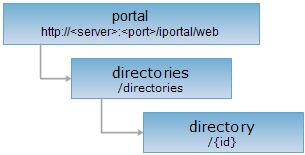
HTTP request methods
Implement the HTTP request on the following URI, where supermapiportal is the server name, with rjson being the output format.
http://supermapiportal:8090/iportal/web/directories/{id}.rjson
GET request
Get all directory structure list and resource list under a single directory
Response structure
Execute GET request for directory resource to get all directory structure list and resource list under a single directory. It is composed:
| Field | Type | Description |
| basicDirInfo | BasicDirInfo | Basic information of the directory. |
| basicDirInfos | List<BasicDirInfo> | The child directory list under the parent directory. |
| dirResources | List<DirectoryResource> | The resource list in the directory. |
Response example
The returned rjson format representation after implementing the GET request on the directory resource http://localhost:8090/iportal/web/directories/1.rjson is as follows:
{
"basicDirInfo": {
"createTime": 1434420488920,
"description": null,
"dirCreator": "admin",
"dirLevel": 1,
"dirName": "Land use",
"dirType": "MAP",
"icon": null,
"id": 1,
"parentDirId": null,
"updateTime": 1434420488920,
"weight": 1
},
"basicDirInfos": [
{
"createTime": 1434426280511,
"description": null,
"dirCreator": "admin",
"dirLevel": 2,
"dirName": "2014",
"dirType": "MAP",
"icon": null,
"id": 6,
"parentDirId": 1,
"updateTime": 1434426280511,
"weight": 1
},
{
"createTime": 1434426285965,
"description": null,
"dirCreator": "admin",
"dirLevel": 2,
"dirName": "2013",
"dirType": "MAP",
"icon": null,
"id": 7,
"parentDirId": 1,
"updateTime": 1434426285965,
"weight": 2
}
],
"dirResources": null
}
POST request
Create a child directory under a single directory.
Request parameter
Following arguments need to be passed in the request sent.
| Name | Type | Description |
|
dirName |
String | [Required] Name of the child directory. |
| dirType | DirectoryResourceType | [Required] Directory type. By default, the child directory type and the parent directory type are the same if the value is null or the parameters will be not be transferred. |
| icon | String | [Required] Directory icon. The null value means the parameter will not be transfered. In other words, the directory icon will use the default icon. |
| description | String | [Required] Directory description. The null value means the parameter will not be transfered. |
Response structure
The structure of the response resource representation is as follows:
| Field | Type | Description |
| newResourceID | String | Create new child directory ID. |
| newResourceLocation | String | Create new child directory URL. |
| succeed | boolean | Whether the child directory is successfully created or not. |
Response example
Execute POST request for directory resource http://localhost:8090/iportal/web/directories/34.rjson, and create a new child directory, the type is MAP and the name is 2012. The request body is as follows:
{
"dirName": "2012",
"dirType": "MAP"
}
The response result in rjson format returned is as follows:
{
"succeed": true,
"newResourceID": "37",
"newResourceLocation": "http://192.168.120.63:8092/iserver/web/directories/37"
}
PUT request
Rename directory.
Request parameter
Following arguments need to be passed in the request sent.
| Name | Type | Description |
|
dirName |
String | [Required] Name of the directory. |
Response structure
The structure of the response resource representation is as follows:
| Field | Type | Description |
| succeed | boolean | Whether the rename of the directory is successful or not. |
| error | Httperror | Error information. This field will not be displayed if the directory is renamed successfully. |
Response example
Exectue PUT request for directory resource http://localhost:8090/iportal/web/directories/34.rjson, and rename the directory. The reqeust body is as follows:
{
"dirName": "Land use status"
}
The response result in rjson format returned is as follows:
{
"succeed": true
}
DELETE request
Delete directory information with specified ID. Fields need to be transferred from URL:
| Field | Type | Description |
| isDeleteResources | boolean | Whether to delete resources from iPortal. Remove resources from the directory if it is fales; delete resources from the directory if it is true. |
Response structure
The structure of the response resource representation is as follows:
| Field | Type | Description |
| succeed | boolean | Whether the directory is successfully deleted or not. |
| error | Httperror | Error information. This field will not be displayed if the directory is deleted successfully. |
Response example
Execute DELETE request for the directory resource http://localhost/iportal/web/directories/34.rjson?isDeleteResources:false 执行 DELETE, delete all directory list information with ID 34, and remove resources from the deleted directory. The returned rjson format response result is as follows:
{ "succeed": true}
HEAD request
Asks for the response identical to the one that would correspond to a GET request, but without the response body. This is useful for retrieving meta-information written in response headers, without having to transport the entire content. The meta-information includes the media-type, content-encoding, transfer-encoding, content-length, etc.
HEAD request can be used to check if the directory resource exists, or if the directory resource can be accessed by clients. It can also determine if the directory resource supports an output format <format> if performed on a URI with .<format> included.