

URI
<portal_uri>/config/portal[.<format>]
Supported methods
Parent resource
Introduction
The portal-level configuration information resource. By sending a GET request to the portalConfig resource, you can query the portal-level configuration information of iPortal. Portal-level configuration includes resource sharing settings, hosted server configuration, organizational structure configuration, etc. For more configuration items, refer to:iPortal configuration file description.
Supported methods:
- GET:Queries the portal-level configuration information of iPortal.
- HEAD: Checks whether the portalConfig resource exists or whether the permission can access the portalConfig resource.
Supported output formats:RJSON,JSON,XML.
Resource hierarchy
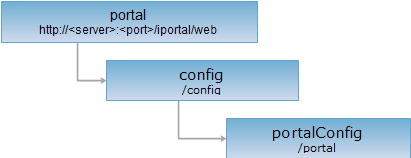
HTTP request methods
Perform an HTTP request on the following URI, using rjson output format as an example, where supermapiportal is the server name.
http://supermapiportal:8190/iportal/web/config/portal.rjson
GET request
Queries the portal-level configuration information of iPortal.
Request parameters
If no parameters are set, all portal-level configuration information is returned. After setting parameters, the specified configuration information is returned. Request parameters must be included in the URI.
| Name | Type | Description |
| scope | String[] | Specifies the portal-level configuration items to query. |
Response structure
Performing a GET request on the portalConfig resource returns all portal-level configuration information of iPortal. If specific items are specified in the URI when sending the GET request, only the specified configuration items are returned. The portal-level configuration consists of the following fields:
| Field | Type | Description |
| shareSetting | Map<String,Object> | The resource sharing settings of iPortal. |
| mapViewerSetting | Map<String,Object> | The configuration for adding data to maps. |
| dataCapabilities | DataCapabilities | The hosted server and hosted data storage configuration of iPortal. |
| registerSetting | Map<String,Object> | The user registration settings of iPortal. |
| portalCustomSetting | Map<String,Object> | The portal custom settings of iPortal. |
| customDirectorySetting | Map<String,Object> | The custom directory settings. |
| appsConfig | Map<String,Object> | The usage permission settings for built-in WebApps in iPortal. |
| departmentSetting | Map<String,Object> | The organizational structure feature settings of iPortal. |
| serviceProxy | Map<String,Object> | The configuration for the service proxy feature in iPortal. |
| mapApps | Map<String,Object> | The collection of map application apps. |
| serviceAuditSetting | Map<String,Object> | The service review settings of iPortal. |
| mapsSetting | Map<String,Object> | The map review and batch map registration settings of iPortal. |
| groupSetting | Map<String,Object> | The group feature settings of iPortal. |
Response example
Performing a GET request on the portalConfig resource: http://localhostl:8190/iportal/web/config/portal.rjson . The rjson format resource representation is as follows:
{
"shareSetting": {
"scope": {
"toUser": true,
"toDepartment": false,
"toGroup": true
},
"allowListUsers": false
},
"mapViewerSetting": {
"displayCoords": false,
"displayDataLayers": false,
"maxFeatures": 3000
},
"dataCapabilities": {
"hasHostedServer": false,
"hasRelationship": false
},
"registerSetting": {
"allowUserAudit": false,
"sendEmailNotification": false,
"allowDataCenterRole": true,
"extendUserFields": [],
"defaultRole": "PORTAL_USER",
"allowRegister": true
},
"customDirectorySetting": {
"allowCustomDirectory": "{\"MAP\":false,\"SERVICE\":false,\"SCENE\":false}"
},
"appsConfig": {
"editableAppsLimitToAdmin": [
"MAPSTYLER",
"APPBUILDER"
]
},
"version": "1.0.0",
"portalCustomSetting": {
"customType": null,
"supportMultiLanguages": {
"languages": null,
"enable": false
}
},
"departmentSetting": {
"enable": false,
"order": {
"orderType": "ASC",
"orderField": "CREATETIME"
}
},
"serviceProxy": {
"enableAccessStatistics": false,
"scheme": null,
"enableBuiltinProxy": true,
"port": 8195,
"proxyServerRootUrl": null,
"rootUrlPostfix": "portalproxy",
"enable": false
},
"mapApps": {
"mapApps": [
{
"name": "mapViewer_ol5"
}
]
},
"serviceAuditSetting": {
"allowServiceAudit": false,
"auditedAttributes": "all"
},
"mapsSetting": {
"allowMapAudit": false,
"showBatchAddMaps": true,
"auditedAttributes": "all"
},
"groupSetting": {
"enable": true
}
}
HEAD request
Returns the same HTTP response headers as a GET request, but without the response entity. Metadata information contained in the response headers can be obtained without transferring the entire response content. Metadata includes media type, character encoding, content encoding, and content length.
HEAD requests can be used to determine whether the portalConfig resource exists or whether the client has permission to access the portalConfig resource. By performing a HEAD request on a URI with .<format>, you can also quickly determine whether the portalConfig resource supports the <format> format representation.