

URI
<portal_uri>/applyinfos[.<format>]
Supported methods
Parent resource
Child resource
Introduction
The application resource contains the request list information for the currently logged-in user to apply for authorization to access multiple resources. It supports retrieving the request list of all resources applied by the current user, applying for authorization to access multiple resources, and allowing resource owners, portal administrators, and administrators with resource review permissions to batch review multiple applications for multiple resources.
Supported methods:
- GET:Retrieves the request list of all resources applied by the currently logged-in user, including pending, reviewed, and reviewable applications.
- POST:The currently logged-in user applies for authorization to access multiple resources, that is, a user can apply for authorization to access multiple resources in a single request.
- PUT:Batch reviews resource applications, supporting batch review of multiple applications for multiple resources.
- DELETE:Deletes the request list information of resource applications, supporting batch deletion.
- HEAD:Checks whether the application resource exists, or whether the permission can access the application resource.
Supported output formats:RJSON,JSON,HTML,XML.
Resource hierarchy
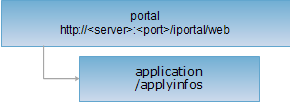
HTTP request methods
Perform an HTTP request on the following URI, using rjson output format as an example, where supermapiportal is the server name.
http://supermapiportal:8190/iportal/web/applyinfos.rjson
GET request
Retrieves the request list of resources applied by the currently logged-in user, including pending, reviewed, and reviewable applications.
Request parameters
When sending a request, the following parameters must be included in the request body. Request parameters must be included in the URI.
| Name | Type | Description |
| resourceType | ResourceType | [Required] Queries by the type of the applied resource. |
| resourceOwners | String[] | Queries by the resource owner's name. |
| resourceIds | Integer[] | Queries by the array of applied resource IDs. |
| applicants | String[] | Queries by the applicant's name. |
| applyStatuses | ApplyStatus[] | Queries by the resource application status. |
| checkUsers | String[] | Queries by the reviewer's name. |
| orderBy | ApplyOrderBy | The sorting method for resource application queries. |
| currentPage | int | Queries by the current page number. |
| pageSize | int | Queries by the page size. |
Response structure
Performing a GET request on the application resource returns the request list of the corresponding resource type applied by the current user based on the request parameters. It consists of the following fields:
| Field | Type | Description |
| content | List<ResourceApplyInfo> | The page content. |
| currentPage | int | The current page number. |
| pageSize | int | The page size. |
| searchParameter | ResourceApplySearchParameter | The search parameters for the current page. |
| total | int | The total number of records. |
| totalPage | int | The total number of pages. |
Response example
To query the request list of applied map resources, set resourceType=MAP in the query parameters
For example, performing a GET request on the application resource: http://localhost:8190/iportal/web/applyinfos.rjson?resourceType=MAP to retrieve the list of map resources applied by the current user. The rjson format resource representation is as follows:
{
"total": 1,
"totalPage": 1,
"pageSize": 9,
"searchParameter": {
"resourceOwners": null,
"orderType": "ASC",
"currentUser": null,
"keywords": null,
"applicants": null,
"orderBy": null,
"pageSize": 9,
"applyStatuses": null,
"currentPage": 1,
"checkUsers": null,
"resourceType": "MAP",
"resourceIds": null
},
"currentPage": 1,
"content": [
{
"resourceId": 880463359,
"applicantNick": "user",
"applyReason": "123",
"resourceName": "ChinaDark",
"checkInfo": null,
"updateTime": 1544753066000,
"applicant": "user",
"checkUser": "zhangty",
"checkUserNick": "zhangty",
"id": 1,
"applyTime": 1544748326543,
"applyStatus": "PASS",
"resourceType": "MAP"
}
]
}
POST request
The currently logged-in user applies for authorization to access multiple resources, that is, a user can apply for authorization to access multiple resources in a single request.
Request parameters
When sending a request, the following parameters must be passed in the request body:
| Name | Type | Description |
| resourceType | ResourceType | The type of the resource for authorization. |
| resourceIds | List<Integer> | The ID array of the resources for authorization. |
| applyReason | String | The reason for applying for resource authorization. |
Response structure
The returned resource representation structure is as follows:
| Field | Type | Description |
| succeed | boolean | Whether the resource authorization application was successful. |
| error | HttpError | Error information. This field is not returned if the resource authorization application is successful. |
Response example
Performing a POST request on the application resource: http://localhost:8190/iportal/web/applyinfos.rjson . The request body is as follows:
{
"resourceIds": [
"1186739732",
"1331027841"
],
"applyReason": "Request access to this resource.",
"resourceType": "MAP"
}
The rjson format response is as follows:
{"succeed": true}
PUT request
Batch reviews applications. Resource owners, portal administrators, and administrators with resource review permissions can batch review multiple applications for multiple resources.
Request parameters
When sending a request, the following parameters must be passed in the request body:
| Name | Type | Description |
| resourceType | ResourceType | The type of the resource applied in the application. |
| applyIds | List<Integer> | The ID array of the resource application. |
| applyStatus | ApplyStatus | The review status of the resource application. For example: PASS for approved, REFUSE for rejected. |
| checkInfo | String | The review information of the resource application. For example: the reason for rejection. |
Response structure
The returned resource representation structure is as follows:
| Field | Type | Description |
| succeed | boolean | Whether the review of the specified resource application was successful. |
| error | HttpError | Error information. This field is not returned if the review of the specified resource application is successful. |
Response example
Performing a PUT request on the application resource: http://localhost:8190/iportal/web/applyinfos.rjson . The request body is as follows:
{
"checkInfo": "",
"applyStatus": "PASS",
"resourceType": "MAP",
"applyIds": [
"5",
"6"
]
}
The rjson format response is as follows:
{"succeed": true}
DELETE request
Deletes resource authorization application records. Supports batch deletion. Resource applicants and portal administrators can delete resource applications.
Request parameters
When sending a request, the following parameters must be passed in the request body:
| Name | Type | Description |
| ids | String[] | The ID array of the resource applications to be deleted. |
Response structure
The returned resource representation structure is as follows:
| Field | Type | Description |
| succeed | boolean | Whether the deletion of the resource application was successful. |
| error | HttpError | Error information. This field is not returned if deleting the resource application is successful. |
Response example
Performing a DELETE request on the application resource: http://localhost:8190/iportal/web/applyinfos.rjson?ids=[1,2] to batch delete two resource applications with IDs 1 and 2. The rjson format response is as follows:
{ "succeed": true}
HEAD request
Returns the same HTTP response headers as a GET request, but without the response entity. Metadata information contained in the response headers can be obtained without transferring the entire response content. Metadata includes media type, character encoding, content encoding, and content length.
HEAD requests can be used to determine whether the application resource exists or whether the client has permission to access the application resource. By performing a HEAD request on a URI with .<format>, you can also quickly determine whether the application resource supports the <format> format representation.
See