DataInsights WebApp provides the ability to extend the analysis function, helping you to easily expand analysis tool. At the same time, it also provides some customized components, such as a drop-down selector, input box, button. You can register components according to your needs to complete the analysis parameters settings.
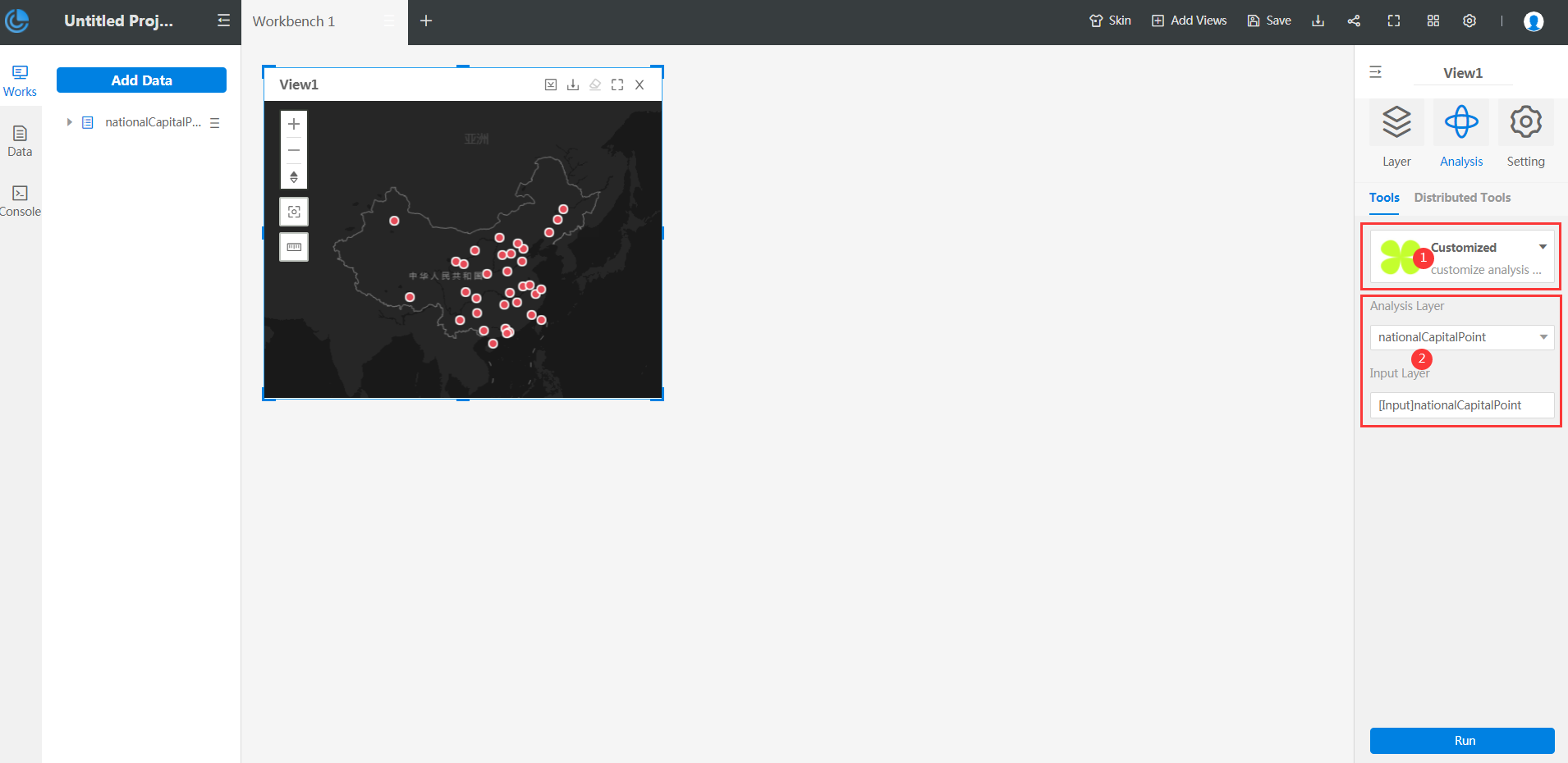
Extension steps
Before the analysis function extension, please read the Datainsight WebApp extension process. This section only introduces the extension steps of analysis function.
Step 1: In the js files of created analysis function, instantiate iDataInsights.Plugins.AnalystExtension, the code is as follows:
const analysis = {
// Analysis Type
type: 'sample',
// Analysis Mode
mode: "CLIENT",
// Analysis Name
name: 'Customized Analysis',
// Analysis Description
remark: 'customize analysis description content',
// Thumbnail
thumbnail: './libs/plugins/images/xxx.png'
}
const analysisInstance = new iDataInsights.Plugins.AnalystExtension([analysis]);
- type, Define the type of extended analysis function, which cannot be repetitive with these existed analysis function types in DataInsights WebApp.
- mode, Define the mode of extended analysis function. The optional values include local offline analysis, server-side online analysis, and distributed analysis, all belong to the standard analysis. See AnalystExtension.AnalystModes.
- name, The extended analysis tool's name, corresponding to the upper bold text in the area marked by red 1 in the figure above.
- remark,The description of the extended analysis tool, corresponding to text below the area marked by red 1 in the figure above.
-
thumbnail, Set the thumbnail displayed by the extended analysis tool in the property panel, corresponding to the picture in the area marked by red 1 in the above figure.
Step 2: Implement the extended analysis method and call bindAnalyse to bind the analysis method to the analysis instance, as shown below:
function analysis(callback) {
// The realization method of analysis
callback('Type of analysis result', 'Analysis result', 'Name of analysis result');
}
analysisInstance.bindAnalyse(analysis);
- The analysis result type must be selected from AnalystExtension.AnalysisResultTypes.
-
The data format of the analysis result must conform to the specification.
The third step is to call the bindComponents method to bind the components, as shown below. (Optional step)
function registComponents() {
// Parameters required to components
return AnalystExtension.Components;
}
analysisInstance.bindComponents(registComponents);
Among them, the return value of the registComponents method must meet the data structure of AnalystExtension.Component.
Reference: