


扩展组件工具
处理自动化扩展开发主要用于希望使用 SuperMap iDesktopX 工具箱进行处理自动化模型搭建,且现有工具无法满足功能需求的用户。您可跟随文档完成处理自动化工具的自定义扩展,并掌握在 SuperMap iDesktopX 工具箱中投入使用的步骤。
在进行工具的扩展开发之前,您可能需要了解工具的结构:
示例代码
public class SampleCodeRegistry extends AbstractProcessRegistry {
    public SampleCodeRegistry(){
        this.classes.add(SampleCodeFunctions.class);
    }
    @Override
    public String getName() {
        return "iobjects_sample_code";
    }
    @Override
    public String getDefaultNamespace() {
        return "com.supermap.desktop.develop.objectsgp.default";
    }
    @Override
    public String getTitle() {
        return DevelopProperties.getString("String_ObjectsProcess");
    }
    @Override
    public String getDescription() {
        return DevelopProperties.getString("String_ObjectsProcess");
    }
    @Override
    public String getResourceBundleName() {
        return "Develop";
    }
}
2. 注册自定义工具类
新建 META-INF\services\com.supermap.sps.impl.annotated.annotation.ProcessRegistry文件,并注册自定义工具类 SampleCodeRegistry 。
示例代码
以自定义一个矢量数据集的查找重复点的工具为例,具体代码如下:
    public class SampleCodeFunctions {
        @NamespaceDef(namespace = "com.supermap.desktop.develop.objectsgp.vector", title = "String_DatasetVector",
					  description = "String_DatasetVector")
        @ProcessDef(name = "findDuplicatePoints", caption = "String_FindDuplicatePoints", description = "String_FindDuplicatePoints")
        @OutputDef(name = "duplicatePointsDataset", caption = "String_ResultDatasetVector", description = "String_ResultDatasetVector",
					  outputSourceType = OutputSourceType.RETURN)
        public static DatasetVector findDuplicatePoints(
                @InputDef(name = "sourceDataset", caption = "String_SourceDataset", description = "String_SourceDataset",
						  meta = {"supportType={POINT}"}) DatasetVector datasetVector,
                @InputDef(name = "tolerance", caption = "String_Tolerance", description = "String_Tolerance",
						  defaultValue = "0.0000001",
						  meta = {"minValue=0.0","left=open","right=open"}) double tolerance,
                @InputDef(name = "resultDatasource", caption = "String_ResultDatasource",
						  description = "String_ResultDatasource") Datasource datasource,
                @InputDef(name = "resultDatasetName", caption = "String_ResultDataset", description = "String_ResultDataset",
						  defaultValue = "duplicatePointsDataset") String resultDatasetName,
                AnnotatedStaticMethodProcessContext annotatedStaticMethodProcessContext) {
            SteppedListener listener = annotatedStaticMethodProcessContext == null ? null : new ObjectsEventSender
									   (annotatedStaticMethodProcessContext.getAnnotatedRunningListener());
            if (listener != null) {
                TopologyValidator.addSteppedListener(listener);
            }
            DatasetVector result = TopologyValidator.validate(datasetVector, null, TopologyRule.POINT_NO_IDENTICAL, tolerance,
															  null, datasource, resultDatasetName);
            if (listener != null) {
                TopologyValidator.removeSteppedListener(listener);
            }
            return result;
        }

    }
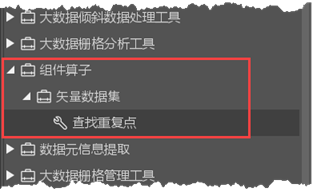
软件界面工具箱中出现自定义的工具,也可将其拖到画布与其他工具组合使用。