



Instructions for Use
Map sheet division refers to partitioning maps into appropriately sized sections based on scale and geographic bounds parameters, generating standardized map sheet datasets for map indexing, cartography, and block operations.
To facilitate topographic map utilization and storage, large-area maps require systematic division. This function employs longitude and latitude grid partitioning, creating map sheet outlines through geographic coordinates - the primary division method used for topographic maps and regional small-scale mapping worldwide.
Chinese topographic maps follow the 1:1,000,000 scale standard, with subsequent divisions based on specified longitude/latitude intervals for different scales. Maps are organized in rows (horizontal) and columns (vertical) as shown below. The 1:1,000,000 division uses 4° latitude intervals from equator to poles (0°-76°N supported in SuperMap, up to row S). Longitude is divided into 6° intervals globally (60 columns numbered 1-60).
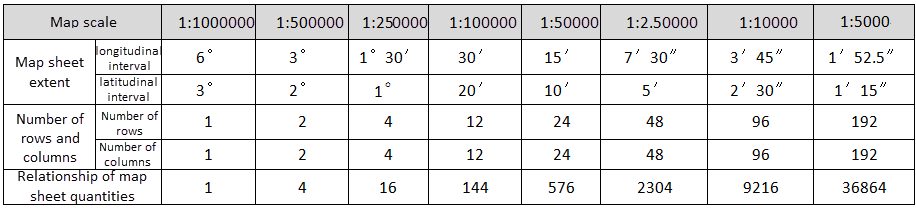 |
| Table: Longitude and Latitude Differences for Each Scale |
Steps
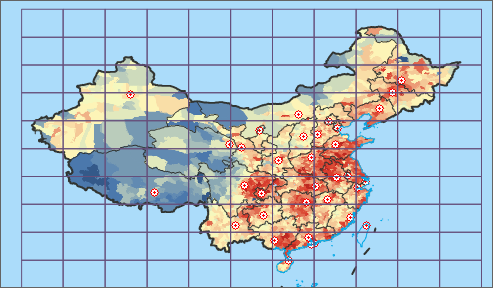 |
| Map Sheet Division Result |
- Open the map in current workspace. Click Connect Chart in the Drawing group under Map tab to open the dialog.
- Select desired scale from Scale dropdown. Available scales: 1:500, 1:1,000, 1:2,000, 1:5,000, 1:10,000, 1:25,000, 1:50,000, 1:100,000, 1:250,000, 1:500,000, 1:1,000,000.
- Choose Map Range type: National Area or Custom Bounds. For custom bounds:
- Manually enter coordinates in left/bottom/right/top boxes
- Use right-side function buttons:
Note: - Available only when map coordinate system is geographic.
- Whole Map: Current map's full extent (viewable via Map Properties panel)
- Current Window: Visible map area (adjust via zoom/scale changes)
- Custom Bounds: Use Select Object or Draw Polygon to define area
- Copy: Copy coordinate values to clipboard
- Paste: Paste coordinate values from clipboard
- Set Result Data storage parameters (datasource and name). Click OK to generate standardized map sheets, automatically added to current map window.
Remarks
The Code field in map sheet attributes stores sheet numbering information. Create thematic label maps using this layer to visualize sheet numbering.