



The Web engine can directly access services provided by WFS, WMS, WCS, REST, and other map service providers. This engine treats Web servers on the network that meet industry standards as data sources for SuperMap. Through it, maps and data published on the web can be fully integrated with SuperMap's maps and data, extending the application domain of the SuperMap data engine. The Web data source is a read-only engine.
Desktop supports the following Web datasources:
1. OGC Standard Services (W*S)
3. Google Map Service (GoogleMaps)
10. Global Terrain Map Service
OGC Standard Services (W*C)
OGC Concept Understanding
- GML: Geography Markup Language, OGC's geographic markup language, whose model uses OGC's simple object model, organizing files based on XML syntax and file format.
- URI: Uses resource identifiers for location. To open an OGC service using a desktop client, you need to input the address of the request body, i.e., the URI. It generally consists of three parts: the naming mechanism for accessing the resource, the host name of the resource, and the name of the resource itself, represented by a path. The path structure is: http://<server>:<port>/iserver/services. Where:
- server: The server address of the published service.
- port: The port number of the published service.
- servicecomponent: The name of the configured service component or a collection of service components. For example, SuperMap iServer is configured by default with the map service component map-world.
- serviceinterface: The name of the configured service interface bound to the service component. For example, SuperMap iServer is configured by default with the WMS 1.1.1 version service interface, whose service interface name is wms111.
- Version Number Negotiation: Version Number Negotiation. OGC Web service standards have high and low versions identified by numbers. Generally, the versions implemented or supported by the client and server often differ. Version negotiation defines how to achieve version synchronization between client and server. The rules are as follows:
- If the server implements the version number requested by the client, the server must send data of that version.
- If the client sends a request for a higher version that the server does not recognize, the server must send the highest version below the requested version.
- If the client requests a version lower than all versions supported by the server, the server must send the lowest version it supports.
- If the client does not recognize the version returned by the server, it stops communication with the server and requests a version lower than the returned version that the client can recognize.
- If the client requests a version lower than all versions supported by the server, according to rule 3, the server responds with its lowest version, but the client still does not recognize this higher version; then the client sends a request for a version higher than the server's response.
- The version negotiation process will repeat continuously until a mutually agreed version is reached, or the client determines it cannot interact with the specific server.
OGC Service Introduction
WMS (Web Map Service) complies with the WMS implementation specification developed by OGC (Open Geospatial Consortium). This standard mainly defines three operations for creating and displaying maps: GetCapabilities (get service capabilities), GetMap (get map), and GetFeatureInfo (get feature information). This standard mainly defines three operations for creating and displaying maps, including:
Currently, Desktop supports opening the following WMS versions:
WCS (Web Coverage Service) complies with the WCS implementation specification developed by OGC (Open Geospatial Consortium).
WCS is an OGC-defined specification for sharing geospatial data in the form of "Coverage" over the Web. "Coverage" refers to data that can return values at any specified point, in a format easy to input into models for use. The WCS service implements the sharing of raster image datasets in the form of "Coverage".
Currently, Desktop supports opening WCS 1.0.0 data.
- WMS Service
- GetCapabilities, used to obtain service-level metadata. This operation is mandatory.
- GetMap, the core operation, used to obtain map images with clearly defined geospatial parameters and size. This operation is mandatory.
- GetFeatureInfo, used to obtain information about certain specific features displayed on the map. This operation is optional.
- WMS 1.1.1
- WMS 1.3.0
- WFS Service
WFS (Web Feature Service) complies with the WFS implementation specification developed by OGC (Open Geospatial Consortium). This standard is mainly used to return GML encoding at the feature level. WFS allows clients to obtain geospatial data encoded in GML from multiple web feature services. Different WFS clients support different character sets, so the encoding type of the request body may vary when sending requests.
Notes
Currently, the WFS data source only supports data browsing functionality.
- WCS
- WMTS
WMS map services can flexibly respond to various requests. Each time a client sends a request, the server visualizes the data in real-time and returns the result as an image. However, under high traffic, frequent requests consume a lot of resources for computation, leading to reduced responsiveness. To improve the response capability of map services, the time for server-side visualization processing needs to be reduced. Therefore, services that use caching to improve response capability have emerged, and WMTS is one of them.
WMTS, Web Map Tile Service, complies with the WMTS specification established by OGC. The WMTS standard defines operations that allow users to access tile maps. It is the first OGC service standard to support REST access.
WMTS is a caching technology standard proposed by OGC. It provides a standardized solution for publishing map services using predefined tiles. Maps are cut into tiles of a certain size and cached on the server side. The server only provides services for these predefined individual tiles, placing more data processing operations such as layer overlay on the client side, thereby relieving the pressure on the GIS server-side data processing and improving the user experience.
WMTS uses a tile matrix set to represent the cut map, as shown in Figure 1. Tiles are matrix units containing geographic data. A map is cut into multiple tiles according to a certain tile size, forming a tile matrix. One or more tile matrices constitute a tile matrix set. Different tile matrices have different scales. Each tile matrix is identified by a tile matrix identifier (usually the sequence number of the tile matrix; the lowest resolution layer is layer 0, and layers are numbered upward sequentially). WMTS specifies that each layer can be associated with multiple tile matrix sets. Each tile matrix set has its own coordinate reference system, and the individual tile matrices in the tile matrix set correspond to various scale levels.
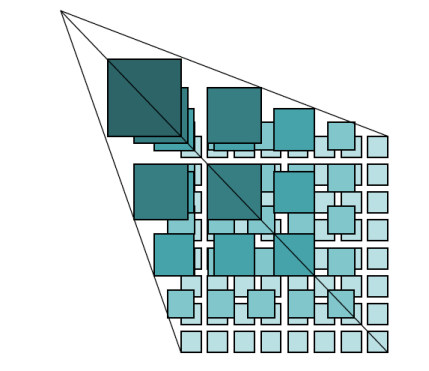
Figure 1: Tile Matrix Set Each tile matrix has the following characteristics:
Each tile in the tile matrix is identified by its row number (TileRow) and column number (TileCol). The row and column values are counted starting from the tile at the upper-left corner of the tile matrix, with the starting row and column being (0, 0), increasing downward and to the right, as shown in Figure 2.
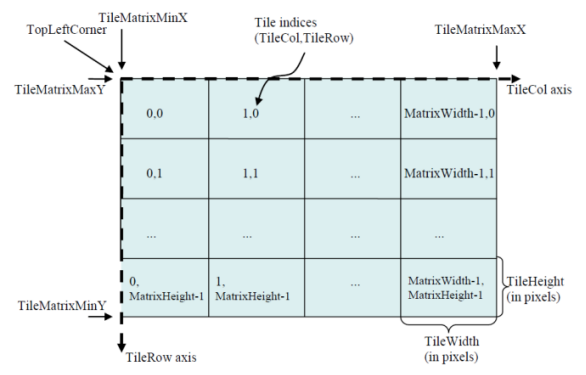
Figure 2: Tile Matrix WMTS 1.0.0 supports three implementation models:
Currently provides implementations using KVP and REST methods.
The resources requested by WMTS from the server can use either a procedure-oriented architecture style or a resource-oriented architecture style. From a procedure-oriented perspective, WMTS 1.0.0 defines three operations: GetCapabilities, GetTile, and GetFeatureInfo, of which GetFeatureInfo is optional. From a resource-oriented perspective, WMTS 1.0.0 defines three resource types: ServiceMetadata, Tile, and FeatureInfo, corresponding to the GetCapabilities, GetTile, and GetFeatureInfo operations, respectively.
1. If the WMTS service uses Basic username-password authentication, the parameter AUTHORIZATION=Basic needs to be added to the URL.
- Introduction of WMTS
- Concept of WMTS
- Uses its own tile size as the scale.
- Width (TileWidth) and height (TileHeight) of each tile defined in pixels, i.e., tile size.
- Upper-left coordinates of the matrix bounding box (TileMatrixminX, TileMatrixmaxY).
- Width (MatrixWidth) and height (MatrixHeight) of the matrix defined in tiles, e.g., number of tiles.
- Implementation Models of WMTS
- HTTP KVP (Key-Value Pair) method
- SOAP method
- REST method
- GetCapabilities, returns service metadata (ServiceMetadata), i.e., service capabilities and information content.
- GetTile, returns tile map (Tile).
- GetFeatureInfo, returns feature information displayed on the tile map (FeatureInfo); this is an optional operation.
- Special Notes on WMTS
- TMS
TMS (Tile Map Service) complies with the TMS specification established by OGC, allowing on-demand access to map tiles and supporting modification.
TMS stores pre-cut tiles on the server, offering higher service performance and faster access. However, operations cannot be performed on the pre-cut tiles.
For more information about OGC services, please refer to the relevant specifications of OGC (Open Geospatial Consortium) at http://www.opengeospatial.org.
REST Service
REST (Representational State Transfer) is a software architectural style proposed by Dr. Roy Fielding in 2000. Web services using the REST architecture style are simpler and easier to use compared to complex SOAP services. SuperMap's REST service provides GIS users with a RESTful GIS service.
REST emphasizes observing the entire network from a resource perspective. REST-based architecture is a resource-oriented architecture (ROA). Resources can be specific data or services that implement certain functions. Client applications uniquely identify resources through URIs (Uniform Resource Identifiers). Client applications obtain representations of resources through URIs, and obtaining these representations causes the client application system to change its state, i.e., representational state transfer.
REST typically uses existing widespread protocols and standards such as HTTP, URI, XML, and HTML. SuperMap UGC REST services have the following characteristics:
- Each resource provided by the server is uniquely identified by a URI, but a resource can be identified by multiple URIs.
- REST services use standard HTTP methods, including GET, POST, PUT, DELETE, etc., corresponding to four operations on resources: retrieve, create, modify, and delete.
- Resources are provided in multiple formats, such as xml, json, html, etc.
- All information required by the REST service to process resource requests is contained within the request.
SuperMap iServer REST Map Service Address Entry Instructions
The template for entering the SuperMap iServer REST Map Service address in SuperMap iDesktopX is: http://{server address}:{port}/iserver/services/{map service name}/rest/maps/{map name}. Parameter descriptions are as follows:
| Parameter | Whether It Is Required | Description | Example |
| {server address}:{port} | Yes | Specify the IP address or domain name of the iServer server and the corresponding port. | 172.16.120.35 |
| {map service name} | Yes | Specify the name set when publishing the service. | map-China100 |
| {map name} | Yes | Specify the specific map name in the service. | China |
Example: http://172.16.120.35:8090/iserver/services/map-China100/rest/maps/China.
SuperMap iServer REST Image Service Address Entry Instructions
(I) Server Address and Parameter Descriptions
SuperMap iDesktopX only supports the tile resource request URL of the iServer image service. For details, refer to the /collections/{collectionId}/tile interface definition in the Image Service Resource OpenAPI.
The basic structure is: http://{server address}:{port}/iserver/services/{image service name}/restjsr/collections/{Image collection ID}/tile.{format}?z={z}&y={y}&x={x}&width={width}&height={height}&renderingRule={renderingRule}&ids={ids}&names={names}&sqlFilter={sqlFilter}&transparent={transparent}. The descriptions of each part of the URL are as follows:
| Parameter | Parameter Group | Whether It Is Required | Description | Example |
| {server address}:{port} | Basic | Yes | Specify the IP address or domain name of the iServer server and the corresponding port. | |
| {Image service name} | Yes | Specify the name set when publishing the service. | imageservice-imageservicetest | |
| {Image collection ID} | Yes | Unique resource identifier of the image collection. | imagedata | |
| {format} | Tile format | No |
Specify the format of the returned tile image. Supports three formats: *.png, *.jpg, *.webp. If not specified, the tile format returned by the image service tileinfo interface (server-side configuration) is used. |
png |
| {z}, {y}, {x} | Query | No | Tile level, row number, column number. Parameters in the URL are invalid; the system returns all tiles that meet the conditions based on the browsing range and scale. | z=13, y=1628, x=6571 |
| {width}, {height} | No | Specify the width and height of the tile. The two values must be equal and set to 256; otherwise, a blank tile is returned. If not specified, the server-side configuration is used. | width=256, height=256 | |
| {renderingRule} | No | Specify the rendering style of the tile. If not specified, the server default style is used. | {"displayMode":"STRETCHED", ...} | |
| {ids} | No | Specify the Image ID, i.e., the SmID of the image in the mosaic dataset. | 26 | |
| {names} | No | Specify the image file name, including the extension. | S-60-45.tiff | |
| {sqlFilter} | No | Build an SQL filter expression using the property fields of the image collection mosaic dataset. | SmID > 100 | |
| {transparent} | No | Specify whether the tile background is transparent. true means transparent display, false means not transparent. If not specified, the server-side configuration is used. | true |
(II) Handling Special Characters
- Special characters such as spaces: When they appear in query parameters (e.g., sqlFilter), they must be converted to URL encoding; otherwise, the connection will fail. For example, the URL encoding of space is %20. Thus, the original URL sqlFilter=smfilename like 'TRIPLESAT_2%' should be converted to sqlFilter=smfilename%20like%20'TRIPLESAT_2%'.
- Chinese characters in query conditions: They should not be URL-encoded, otherwise matching will fail.
- Chinese characters in the image collection ID: It is not recommended to URL-encode them. If encoded, the cache directory name will also become encoded.
(III) Local Caching Mechanism
After connecting to the image service, browsed tiles are cached to different folders based on different URL requests, facilitating faster loading later.
Tile path: iDesktopX installation directory\bin\Cache\WebCache\Rest\{server address}_{port}\imageservice-{image service name}\{Image collection ID}\{tile files under different request URLs}.
Regarding cached tiles, note the following:
- Same URL but tileFormat not specified: If the server-side tile format changes, it is treated as a different request and new cache will be generated.
- Token parameter: When only the token value differs, it is treated as the same request and the cache is reused.
- Cache update: The cache is not updated automatically; the corresponding cache directory must be manually deleted to reload. For example, after modifying the image collection style configuration on the server side, the original cache directory must be deleted first before the system re-caches the tiles.
- Cache example for Chinese collection name: If the Chinese in the image collection ID is URL-encoded, the "Image collection ID" folder name in the cache directory will use the encoded result.
- Original URL: http://{server address}:{port}/iserver/services/imageservice-imageservicetest/restjsr/collections/satellite image.
- Cache directory: Cache\WebCache\Rest\server address_port\imageservice-imageservicetest\satellite image\.
- After URL encoding: http://{server address}:{port}/iserver/services/imageservice-imageservicetest/restjsr/collections/%E5%8D%AB%E6%98%9F%E5%BD%B1%E5%83%8F.
- Cache directory becomes: Cache\WebCache\Rest\server address_port\imageservice-imageservicetest\%e5%8d%ab%e6%98%9f%e5%bd%b1%e5%83%8f\.
(4) Common Examples
- No Query Parameters:
- Example: http://{server address}:{port}/iserver/services/imageservice-imageservicetest/restjsr/collections/imagedata.
- Description: Requests the tile resource of the image collection imagedata. When browsing, all tiles are loaded according to the map bounds and scale, and the tile format, size, and style use the server-side configuration.
- Specify Tile Format:
- Example: http://{server address}:{port}/iserver/services/imageservice-imageservicetest/restjsr/collections/imagedata/tile.webp.
- Description: Requests the tile resource of the image collection imagedata, specifying the tile format as WEBP. The size of tiles and style use the server-side configuration.
- Specify Tile Format and Size:
- Example: http://{server address}:{port}/iserver/services/imageservice-imageservicetest/restjsr/collections/imagedata/tile.webp?width=256&height=256.
- Description: Requests the tile resource of the image collection imagedata, specifying the tile format as WEBP, size as 256×256 pixels, and the tile style uses the server-side configuration.
- Filter by Filename (names):
- Example: http://{server address}:{port}/iserver/services/imageservice-imageservicetest/restjsr/collections/imagedata?names=E49C002001.tif.
- Description: Requests the tile resource of the image with filename E49C002001.tif in the image collection imagedata. The tile format, size, and style use the server-side configuration.
- Filter by ID (ids):
- Example: http://{server address}:{port}/iserver/services/imageservice-imageservicetest/restjsr/collections/imagedata?ids=1.
- Description: Requests the tile resource of the image with ID (smID) of 1 in the image collection imagedata. The tile format, size, and style use the server-side configuration.
- Filter by SQL (sqlFilter):
- Example:
In the request URL, use the sqlFilter query parameter to build an SQL statement for filtering tiles using the image collection mosaic dataset property field. The URL is: http://{server address}:{port}/iserver/services/imageservice-imageservicetest/restjsr/collections/imagedata?sqlFilter=smfilename like 'TRIPLESAT_2%'.
However, the above URL contains a space special character, which must be converted to its corresponding URL encoding (%20). The encoded URL is: http://{server address}:{port}/iserver/services/imageservice-imageservicetest/restjsr/collections/imagedata?sqlFilter=smfilename%20like%20'TRIPLESAT_2%'.
- Description: Requests the tile resources of images with filenames containing "TRIPLESAT_2" in the image collection imagedata. The tile format, size, and style use the server-side configuration.
- Example:
- Spatial Filtering:
In the request URL, use the sqlFilter query parameter with the st_geometry spatial function for spatial query filtering.
- Polygon Intersection:
- Example: http://{server address}:{port}/iserver/services/imageservice-imageservicetest/restjsr/collections/imagedata?sqlFilter=st_intersects(smgeometry, st_geomfromtext('polygon((107.23237354532517 33.81726420547909,107.30852651319088 33.81726420547909,107.30852651319088 33.760425396130046,107.23237354532517 33.760425396130046,107.23237354532517 33.81726420547909))',4326)).
- Description: The coordinate system (EPSG code) specified in the query conditions must be consistent with the coordinate system of the queried image collection.
- Rectangle Range Intersection:
- Example: http://{server address}:{port}/iserver/services/imageservice-imageservicetest/restjsr/collections/imagedata?sqlFilter=st_intersects(smgeometry,st_makeenvelope(107.23237354532517,33.760425396130046,107.30852651319088,33.81726420547909,4326)).
- Description: Only applicable to image services that use a PostGIS database datasource to store the image collection.
- Polygon Intersection:
- Specify Rendering Style:
- Example: http://{server address}:{port}/iserver/services/imageservice-imageservicetest/restjsr/collections/imagedata?renderingRule={"displayMode":"COMPOSITE","displayBands":"0,1,2"}.
- Description: Requests the tile resource of the image collection imagedata, and displays the image using the specified band combination. The tile format and size use the server-side configuration.
- Multiple Query Parameters Combination:
- Example: http://{server address}:{port}/iserver/services/imageservice-imageservicetest/restjsr/collections/imagedata/tile.png?names=TRIPLESAT_2_PAN_L1_20190707031410_001D99VI_006_0120190829004001_013_ortho_fuse_color1.img,TRIPLESAT_3_PAN_L1_20190921031507_0024BDVI_016_0120191014007001_002_ortho_fuse_color1.img&sqlFilter=producetime>'2024-09-25'&renderingRule={"displayMode":"COMPOSITE","displayBands":"0,1,2","stretchOption":{"stretchType":"GAUSSIAN","gaussianCoefficient":2,"useMedianValue":true}}.
- Description: Requests the tile resources from the image collection imagedata that satisfy the file name and image production time filters, and displays the image using the specified band combination and stretch method. The tile format is PNG, and the size of tiles uses the server-side configuration.
Google Map Service (GoogleMaps)
For Google electronic map service, read-only, cannot be created.
Google Maps (GoogleMaps) is an electronic map service provided by Google, including vector maps, remote sensing imagery at different resolutions, and some terrain data. The desktop integrates the GoogleMaps engine. When the network is connected, you can access the Google map service directly in the desktop product. Currently, the following map types are supported:
- roadmap: Standard route map, such as the ordinary map shown on the Google Maps website.
- satellite: Satellite image layer.
- terrain: Terrain map, used to display terrain and vegetation.
- hybrid: A hybrid layer containing satellite images and route maps, showing main streets and address names as a transparent layer on satellite images.
Google Maps website: http://maps.google.com
Note: Currently, the default server address http://maps.google.com may not display maps correctly in mainland China. After opening, the map will appear blank, but users outside China can use this feature normally.
For users in mainland China, you can switch the server address to http://www.google.cn/maps and try accessing the map again.
Tianditu Map Service (MapWorld)
For the map service published by Tianditu. Read-only, cannot be created.
Tianditu map service is an authoritative, reliable, and unified geographic information service provided by the National Administration of Surveying, Mapping and Geoinformation for the public. It is currently the most comprehensive geographic information service website in China. The Tianditu website provides massive basic geographic information resources, including global vector terrain services and remote sensing imagery, national area map data, navigation digital map data, and 3D street view data of some cities. The desktop integrates the Tianditu engine. When the network is connected, you can access the Tianditu map service directly in the desktop product. Currently supported layer types include:
- BackgroundMap: Background layer, can be used as a base map.
- AnnoMap: Chinese annotation layer.
- AnnoMapE: English annotation layer.
- Terrain: Terrain layer, coordinate system is WGS_1984, can be directly loaded into the scene.
Tianditu website: www.tianditu.cn
Geovis Earth
Geovis Earth is an online digital earth exploration portal for the general public. With rich spatio-temporal data browsing, analysis, and interactive digital content capabilities, it provides users with rich digital content and instant interactive experience. The desktop integrates the Geovis Earth engine. When the network is connected, you can access the Geovis Earth service directly in the desktop product.Currently, Geovis Earth provides three map services: vector, imagery, and terrain.
Geovis Earth website: https://online.geovisearth.com
Siwei Earth
Siwei Earth provides a global one-map tile imagery service. The data is processed through unified fusion and mosaicking, ensuring strong consistency in image quality and color with high timeliness. It supportsonline operation services. Users do not need to download data; they can access and apply it through a browser. The desktop integrates the Siwei Earth engine. When the network is connected, you can access the Siwei Earth service directly in the desktop product.
Siwei Earth website: https://siweiearth.com
CareLand
The vector map provided by CareLand covers only China, including elements such as administrative divisions at all levels, road networks, water systems, and POIs. This map uses the Mercator coordinate system, with a maximum display level of 18. The elements are clear and complete, and can be called as a service. The desktop integrates the CareLand map engine. When the network is connected, you can access the CareLand map service directly in the desktop product.
CareLand website: https://map.careland.com.cn
Century Space Images
Provided by Twenty-First Century Space Technology Application Co., Ltd., this is an internet-based full-resolution online application service for imagery. The data resolution for domestic land and some islands is sub-meter level, with acquisition times mainly in 2019 and 2020. This service uses the Mercator projected coordinate system. The maximum display level abroad is 7, and domestically it is 18.
Century Smart Cloud Remote Sensing Imagery Online Service Platform website: https://mapcube.21atcloud.com.cn
Jilin No.1
Jilin No.1, as China's first self-developed commercial high-resolution remote sensing satellite, has built the world's largest sub-meter commercial remote sensing satellite constellation and holds a dominant position in remote sensing information services. This satellite constellation can revisit any location globally 38-40 times per day, providing high-quality remote sensing information and product services for areas such as national security, geographic surveying and mapping, land planning, agricultural and forestry production, ecological environmental protection, and smart cities, which is of great significance to the construction of a digital China.
For professional development needs, Jilin No.1 also launches a nationwide tile imagery suite, providing the latest and high-quality basic image data. You can log in to the Jilin No.1 website to obtain the server address and access this efficient data resource.
Global Terrain Map Service
It can be divided into topographic map service and dark topographic map service. It is a global hillshade map provided in raster tile format. The global hillshade map, based on global DEM, uses shadows and color gradients to show the undulating changes of the global surface, while overlaying data such as vegetation, urban areas, glaciers, and wastelands, making it convenient for users to directly use this map as a base map to display specific thematic elements.
The terrain map service is divided into ten display scales. To achieve better terrain display effects, each display scale uses terrain data of different resolutions, obtained by resampling the DEM with a resolution of 1800m.
Among them, the topographic map is global light-colored terrain data; the dark topographic map is global blue-black terrain data. You can view this data in a browser at the following addresses:
Topographic map: https://maptiles.supermapol.com/iserver/services/map-Hillshade/rest/maps/WorldTerrainBase
Dark topographic map: https://maptiles.supermapol.com/iserver/services/map-Hillshade/rest/maps/WorldTerrainBlueDark
Service Examples
Interested users can visit the following addresses to experience some services provided by the iServer server.
- WMS Service:
http://support.supermap.com.cn:8090/iserver/services/map-china400/wms111/China
http://support.supermap.com.cn:8090/iserver/services/map-world/wms130/World
- WFS Service:
http://support.supermap.com.cn:8090/iserver/services/data-world/wfs100
- REST Service:
http://support.supermap.com.cn:8090/iserver/services/map-china400/rest/maps/China