



Validate topology is used to check objects in point, line, and region datasets, as well as between different types of datasets, that do not conform to topology rules. It is mainly used for data editing and topology analysis preprocessing.
SuperMap provides the validate topology function, which offers 7 topology rules for point datasets, 17 for line datasets, 14 for region datasets, and additionally, 7 topology rules applicable to different types of datasets, meeting common validate topology requirements.
Validate topology also supports attribute check rules for checking field value completeness, validity, consistency, and business logic relationships between fields or datasets. Attribute check rules and geometric topology rules share the Topology Rules parameter in the validate topology and custom topology check schemes.
The following sections introduce topology rules applicable to point, line, and region datasets, topology rules applicable to multiple dataset types, and check rules for attribute data.
Rules for Point Datasets
| Name | Description | Illustration |
| Point Must Be On Line |
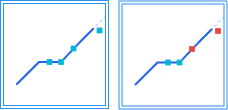
Check whether there are point objects in the point dataset that are not covered by lines in the reference line dataset. Points must lie on the reference line dataset's line objects, including on the interior, on line nodes, and on line endpoints, but cannot be outside the line. For example, toll booths on a highway must be located on the highway. Point objects not covered by lines will be generated as topology errors into the result dataset. Error dataset type: Point dataset. |
 |
| Point On Region Boundary |
Check whether there are point objects in the point dataset that are not on the boundaries of polygons in the reference region dataset. Point objects must not be inside or outside the polygons. For example, boundary markers must be placed on national borders or administrative boundaries. Point objects not on polygon boundaries will be generated as topology errors into the result dataset. Error dataset type: Point dataset. |
  |
| Point Contained In Region |
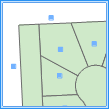
Check whether there are point objects in the point dataset that are not inside polygons of the reference region dataset. Point objects must not be outside or on the boundaries of the polygons. For example, a point representing a provincial capital must be located within the province's boundaries. Point objects not inside polygons will be generated as topology errors into the result dataset. Error dataset type: Point dataset. |
  |
| Point Covered By Line End |
Check whether there are point objects in the point dataset that are not covered by line endpoints in the reference line dataset. Points must be on the endpoints of line objects, not on line nodes, on other interior positions, or outside the line. Point objects not covered by line endpoints will be generated as topology errors into the result dataset. Error dataset type: Point dataset. |
  |
| No Identical Points |
Check whether there are duplicate point objects in a single point dataset. For example, public facilities such as fire stations and schools, represented as a point dataset on a map, must not have more than one at the same location. Duplicate point objects will be generated as topology errors into the result dataset. Error dataset type: Point dataset. |
  |
| Point Not Within Region |
Check whether there are point objects in the point dataset that are contained by polygons of the reference region dataset. If a point object is on the polygon boundary or outside the polygon, it is considered valid topology. Point objects contained by polygons will be generated as topology errors into the result dataset. Error dataset type: Point dataset. |
  |
| Points Are Not Covered By Faces |
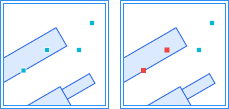
Check whether there are point objects in the point dataset (or point record set) that are covered (located on the boundary or interior of a polygon object) by an object in the region dataset (or polygon record set). For example, when checking building points and water elevation points, the elevation points must not be inside or on the boundary of building polygons. Point objects covered by polygons (on the boundary or interior) will be generated as topology errors into the result dataset. Error dataset type: Point dataset. |
 |
Rules for Line Datasets
| Name | Description | Illustration |
| Line Not Intersect With Line |
Check whether there are line objects in the line dataset that intersect with lines in the reference line dataset. All line objects in the two line datasets must be separate from each other. Intersection points will be generated as topology errors into the result dataset. Error dataset type: Point dataset. |
  |
| No Intersect In Line |
Check whether a line dataset contains two (or more) line objects that intersect within the line interior. The intersection point must lie within the interior of both lines; if it is an endpoint of either line, it is considered a valid topological relationship. Intersection points will be generated as topology errors into the result dataset. Error dataset type: Point dataset. |
  |
| No Overlap In Line |
Check whether there are two (or more) line objects in a single line dataset that overlap each other and share nodes on the overlapping portion. For example, in city streets, single or multiple streets can intersect but must not have identical route segments. Overlapping portions will be generated as topology errors into the result dataset. Error dataset type: Line dataset. |
  |
| No Dangles In Line |
Check whether there are line objects in a single line dataset defined as dangling lines, where the endpoint of a line is not connected to the interior of another line or to another line's endpoint. This includes long dangles and short dangles. For example, boundary lines that must be closed can be checked with this rule. Dangling points will be generated as topology errors into the result dataset. Error dataset type: Point dataset. |
  |
| No Short Suspension Lines In The Line |
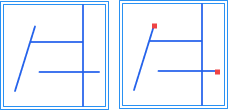
Check whether a line dataset contains dangling branches whose length from a junction to a free end is less than a given value. A dangling line whose length is less than the dangle tolerance is a short dangling line. Error dataset type: Point dataset. |
 |
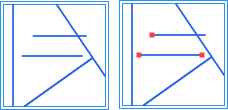
| No Long Suspension In The Line |
Check whether a line dataset contains dangling branches whose length from a junction to a free end is greater than a given value. A dangling line is considered long if it intersects with another arc after extending a specified length along its direction. Error dataset type: Point dataset. |
 |
| No Pseudo Nodes In Line |
Check whether there are line objects in a single line dataset that contain pseudo nodes (nodes connecting only two arcs). A line object must connect to two (or more) line objects. Pseudo nodes will be generated as topology errors into the result dataset. Error dataset type: Point dataset. |
  |
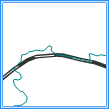
| Line Not Overlap Line |
Check whether there are line objects in the line dataset that overlap with lines in the reference line dataset, and the overlapping portions share nodes. Line objects between the two line datasets must not have coincident parts. For example, in transportation route data, highways and railways must not overlap. Overlapping portions will be generated as topology errors into the result dataset. Error dataset type: Line dataset. |
  |
| Line Has No Intersects/Touches |
Check whether there are two (or more) line objects in a single line dataset that intersect at a line node or at the interior of a line. Line objects can only intersect at endpoints, and all intersection points must be line endpoints. All intersecting arcs must be split. This rule does not check self-intersection of line objects. Intersection points will be generated as topology errors into the result dataset. Error dataset type: Point dataset. |
  |
| No Self Overlap In Line |
Check whether there are line objects in a single line dataset that overlap with themselves. A line object must not have overlapping parts with itself. For example, in transportation data, a road must not have duplicate segments. Overlapping portions will be generated as topology errors into the result dataset. Error dataset type: Line dataset. |
  |
| No Self Intersect In Line |
Check whether there are line objects in a single line dataset that intersect or overlap with themselves. A line object must not have overlapping (same coordinates) nodes. This rule is often used for lines like contour lines that must not self-intersect. Intersection points from self-intersection or endpoints of overlapping portions will be generated as topology errors into the result dataset. Error dataset type: Point dataset. |
  |
| Line Covered By Lines Fully |
Check whether there are line objects in the line dataset that are not covered by one or more lines from the reference line dataset. For example, a line must coincide with the road network, i.e., be fully covered by road data. Uncovered portions will be generated as topology errors into the result dataset. Error dataset type: Line dataset. |
  |
| Line Covered By Region Boundary |
Check whether there are line objects in the line dataset that are not covered by the boundaries (one or more polygon boundaries) of the reference region dataset. For example, line data representing the boundary of a certain area (e.g., urban district boundary) must be covered by the boundary of that area (the urban district). Uncovered portions will be generated as topology errors into the result dataset. Error dataset type: Line dataset. |
  |
| Line End Covered By Point |
Check whether there are line objects in the line dataset whose endpoints are not covered by points from the reference point dataset. Uncovered endpoints will be generated as topology errors into the result dataset. Error dataset type: Point dataset. |
  |
| No Intersection Between Line And Polygon |
Check whether there are line objects in the line dataset that intersect with or are contained by polygons of the reference region dataset. The line dataset and the reference region dataset must have no intersection. The intersection part between lines and polygons will be generated as topology errors into the result dataset. Error dataset type: Line dataset. |
  |
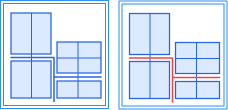
| The Line Must Intersect The Face |
Check whether line objects in the checked dataset intersect with polygon objects in the reference region dataset. In boundary cases, if a line endpoint falls on a polygon boundary or coincides with a polygon node, it is not considered an intersection; if a line coincides with a polygon boundary, it is not considered an intersection. Line objects that do not intersect the reference polygons will be generated as topology errors into the result dataset. Error dataset type: Line dataset. |
 |
| No Sharp Angles In Line |
Check whether there are two consecutive angles formed by four consecutive nodes, both smaller than a given angle value (in degrees). If both angles are smaller than the value, the line object is considered to bend at the middle two nodes. The first bending point will be generated as an error into the result dataset. Error dataset type: Point dataset. |
  |
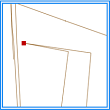
| No Sharp Angles In The Line |
Check whether there are acute angles smaller than a given angle value in the line dataset. If the angle formed by three consecutive nodes is smaller than the given angle, it is judged as an acute angle. The vertex of the acute angle will be generated as a topology error into the result dataset. Error dataset type: Point dataset. |
  |
| The Length Of The Segment Must Be Equal To The Threshold |
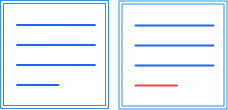
Check whether the length of each line segment in line features equals a set threshold. The distance unit is m. In a geographic coordinate system, the segment length is calculated based on geodesic distance. In boundary cases, a segment length within the tolerance range equal to the threshold is considered correct, with the tolerance defaulting to millimeter precision (1e-3). Segments whose length does not meet the requirement will be generated as topology errors into the result dataset. Error dataset type: Line dataset. |
 |
Rules for Region Datasets
| Name | Description | Illustration |
| No Overlap In Region |
Check whether there are two (or more) polygon objects in a single region dataset that overlap partially or completely. This rule is often used when an area cannot belong to two (or more) polygons simultaneously, such as administrative divisions where a region cannot be under the jurisdiction of two administrative regions. Overlapping portions will be generated as topology errors into the result dataset. Error dataset type: Region dataset. |
  |
| No Gaps In Region |
Check whether there are gaps between adjacent polygon objects in a single region dataset. The boundaries of adjacent polygons must coincide, and polygon interiors must not have holes (donut polygons). This rule is often used to check for gaps between adjacent areas in a region dataset, such as land use map patch data, which requires no undefined land use type patches. Gap portions will be generated as topology errors into the result dataset. Error dataset type: Region dataset. |
  |
| Region Inside Not Overlap Region |
Check whether there are polygon objects in the region dataset that overlap with polygons in the reference region dataset, including partial or complete overlap. Polygon objects in the region dataset must have no intersection between them. This rule can be used for data where areas cannot share the same region, such as water bodies and dry land. Overlapping portions will be generated as topology errors into the result dataset. Error dataset type: Region dataset. |
  |
| Region Covered By Regions |
Check whether there are polygon objects in the region dataset that are not covered by polygons in the reference region dataset. One or more polygons from the checked region dataset must be completely covered by polygon objects in the reference region dataset. This rule is often used for nested polygon data, such as provincial boundaries in a regional map that must be fully covered by all county boundaries within the province. Uncovered portions will be generated as topology errors into the result dataset. Error dataset type: Region dataset. |
  |
| Region Covered By Region |
Check whether there are polygon objects in the region dataset that are not contained by polygons in the reference region dataset. The polygons in the checked region dataset must be a subset of polygon objects in the reference region dataset. This rule can be used for polygon data with a containment relationship, such as animal activity areas within the entire study area. Entire polygons not contained will be generated as topology errors into the result dataset. Error dataset type: Region dataset. |
  |
| Region Boundary Covered By Lines |
Check whether there are polygon boundaries in the region dataset that are not covered by lines from the reference line dataset. Polygon data may not store some boundary line attributes; in such cases, dedicated boundary line data is needed to store different attributes of regional boundaries, requiring that boundary lines fully coincide with the polygons. Uncovered boundaries will be generated as topology errors into the result dataset. Error dataset type: Line dataset. |
  |
| Region Boundary Covered By Line |
Check whether there are polygon boundaries in the region dataset that are not covered by boundaries of one or more polygon objects in the reference region dataset. This rule is often used when polygon objects in one region dataset are composed of one or more polygon objects from another region dataset, such as provincial boundaries composed of all county boundaries within the province, sharing the same boundaries. Uncovered boundaries will be generated as topology errors into the result dataset. Error dataset type: Line dataset. |
  |
| Region Contains Point |
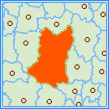
Check whether there are polygon objects in the region dataset that do not contain points from the reference point dataset. Points in the reference dataset must be inside the polygon, not outside or on its boundary. A polygon can contain one or more points. Polygons that do not contain any points will be generated as topology errors into the result dataset. Error dataset type: Region dataset. |
  |
| Region Boundary Not Overlap |
Check whether there are polygon boundaries in the region dataset that overlap with boundaries of polygons in the reference region dataset. This rule does not check boundary overlap within a polygon. Overlapping boundary portions will be generated as topology errors into the result dataset. Error dataset type: Line dataset. |
  |
| No Acute Angle In Region |
Check whether there are acute angles smaller than a given angle value in the region dataset. If the angle formed by three consecutive nodes is smaller than the given angle, it is judged as an acute angle. The vertex of the acute angle will be generated as a topology error into the result dataset. Error dataset type: Point dataset. |
  |
| No Narrow Face |
Check whether the thinness ratio of polygon features is greater than the tolerance. When the feature area is A and the perimeter is P, the thinness ratio T = 4π(A/P²). Polygons whose thinness ratio is not greater than the tolerance will be generated as topology errors into the result dataset. Error dataset type: Region dataset. |
 |
| There Cannot Be Adjacent Faces |
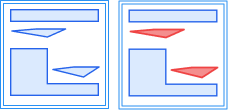
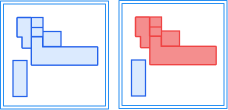
Check whether polygon objects in the same dataset have boundary contact (touching). In boundary cases, polygons that intersect even with boundary contact are not considered adjacent; polygons that contain or are contained even with boundary contact are not considered adjacent; boundary contact of solid polygons within holes is considered adjacent. Contact boundaries between adjacent polygons will be generated as topology errors into the result dataset. Error dataset type: Region dataset. |
 |
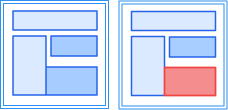
| Faces Cannot Be Adjacent To Other Faces |
Check whether polygon objects in the checked dataset have boundary contact with polygon objects in the reference region dataset. In boundary cases, polygons that intersect even with boundary contact are not considered adjacent; polygons that contain or are contained even with boundary contact are not considered adjacent; boundary contact of solid polygons within holes is considered adjacent. Contact boundaries adjacent to reference polygons will be generated as topology errors into the result dataset. Error dataset type: Region dataset. |
 |
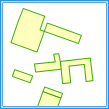
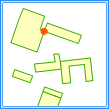
| No Self Intersect In Region |
The boundary of each polygon feature must not intersect other parts of its own boundary. Detects intersection points generated by self-intersection. If a line segment endpoint in the same subcomponent falls on another line segment or coincides with an endpoint, that endpoint is counted as an error. Boundary folding cases are not considered. Intersection points from boundaries of different subcomponents are also counted as errors. If there is overlap between boundaries of different subcomponents, endpoints of one boundary segment lying within another boundary segment are counted as errors. Error dataset type: Point dataset. |
  |
| No Self-Intersection In Plane (Feature) |
The boundary of each polygon feature must not intersect itself. Detects duplicate vertices caused by self-intersection and outputs the entire erroneous polygon feature. If a line segment endpoint in the same subcomponent falls on another line segment or coincides with an endpoint, the feature is counted as an error. Boundary folding cases are not considered. If boundaries of different subcomponents intersect or overlap, the feature is counted as an error. Error dataset type: Region dataset. |
 |
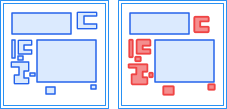
| Minimum Area |
Check whether the area of polygon features is less than the tolerance value. Polygons with area less than the tolerance value will be generated as topology errors into the result dataset. Error dataset type: Region dataset. |
 |
Rules for Multiple Dataset Types
The following topology rules apply to one or more types of datasets, including point, line, and region datasets, whether within a single dataset or between two datasets.
| Name | Description | Illustration |
| No Complex Object |
Check whether line or region datasets contain complex objects (objects that contain one or more sub-objects, such as parallel lines). Complex objects will be generated as topology errors into the result dataset. Error dataset type: Line dataset or region dataset. |
  |
| Feature Node Duplication |
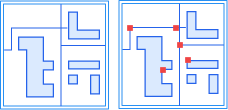
Check whether there are consecutive duplicate vertices in line or region datasets, i.e., two adjacent vertices with the same coordinates. In boundary cases, duplicate start and end nodes are not considered errors; duplicate last node of one subcomponent and first node of the next subcomponent are not considered errors. Duplicate vertices will be generated as topology errors into the result dataset. Error dataset type: Point dataset. |
 |
| No Parameterized Objects |
Check whether the checked dataset contains only line and polygon geometries, and no other types of geometries such as arc, ellipse. Objects that do not meet the requirement will be generated as topology errors into the result dataset. Error dataset type: Line dataset or region dataset. |
 |
| Vertex Distance > Tolerance |
Check whether the node distance between objects in point, line, or region datasets (within a single dataset or between two datasets) is less than or equal to a set tolerance. Nodes not greater than the tolerance will be generated as topology errors into the result dataset. Error dataset type: Point dataset. Note: This rule is derived from the topology preprocessing operation. It is recommended not to check this topology rule together with the "Topology Preprocessing" operation, otherwise the errors detected by this rule will be automatically fixed during topology preprocessing and the expected results may not be achieved. |
  |
| Vertex Exists At Line Intersect |
Check whether there is a node at the crossing point of two lines in line or region datasets (within a single dataset or between two datasets), and this node exists on at least one of the intersecting line segments. Two line objects connecting at their endpoints are considered correct topology. Note: endpoints touching between two line segments do not violate the rule. If there is no node at the intersection, the system will calculate this node and generate it as a topology error into the result dataset. Error dataset type: Point dataset. Note: This rule is derived from the topology preprocessing operation. It is recommended not to check this topology rule together with the "Topology Preprocessing" operation, otherwise the errors detected by this rule will be automatically fixed during topology preprocessing and the expected results may not be achieved. |
  |
| Vertices Must Match |
Check whether, within the tolerance range of the current node, there is a line object (or polygon boundary) with a matching node on the line or between point and line datasets, or point and region datasets (within a single dataset or between two datasets). For unmatched points, the system calculates the matching point position by dropping a perpendicular to the line, and this matching point will be stored as a topology error into the result dataset. Error dataset type: Point dataset. Note: This rule is derived from the topology preprocessing operation. It is recommended not to check this topology rule together with the "Topology Preprocessing" operation, otherwise the errors detected by this rule will be automatically fixed during topology preprocessing and the expected results may not be achieved. |
  |
| Line/Region Has No Redundant Vertex |
Check whether line objects or polygon boundaries in line or region datasets have redundant nodes. There must be no other collinear nodes between two nodes; such collinear nodes are redundant nodes. Redundant nodes will be generated as topology errors into the result dataset. Error dataset type: Point dataset. |
  |
Rules Applicable to Attribute Data
The following attribute check rules apply to attribute quality checks of vector datasets. When selecting an attribute check rule, the system displays corresponding parameters based on the rule type and validates required fields, types, value ranges, SQL statements, etc.
| Name | Description |
| Non-Empty Check |
Checks whether the value of a specified field is empty. For text fields, empty strings or strings that become empty after trimming leading/trailing spaces are considered errors; for numeric and date fields, only NULL is considered empty. Multiple check fields can be selected at once; if any field is empty, an attribute check error is generated. |
| Enumeration Value Check |
Checks whether the value of a specified field belongs to a predefined set of enumerated values. If the field value is not in the enumeration set, an attribute check error is generated. Enumeration values can be selected from a dropdown or manually entered, with multiple values separated by English semicolons (;). |
| Unique Value Check |
Checks whether the value of a specified field is unique, used to identify duplicate records. NULL values are not compared for uniqueness. This rule only supports single-field checks. |
| Length Check |
Checks whether the length of a character field value satisfies the constraint. If the field value length does not meet the configured comparison relationship and length value, an attribute check error is generated. Field length is calculated by character count, not byte count. |
| Range Check |
Checks whether a numeric field value falls within a set value range. Supports constraints such as setting only a minimum value, only a maximum value, closed intervals, and open intervals. When both minimum and maximum values are set, the minimum value cannot be greater than the maximum value. |
| Field Relationship Check |
Checks whether the values of two fields in the same record of the same dataset satisfy a specified comparison relationship. Supports comparison relationships such as equal, not equal, greater than, no less than, less than, and no more than. The two fields must be of the same or comparable types. |
| Association Consistency Check |
Based on association fields, checks record associations and attribute consistency between two datasets, used to identify issues such as missing check data, redundant reference data, or inconsistent field values on both sides. This rule requires configuring check data and reference data. The association fields and comparison types on both sides must be the same or compatible. |
| Geometric Attribute Consistency Check |
Checks whether the property field value is consistent with the geometric area or geometric length of the object. Area data supports area checks, and line data supports length checks. The property field must be a numeric type, and the allowable tolerance must be no less than 0. |
| Custom SQL Checking |
Expresses complex attribute check logic through SQL statements. Records that meet the SQL condition are considered passed; records that do not meet the condition are considered problematic and output to the result dataset. The SQL statement must be a query and the returned result must include fields used to locate the result records. |