



Ungroup
Function Description
Ungroup one or more complex objects or compounds. The result of ungrouping can be single objects or complex objects.
- The ungroup feature applies to line layers, polygon layers, text layers, and CAD layers.
- Only complex objects or compounds can be ungrouped; simple objects cannot be ungrouped.
- Ungrouping a complex object (i.e., a non-text object containing multiple sub-objects) generates multiple single objects, all of which are simple objects. Ungrouping a compound generates multiple single objects. If the resulting single objects still contain compounds, they can be further ungrouped until all are simple objects.
The following figure shows a donut polygon. After performing the ungroup operation, the new objects obtained are two single objects:
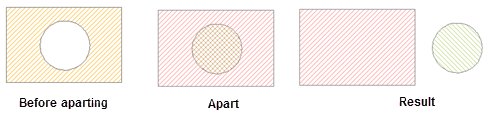
Figure: Ungroup complex object - For ungrouping a text, you can choose simple split or complete split:
- Simple split: Decomposes a compound text into multiple sub-object text strings. The left figure below shows a compound text composed of two sub-objects. After simple split, it becomes two texts as shown in the right figure.

Figure: Text simple split - Complete split: Splits a text completely into individual characters. After complete split of the left figure below, the result is eight single-character texts as shown in the right figure.
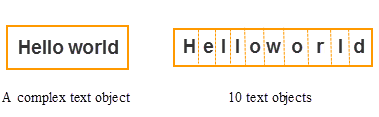
Figure: Text complete split
- Simple split: Decomposes a compound text into multiple sub-object text strings. The left figure below shows a compound text composed of two sub-objects. After simple split, it becomes two texts as shown in the right figure.
- For the attributes of the newly generated objects, the field SmUserID and non-system fields inherit the corresponding information from the source object; other system fields are assigned by the system.
Feature Entry
- Edit Data tab -> Object Editing group -> General editing -> Group and Ungroup -> Ungroup
- In the map -> context menu -> Ungroup button.
Instructions
- Under the editable state of the layer, select one or more complex objects or compounds.
- On the Edit Data tab, in the General editing drop-down menu, click the Ungroup button in the Group and Ungroup group to perform the ungroup operation.
Alternatively, perform the following operation:
Right-click and select the Ungroup command from the context menu.
- If the ungrouped objects still contain compounds, you can continue to use the ungroup feature to ungroup them until all are single objects.