



Function Description
A linem is a linear feature object composed of points with X, Y coordinates and linear measure values (M values). For example, mile markers on highways, traffic control departments often use mile markers on highways to mark and manage road conditions, vehicle speed limits, and locations of accidents, etc. Linem M calibration is the process of adjusting route measurements to keep them consistent with known reference points. For more information about calibrating routes, please refer to the Calibrate Route Overview.
Function Entry
- Edit Data tab -> Object Editing group drop-down box -> Calibrate M Value.
Operation Instructions
- Add the route data to the map window, set the layer to editable state, and select a linem that needs M value calibration.
- In the Edit Data tab, under the Route Edit drop-down menu, click the Calibrate M Value button, and the Linem M Value Calibration window will pop up.
- The list in the dialog box displays the coordinates and M values of the linem. Users can check the route nodes as reference points for M value calibration. The selected linem nodes will be highlighted in the map, and the M values of the reference points can be directly modified in the list.
- Set the calibration method in the parameters section. The calibration methods are divided into two types: Calibrate by Distance and Calibrate by Measure. For an introduction to these two calibration methods, please refer to the Calibrate Route Overview.
- Calibrate by Distance: Calculates the M value based on the distance along the route between two reference points.
- Calibrate by Measure: Uses the measure values of positions on the route corresponding to reference points for calibration. When the ratio of the length of the route being calibrated to the measure values is inconsistent, this method is very suitable for fine-tuning the measure values of the route.
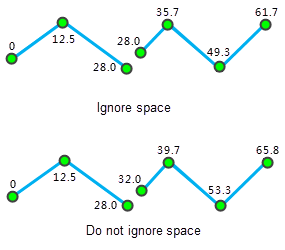
- Ignore the Subobject Space: Sets whether to ignore intervals between subobjects. By default, intervals between subobjects are ignored. The route can be a complex object containing multiple subobjects. When two subobjects are discontinuous, intervals are generated. Whether to ignore the intervals between subobjects affects the continuity of route measure values. If the intervals are ignored, the measure values will be continuous; otherwise, they will be discontinuous, and the interval distance between subobjects will be the Euclidean distance between the two endpoints.
As shown in the following figure, when ignoring intervals between subobjects, the M value of the end point of the first subobject is the same as the M value of the start point of the second subobject; when not ignoring intervals, the M value of the start point of the second subobject equals the M value of the end point of the first subobject plus the Euclidean distance of the interval between them.
- After setting the above parameters, click the Calibrate button to execute the operation.
 Notes:
- At least two reference points are required for calibrating the route. It is recommended to use the two reference points closest to the node to be calibrated.
- If the M value of a reference point is no value, i.e., -9999, the linem M value calibration will fail.
Related Topics