



Parametric objects refer to geometries that use one or more parameters (such as angle, length, etc.) to represent (x, y) coordinate points. For example, a circle and an ellipse are expressed using parametric equations as:
Circle: x = a + rcosθ, y = b + rsinθ (θϵ[0,2л))
Ellipse: x = acosθ, y = bsinθ (θϵ[0,2л))
The advantage of using parametric objects to express the geometric characteristics of features is that when the outline of a real-world feature contains curves, using parametric data for description makes the map display more consistent with the actual feature outline and more accurate in geometric calculations such as area and perimeter.
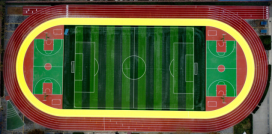 |
| Figure Outline curve of a playground |
Types of Parametric Objects
Currently, line and region datasets support storing parametric objects, including circle, arc, ellipse, elliptic arc, and third-order bezier curve. They also support composite line and region datasets composed of these parametric objects. The specific types of parametric objects are described as follows:
|
Parametric Objects
|
Descriptions
|
Parametric Object Graphics
|
Class Name
|
|
Arc
|
|
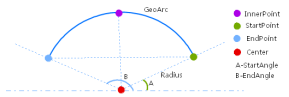 |
GeoArc
|
|
Circle
|
|
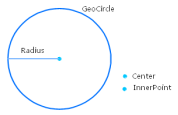 |
GeoCircle
|
|
Elliptic Arc
|
|
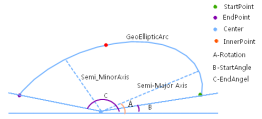 |
GeoEllipticArc
|
|
Ellipse
|
|
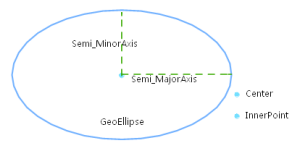 |
GeoEllipse
|
|
Bezier Curve
|
Third-order bezier curve
|
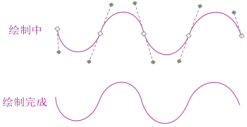 |
GeoBezier3Curve
|
|
Parametric Line
|
It can be composed of the following geometries: polyline (GeoLine), arc (GeoArc), circle (GeoCircle), elliptic arc (GeoEllipticArc), ellipse (GeoEllipse), and bezier curve (GeoBezier3Curve). The end coordinate of a previous geometry must coincide with the start coordinate of the next geometry.
|
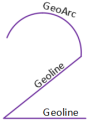 |
GeoCompoundCurve
|
|
Parametric Region
|
It can be composed of the following geometries: polyline (GeoLine), parametric line (GeoCompoundCurve), circle (GeoCircle), and ellipse (GeoEllipse), and each geometry must be closed.
|
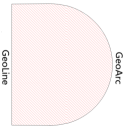 |
GeoCurvePolygon
|
|
Multi Curve
|
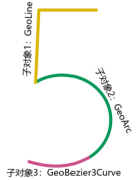
It consists of multiple sub-objects, each containing only one geometry, which can be: polyline (GeoLine), arc (GeoArc), circle (GeoCircle), elliptic arc (GeoEllipticArc), ellipse (GeoEllipse), parametric line (GeoCompoundCurve), or bezier curve (GeoBezier3Curve). Specifically, when the sub-object is GeoLine, the line object count can only be 1.
|
 |
GeoMultiCurve
|
|
Multi Surface
|
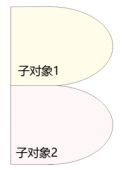
It consists of multiple sub-objects, each containing only one geometry, which can be: region (GeoRegion) or parametric region (GeoCurvePolygon). Specifically, when the sub-object is GeoRegion, the region object count can only be 1.
|
 |
GeoMultiSurface
|
Importing Parametric Objects from External Formats
Currently, importing parametric objects from DWG and FileGDB data is supported, and it is supported on Windows_x86, Linux_x86, and Linux_ARM environments.
- DWG
DWG GeometryImport as Line or Region DatasetImport as CAD DatasetKeep Parametric ObjectDo Not Keep Parametric ObjectKeep Parametric ObjectDo Not Keep Parametric ObjectCircle, EllipseCircle, EllipseFitted Polyline / Fitted RegionCircle, EllipseCircle, EllipseArc, Elliptic ArcArc, Elliptic ArcFitted PolylineArc, Elliptic ArcArc, Elliptic ArcSpline CurveParametric LineFitted PolylineParametric LineFitted PolylinePolylineParametric LineFitted PolylineParametric LineCompoundHatchParametric RegionFitted RegionParametric RegionCompoundBlockParametric Line / RegionFitted Polyline / RegionParametric Line / RegionCompound
* When importing polyline as CAD dataset, you need to set "Keep Parametric Object" and ensure that parametric objects exist and the polyline width is ignored or zero, so that it can be imported as parametric objects; otherwise, it will be imported as compound.
* Importing DWG as parametric objects only supports importing to 2D datasets. If you want to keep object height information, it will be fitted to a polyline.
- FileGDB
FileGDB GeometryImport as Line or Region DatasetCircle, ArcCircle, ArcBezier CurveMulti curve with sub-objects as bezier curvesCircle, Ellipse, Parametric RegionCircle, Ellipse, Parametric RegionLine/Region elements composed of multiple line regions (see Figure 2)Multi curve / Multi surface
* When a line/region element in FileGDB has multiple sub-objects (as shown below), the import will convert it to a multi curve or multi surface containing multiple sub-objects.
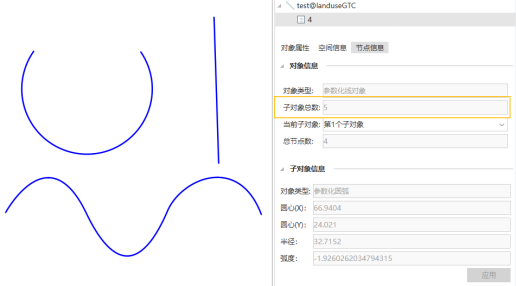
Figure Multi curve composed of multiple sub-objects
- Other External Formats
Importing parametric objects from other external formats will be fitted to polylines.
Exporting Parametric Objects to External Formats
Currently, the platform supports exporting parametric objects to multiple data formats, including DWG, DXF, and FileGDB.
- FileGDB export support: Currently only supports exporting two types of parametric objects: circle and arc.
- DWG and DXF export support: Exporting parametric objects is supported on Windows_x86, Linux_x86, and Linux_ARM environments.
- Other format export description: When exporting parametric objects to other formats, they will be automatically fitted to polylines.
Currently, only when exporting parametric objects to DWG and DXF formats are the parameterized objects still kept, and this is supported on Windows_x86, Linux_x86, and Linux_ARM environments. When exporting to other formats, including formats that do not support parametric objects such as CSV, GeoJSON, KML, etc., parametric objects will be fitted to polylines.
Supported Functions
- Currently, the vector processing and analysis functions that support parametric objects include: overlay analysis, buffer analysis, merge, regularize building, compute area, vector resampling, centerline from polygon, measure distance, smooth line/polygon, create random point, vector to raster, update attributes, vector clip, line topology processing, eliminate, region aggregation, cluster and outlier analysis (Anselin Local Moran's I), hot spot analysis (Getis-Ord Gi*), etc.
- Starting from SuperMap iDesktopX 2025, the object editing functions supported by parametric objects only include: erase, line to point, region to line, line to region, specify coordinates, specify orientation, specify offset, positioning copy, mirror, and rotate.
Related Topics