



Line To Point
Function Description
Convert the selected line objects to point objects, and save to the point dataset or CAD dataset.
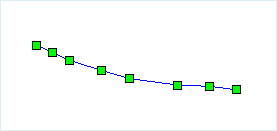
When converting a line object to a point object, all node in the line object are directly saved as point objects, as shown in the figure below. Figure 1 shows the line objects to be converted, and Figure 2 shows the point objects saved in the point or CAD dataset after conversion.
 |
 |
| Figure 1: Line objects to be converted | Figure 2: Converted point objects |
Function Entry
- Edit Data Tab -> Object Editing Group -> Type Conversion -> Line to Point
Operation Instructions
- Open the line dataset into the map. With the current line layer in a selectable state, select one or more line objects.
- In the Edit Data tab, under the Type Conversion drop-down menu, click the Line to Point button to open the Line to Point dialog box.
- In the dialog box, select the target datasource and dataset to store the newly generated point objects. The result data can be saved in two ways: save to an existing dataset or create a new point dataset. The parameters in the dialog box are as follows:
- Target Datasource: Set the datasource where the result data will be saved.
- Target Dataset: Select an existing point or CAD dataset to store the newly generated point objects.
- New Dataset: Check the New Dataset checkbox, set the new dataset name, and save the newly generated point objects to the new point dataset.
- Delete Source Object: If the selected line object layer is editable, you can check the Delete Source Object checkbox to delete the select objects from the source dataset.
- Click the OK button to complete the conversion of line objects to point objects.