



Adjacent Point Connection Line
Function Description
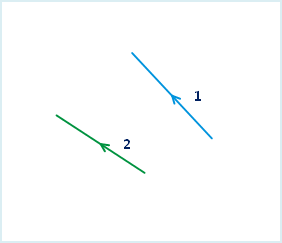
Adjacent Point Connection Line: When connecting, the start and end points of lines are not considered. The connection is determined by the distance between the endpoints of the line objects. The endpoint of the first line is connected to the endpoint of the nearest line object. The direction of the generated line is the same as that of the first line object.
- The joint line object function is applicable to 2D line layers and CAD layers.
- The joint line object function is available only when line objects are selected.
- This operation is not applicable to complex objects and compounds. For an introduction to object types, please refer to Object Overview.
Function Entry
- Edit Data tab -> Object Editing group -> Line Editing -> Connect and Break -> Adjacent Point Connection Line
Instructions
In the Adjacent Point Connection Line dialog box, you can set the operation method for each field individually, or select multiple fields to set them uniformly. The following is an explanation of the dialog box.
- With the layer in an editable state, select one or more line objects to be connected.
- On the Edit Data tab, in the Line Editing drop-down menu, click the Adjacent Point Connection Line button in the Connect and Break group to perform the line connection operation.
- The corresponding Adjacent Point Connection Line dialog box pops up. In this dialog box, set the properties of the new object after connection.
- Edit Layer: The Edit Layer drop-down list shows all editable layers in the current map. You can select the layer to operate on by clicking the drop-down arrow on its right side.
- Field List Area: This area lists information about all non-system fields and editable system fields in the current editable layer, including field, type, and the operation method for the new object's field after the connection operation is completed. By default, the field attributes of the first object are used.
- Operation Method Setting Area: Provides four operation methods.
- Null: The value of this field in the new object will be null after the connection is completed.
- Sum: The value of this field in the new object after connection is the sum of the corresponding field values of each connected object.
- Weighted Mean: The value of this field in the new object after connection is the weighted mean of the field values of all connected objects. A weighting field must be specified. If no weighting field is selected, a simple average is calculated, which is the sum of the selected field values of all source objects divided by the number of source objects.
- Save Geometry: The value of this field in the new object after connection is the same as the value of the same field in a currently selected object. You can click the drop-down arrow on the right to select the object property value to be used for the new object.
- Click the OK button to complete the line object connection operation.
 |
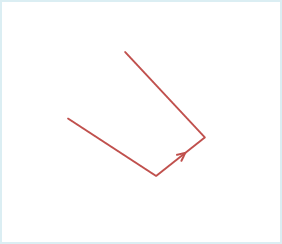 |
| Figure 1: Line objects before connection | Figure 3: Adjacent Point Connection Line |