



Feature Description
Extract all faces, also known as extract all isoregions, extracts all qualified isoregions from the surface model by specifying parameters.
- The source dataset used for extracting isosurface must be a DEM or Grid dataset.
Application Example
Open the 'Terrain' data source in the 'ExerciseData/RasterAnalysis' folder, which contains DEM data with a resolution of 5 meters. We use this data as an example.
Function Entries
- In the Spatial Analysis tab -> Raster Analysis -> Surface Analysis -> Extract All Faces;
- Toolbox -> Raster Analysis tool -> Surface Analysis -> Extract Isolines/Areas -> Extract All Faces.
Main Parameters
Base Value: The base value serves as the initial starting value for generating isoregions, calculated in both directions from the base value at intervals of the contour interval, so it is not necessarily the value of the smallest isoregion.
Contour Interval: Starting from the base value, the elevation interval between two adjacent isoregions, with the default unit being the same as the source dataset unit. Together with the base value, it determines which isoregions are extracted.
After parameters are set, the system will automatically calculate and display the result information. The description of the result information is as follows:
Maximum Raster Value: The maximum raster value in the selected source dataset, which is system information and cannot be changed.
Minimum Raster Value: The minimum raster value in the selected source dataset, which is system information and cannot be changed.
Maximum Isoregion: The maximum value of isoregions in the target dataset.
Minimum Isoregion: The minimum value of isoregions in the target dataset.
Number of Isoregions: The total number of isoregions in the target dataset.
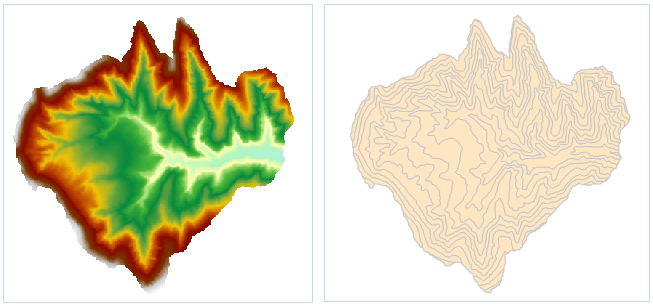 |
| Figure: Extract All Isoregions Result |
- The settings include the source data, target dataset, and parameters such as resampling factor, smooth method, smoothness. For the settings of common parameters like source data, target dataset, and parameters, please refer to: Common Parameter Description.
- Set the base value and contour interval in the parameters.
- Click the "OK" button to complete the isoregion extraction operation. The result is as shown in the figure below:
 Notes:
- Currently, extracting isoregions from raster datasets with over 400 million pixels is not supported.
Related Topics