



Feature Description
Focal statistics performs statistical analysis on cell values within the neighborhood of each raster cell. It expands a specified range around the target cell and calculates statistical results based on surrounding raster data. Available statistical methods include: Maximum, Minimum, Majority, Minority, etc. Common neighborhood types include: Rectangle, Circle, Annulus, and Sector.
The diagram below illustrates focal statistics, where the value of the cell in the second row and third column is determined by all cell values within its 3*3 rectangular neighborhood.
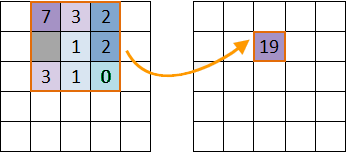 |
| Figure: Focal Statistics Schematic Diagram |
- Statistical Mode
SuperMap focal statistics provides 10 statistical modes:
- Min: Finds the minimum cell value within the neighborhood.
- Max: Finds the maximum cell value within the neighborhood.
- Average: Calculates the average value of all cells in the neighborhood.
- STDEV: Computes the standard deviation of cell values in the neighborhood.
- Sum: Calculates the sum of all cell values in the neighborhood.
- Variety: Counts the number of distinct cell values in the neighborhood.
- Range: Computes the difference between maximum and minimum values in the neighborhood.
- Majority: Determines the most frequently occurring cell value.
- Minority: Determines the least frequently occurring cell value.
- Median: Finds the median value after sorting all cell values in ascending order.
- Neighborhood Shape Types
Four neighborhood window types are available:
The diagram below shows the four shapes with default 3*3 neighborhood size. Cells are for illustrative purposes only.
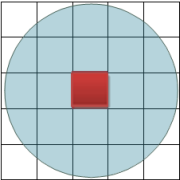
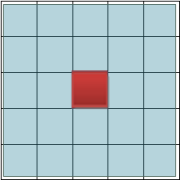
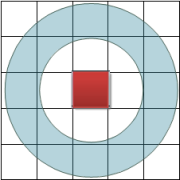
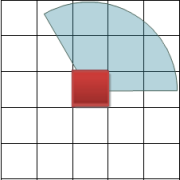
- Rectangle: Defined by specified width and height (default 0 in geographic/raster units).
- Circle: Defined by radius (default 3 units). Cells partially within the circle are included.
- Annulus: Defined by inner and outer radii (default 3 and 6 units respectively).
- Sector: Defined by radius, start angle and end angle (default radius 3 units, angles 0°-360°).
Feature Entry
- Spatial Analysis Tab->Raster Analysis Group->Raster Statistics->Focal Statistics.
- Toolbox->Raster Analysis->Raster Statistics->Focal Statistics.
Parameter Description
- Source Dataset: Select source raster dataset including datasource and dataset.
- Parameter Settings: Configure focal statistics parameters:
- Statistical Mode: Choose from 10 modes including Min, Max, Average, STDEV, Sum, Variety, Range, Majority, Minority and Median.
- Unit Type: Select between rows/columns (raster units) or map units for measurement.
- Neighborhood Shape: Configure dimensions for selected shape (Rectangle/Circle/Annulus/Sector).
- Ignore No Value: When checked, excludes NoData cells from calculation.
- Result Data: Specify output datasource and raster dataset name.