



9. Vector Tile Generation Configuration
This article summarizes the SuperMap map styles and settings that SuperMap vector tiles can and cannot support, defines clear capability boundaries, and assists users in creating vector maps suitable for vector tile production.
SuperMap supports generating vector tiles (.mvt) that follow the MapBox MVT specification from vector maps. Tile data includes the geometry and attributes of features, while the styling of features is described by a MapBox standard style file (style.json) and follows the style specification of MapBox GL version 8. For more information on MapBox styles, please refer to: https://www.mapbox.com/mapbox-gl-style-spec.
The vector tiles generated by SuperMap will be displayed in SuperMap iClient based on the MapBox style file; the client uses MapBox GL or OpenLayers to render vector tiles. Among them, OpenLayers supports rendering vector tiles in various projections, while MapBox GL only supports rendering vector tiles in the EPSG:3857 projection.
When generating vector tiles, the program needs to translate SuperMap's map styles into MapBox style descriptions. However, some of SuperMap's map styles and settings are not supported by MapBox and cannot be translated into MapBox style descriptions. Therefore, after generating vector tiles from a SuperMap map, the display effects may be inconsistent with the original map, or some style and map setting effects may be lost.
| Map Content, Rendering Styles, and Related Configuration | Supported by Vector Tiles | Remarks | |
|---|---|---|---|
| 1. Layer Data Content | |||
| Vector Dataset | 2D point, line, region, text datasets | Supported | Raster data layers are not supported. When a map contains unsupported dataset layers, these layers will be ignored during vector tile generation. If a geometry contains too many sub-objects, it will affect the tile generation speed when creating vector tiles. It is recommended to split the sub-objects to improve tile generation efficiency. The styles of EPS data layers in the map cannot be converted to vector tile style descriptions, meaning the styles cannot be output. |
| 3D point, line, region, text datasets | Supported | ||
| Tsinghua Sunrise (EPS) point, line, region, text datasets | Partially Supported | ||
| Other Datasets | Not Supported | ||
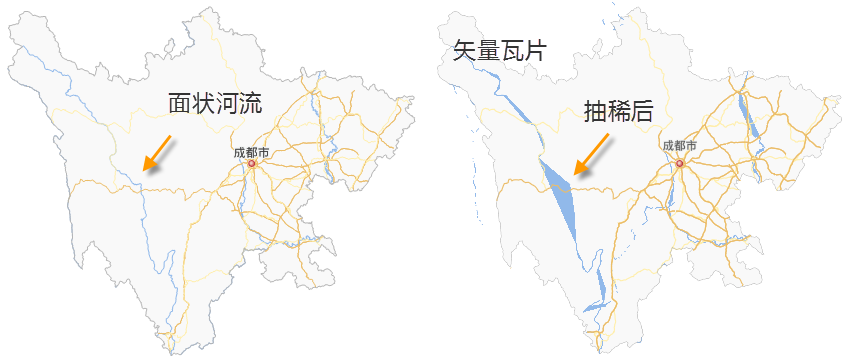
| Geometry Complexity | For massive region data, to improve vector tile generation and display efficiency, data simplification is required. Whether to apply simplification can be set by the user based on the actual data.
|
||
| Vector Data Coordinate System | If the coordinate system of the data is different from the map's display coordinate system, during vector tile generation, the system will perform a coordinate system transformation on the data, converting it to the map's display coordinate system. If the map data volume is large, this transformation operation will consume significant disk space and tile generation time. It is recommended that users first transform the data's coordinate system to the map's display coordinate system, and then generate vector tiles. | ||
| 2. Layer Properties Settings | |||
| Layer Visible Scales | Maximum, minimum visible scale | Supported | Vector tiles are created using global scales. The visible scale range of layers in the vector map needs to be adjusted according to the global scales; otherwise, the visibility effect of map elements in the vector tiles may be inconsistent with the original map. The numerical values and precision of layer visible scales must exactly match the global scales. |
| Layer Display Filter | Filter expression | Partially Supported |
When "Separate data from style" is checked during vector tile generation:
Only simple logical relationship judgments and comparison operations are supported.
When the filter expressions used for point labels and their corresponding layers (thematic maps and normal layers) are different, the resulting vector tiles will use the label's filter expression. When "Separate data from style" is NOT checked during vector tile generation: Layer display filters are supported without restrictions. When outputting vector tiles, only data matching the conditions will be output to the tile data, effectively reducing tile volume. |
| Layer Join Attribute Table Settings | Not Supported | ||
| Normal Layer and Thematic Layer Aggregation |
Labels and their corresponding vector layer need to be under the same layer group, and the label layer should be placed above the corresponding vector layer. |
||
| Object Minimum Size | Supported | ||
| Layer Blend Mode | Not Supported | ||
| Scale With Map | Not Supported | ||
| Weight | Not Supported | ||
| Rarefy Display Settings | Not Supported | ||
| Filter Small Overlapping Objects Settings | Not Supported | ||
| Object Display Order | Not Supported | ||
| 3. Thematic Maps | |||
| Unique Value Thematic Map | Single Value Expression | Partially Supported | Only supports a single field; does not support field expressions or SQL function calculation results, e.g., name || '_'|| type. Note: Vector tiles do not display sub-item objects with a field value of NULL. |
| Property Field Defining Marker Style | Partially Supported | Version 12.0.0 and above, only supports point unique value thematic maps controlling symbol rotation angle via fields. Apart from this, controlling symbols, color, size, or rotation angle via property fields is not supported. | |
| Thematic Layer Offset Settings | Not Supported | ||
| Marker Style | Partially Supported | For support details, refer to the "Point Symbols," "Line Symbols," and "Fill Symbols" sections. | |
| Traffic Situation Configuration | Not Supported | ||
| Graduated Color Thematic Map | Segmentation Expression | Supported | Currently only supports a single field; does not support field expressions or SQL function calculation results. |
| Segmentation Method | Supported | ||
| Segment Precision | Supported | ||
| Marker Style | Partially Supported | For support details, refer to the "Point Symbols," "Line Symbols," and "Fill Symbols" sections. | |
| Uniform Label Thematic Map | Label Expression | Partially Supported | For the labeling fields used by label thematic maps, currently only a single field is supported; field expressions and SQL function calculation results are not supported, e.g., name || '_'|| type. |
| Label Background | Partially Supported |
When a point symbol is used for the label background, the point symbol does not automatically adjust its size based on the label length. |
|
| Label Offset | Supported | ||
| Leader Line | Not Supported | ||
| Label Alignment with Point | Partially Supported | Left baseline, right baseline, and central baseline alignment are not supported. | |
| Overlap and Avoidance Settings (Flow, No Overlap) | Not Supported | MapBox handles the avoidance of map elements differently from SuperMap, leading to differences in the number of labels displayed, label alignment with points, etc., between the two. | |
| Text Layout (Long Text Handling, Line Break, Multi-Line Text Alignment, Landscape Display Tags) | Not Supported | MapBox handles line breaks for long labels differently from SuperMap. When label thematic maps use settings related to label line breaks and multi-line text layout, the display effects in the generated vector tiles may differ significantly from the original map. | |
| Text Avoidance of Tile Range | Not Supported (Supported in version 12.0.1 and above) |
||
| Label Height Range | Not Supported | ||
| Text Style Settings | Partially Supported | For support details, refer to the "Text Style" section. | |
| Label Along-Line Orientation | Partially Supported | MapBox styles only support two along-line orientations (perpendicular to the line and top-to-bottom, left-to-right). If the map sets other along-line orientations, the vector tile will use the "top-to-bottom, left-to-right" orientation for label placement. | |
| Show Slivers | Not Supported | ||
| Along-Line Label Character Spacing | Supported (Supported in version 12.0.0 and above) |
MapBox handles labels along lines differently from SuperMap. Therefore, the display effect of labels along lines in vector tiles may differ from the original map, e.g., the effect of periodic spacing along lines. When a fixed text angle is set for labels along lines, the "Along-Line Label Drawing Type" must be set to "Entire Draw"; otherwise, the fixed text angle will be invalid in the vector tile. |
|
| Along-Line Character Relative Angle | Not Supported | ||
| Label Along-Line Mode | Not Supported | ||
| Fixed Text Angle | Supported | ||
| Remove Duplicate Labels | Not Supported | ||
| Periodic Spacing Along Line | Supported | ||
| Along-Line Label Drawing Type (Split Draw, Entire Draw, Compatible Draw, etc.) | Not Supported | ||
| Single-Value Label Thematic Map | Single-Value Field | Partially Supported | Only supports a single field; does not support field expressions or SQL function calculation results, e.g., name || '_'|| type. For the same point dataset, if both a unique value thematic map and a single-value label thematic map based on that point dataset exist simultaneously, they must use the same field for their single-value fields. |
| Other Settings Content | Consistent with Uniform Label Thematic Map | ||
| Custom Thematic Map | Not Supported | If the map contains unsupported thematic maps, these thematic layers will be ignored during vector tile generation. | |
| Matrix Label Thematic Map | Not Supported | ||
| Graduated Symbol Thematic Map | Not Supported | ||
| Statistical Thematic Map | Not Supported | ||
| Dot Density Thematic Map | Not Supported | ||
| Aggregation Maps (Heat Map, Grid Map, etc.) | Not Supported | ||
| 4. Text Style | |||
| Font | Supported | Ensure the corresponding font file exists on the computer. | |
| Text Color | Supported | ||
| Font Size | Supported | ||
| Font Effect | Bold | Supported | When text uses bold and italic effects, ensure the computer has the corresponding bold and italic font library files for that font, so that the bold and italic effects in the generated vector tiles are valid. |
| Italic | Supported | ||
| Outline | Supported | ||
| Shadow | Not Supported | ||
| Underline | Not Supported | ||
| Strikethrough | Not Supported | ||
| Rotation Angle | Supported | ||
| Oblique (Left Oblique, Right Oblique, Oblique Angle) | Not Supported | ||
| Fixed Size | Supported | During vector tile generation, text in the map needs to be set to fixed size; otherwise, the text display effect in the tiles may differ from the original map. | |
| Text Background | Not Supported | The text background will appear as a text outline in vector tiles. | |
| Superscript/Subscript | Not Supported | ||
| Text Layout | Multi-line text alignment, etc. | Not Supported | |
| 5. Point Symbols | |||
| System Point Symbols | System0 | Not Supported | System0 square point symbols will appear as round point symbols in vector tiles. Workaround: Create a new point symbol by drawing a square geometry to make a square point symbol. |
| System1 | Supported | ||
| Vector Point Symbols | Supported | ||
| Raster Point Symbols | Supported | ||
| Color | Supported | ||
| Symbol Rotation Angle | Supported | ||
| Symbol Transparency | Not Supported | ||
| Scale With Map | Not Supported | ||
| 6. Line Symbols | |||
| System Line Types | System0, System1 | Supported | |
| System2, System3, System4 | Not Supported | System2, System3, System4 line types will appear as solid lines in vector tiles. Alternative: Create a new line type, add a dash (system line type) sub-line, and adjust the sub-line's virtual-real mode to create the required dashed line type. |
|
| Custom Line Types | Supported | Custom line types support line symbols containing multiple sub-lines, but each sub-line's type must be "default". | |
| Sub-Line Types | Dash (System Line Type) | Supported | Supports virtual-real mode. |
| Other Sub-Line Types | Not Supported | Unsupported sub-lines will appear as solid lines in vector tiles. | |
| Sub-Line Settings | End Symbol | Not Supported | |
| Sub-Line Offset | Not Supported | ||
| Scale With Map | Not Supported | ||
| 7. Fill Symbols | |||
| System Fill Symbols | System0, System1, System2, System3, System4, System5, System6, System7 | Supported | |
| Fill Symbol Outline | Consistent with Line Symbols | MapBox styles' support for area symbol outlines is consistent with that for line type symbols. | |
| Custom Fill Symbols | Supported | Custom fill symbols only support symbols containing one fill sub-layer. The fill sub-layer can be an image filling or a symbol fill. | |
| Fill Symbol Sub-Layers | Symbol Filling | Supported | Versions below 12.0.0: Support symbols containing only one sub-layer. Filling methods support point symbol filling, picture fill, pure filling, and linear filling. Version 12.0.0 and above: Support symbols containing multiple sub-layers. Filling methods support point symbol filling, picture fill, pure filling, and linear filling. |
| Image Filling | Supported | ||
| Scale With Map | Not Supported | ||
| 8. Map Properties Settings | |||
| Map Fixed Scales | Supported | Vector tiles are created using global scales. The fixed scales of the vector map need to be adjusted according to the global scales; otherwise, the visibility effect of map elements in the vector tiles may be inconsistent with the original map. The numerical values and precision of layer visible scales must exactly match the global scales. |
|
| Map Overlap Settings | Not Supported | Version 12.0.0 and above only supports the map overlap setting for turning off "Show/Hide Points with Text." | |
| Fixed Symbol Angle | Not Supported | ||
| Fixed Text Angle | Not Supported | ||
| Fixed Text Direction | Not Supported | ||
| Line Antialiasing | Not Supported | ||
| Text Antialiasing | Not Supported | ||
| Label Weight Settings | Not Supported | ||
| 9. Vector Tile Generation Configuration | |||
| Tile Scales | Global Scales | Supported | |
| Custom Scales | Not Supported | ||
| Tile Level Range | Continuous Scale Levels | Supported | |
| Non-Continuous Scale Levels | Supported | If the scale levels are not continuous, the display effects at missing levels will be abnormal when viewing vector tiles. | |
| Storage Format | Compact | Supported | |
| Original | Supported | ||
| MongoDB | Supported | ||
| Storage Path | Local Directory | Supported | |
| Shared Directory | Not Supported | ||
| FTP Directory | Not Supported | ||
| Object Storage Path | Partially Supported | Only vector tiles in the original storage format can be stored in object storage. | |
| Tile Bounds | Whole Map | Supported | Default tiling range. |
| Current Window (Desktop) | Supported | Not supported by the GPA tool. | |
| Custom Bounds - Rectangle Range | Supported | Specified by "Left, Top, Right, Bottom" coordinate values in the GPA tool. | |
| Custom Bounds - Specify the Object (Desktop) | Supported | Not supported by the GPA tool. | |
| Custom Bounds - Custom Expression (Desktop) | Not Supported | ||
| Origin of Tile | Modify Origin of Tile | Not Supported | |
| Vector Tile Parameters | Generate Font Cache File | Supported | Need to enable "Generate font cache file"; otherwise, the text content in the resulting vector tiles may be abnormal. |
| Generate Vector Tiles | Supported | Generate vector tiles. In vector tile update scenarios | |