



inverse distance weight
Feature Description
Inverse distance weight interpolation is based on the similarity of sample points within the interpolation area, calculating the weighted mean distance to neighboring sample points to estimate cell values, thereby interpolating a surface.
- The source dataset used for interpolation must have a numeric field as the interpolation field.
- Inverse distance weight interpolation is a relatively accurate interpolation method, suitable for point datasets that are uniformly distributed and whose density can reflect local differences.
- Inverse distance weight interpolation uses the weighted mean distance between sample points. The average value cannot be greater than the maximum input value or less than the minimum input value, so in the generated result data, each raster value falls within the range of the maximum and minimum values of the sampled data.
- If the known observation point data does not include the maximum value of a local area (such as the peak of a mountain), the interpolation obtained at that location may be lower than the values of nearby points, which may not match the actual situation. Therefore, it is recommended that the sample point dataset include sampling points for the maximum and minimum values of the interpolation area.
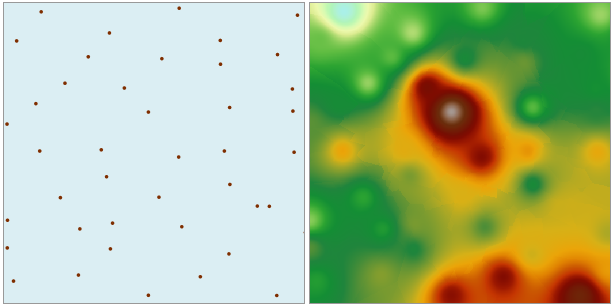
Parameter description
| Parameter Name | Default Value | parameter interpretation | parameter type |
|---|---|---|---|
| source dataset | The point dataset that requires interpolation analysis | DatasetVector | |
| field | The field that stores the numerical value represented by each point (e.g., elevation value, precipitation, etc.), used in the interpolation process. Text fields are not supported. | String | |
| zoom ratio | 1.0 | The zoom ratio of the interpolation field value. Multiply the interpolation field value of the source data by the scale factor before interpolation to scale the interpolation result. For example, when the scale factor is 2, the raster value at the same location after interpolation is approximately twice that when the scale factor is 1. Generally set to 1. | Double |
| target datasource | Sets the datasource where the result dataset is located | Datasource | |
| the name of the resulting dataset | Sets the name of the resulting dataset | String | |
| Resolution | 0.0 | The resolution of the interpolation analysis result, i.e., the ground area size corresponding to a single pixel, with units consistent with the dataset units | Double |
| pixel format | The storage format of the interpolation dataset pixels, including 1-bit unsigned, 16-bit, 32-bit, single, double. Users can choose the appropriate pixel format based on actual needs | PixelFormat | |
| NoData Value | 0.0 | The value of the NoData attribute for the result dataset | Double |
| find method | The method for finding points participating in the interpolation operation, supporting three ways: fixed count, fixed radius, and block search | SearchMode | |
| Expected number of points (Optional) |
0 | The expected number of points to participate in the interpolation operation | Integer |
| Search radius (Optional) |
0.0 | The search radius for finding points participating in the operation | Double |
| Maximum number of search points (Optional) |
0 | The maximum number of points participating in interpolation during block search | Integer |
| Maximum number of points in a block (Optional) |
0 | The maximum number of search points within a single block during block search | Integer |
| Power | 0 | The power is the exponent of the weight distance, controlling the weight of surrounding points during interpolation. It can be a positive integer greater than 0. Generally set to 2 | Integer |
| geographical extent of the resulting dataset (Optional) |
Sets the geographical extent for interpolation analysis | string |
Output Result
| Parameter Name | parameter interpretation | parameter type |
|---|---|---|
| result dataset | The raster dataset obtained from interpolation analysis | DatasetGrid |