Barrier Splines
Feature Description
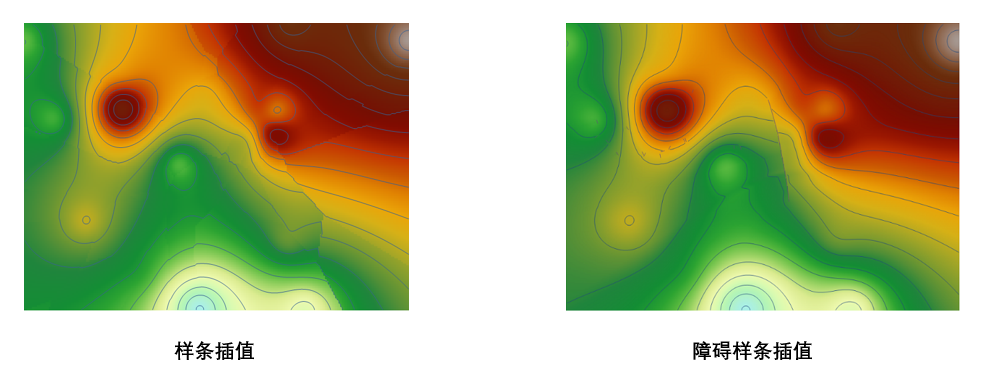
It can interpolate data by bypassing obstacles, ensuring the accuracy of interpolation simulation. Currently, it only supports line datasets. Common types of obstacles include: faults, cliffs, coastlines.
Application Scenarios
1. Extraction of gas concentration contours with obstacle barriers, used for safety monitoring in the coal mine exploration industry.
2. It also has corresponding applications in hydrology (simulating water quality) and meteorology.
Parameter description
| Parameter Name | Default Value | parameter interpretation | parameter type |
|---|---|---|---|
| source dataset | The point dataset that requires interpolation analysis. | DatasetVector | |
| obstacle dataset | Obstacle dataset, currently only line datasets are supported. | DatasetVector | |
| field | The field that stores the numerical value represented by each point (e.g., elevation value, precipitation amount), used in the interpolation process. Text fields are not supported. | String | |
| zoom ratio | 1.0 | Zoom ratio of the interpolation field value. Multiply the interpolation field value of the source data by the scale factor before interpolation to scale the interpolation results. For example, if the scale factor is 2, the raster value at the same location after interpolation is approximately twice that when the scale factor is 1. It is generally set to 1. | Double |
| target datasource | The specified datasource where the result dataset is stored. | Datasource | |
| pixel format | pixel format | PixelFormat | |
| No Value | 0 | No value | Double |
| expected number of points (Optional) |
0 | The expected number of points to participate in the interpolation operation. | Int |
| Resolution | 0 | The resolution of the interpolation analysis result, i.e., the ground area size corresponding to a single pixel, with units consistent with the dataset units. | Double |
| smoothness | 0.100000001490116 | Smoothness, with a value range of [0,1]. | Double |
| tension: | 0 | tension: | Double |
| geographical extent of the resulting dataset (Optional) |
Set the interpolation analysis range. | string |
Output Result
| Parameter Name | parameter interpretation | parameter type |
|---|---|---|
| result dataset | The specified resulting dataset name. | String |
As shown in the figure below, the left image shows interpolation without an obstacle dataset, and the right image shows interpolation with an obstacle dataset.