



File Iterator
Feature Description
Using the File Iterator tool, it can batch process data files, thereby saving time required for repetitive operations and improving processing efficiency.
Usage Scenarios
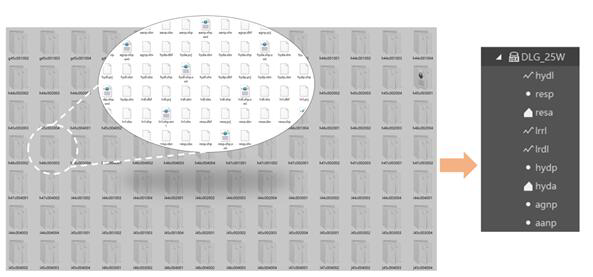
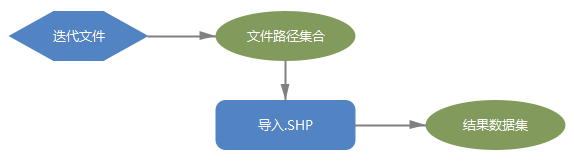
There is a batch of DLG data. The source data is divided into 50 sheet folders, each containing 9 types of feature SHP files. To import these 450 SHP files categorically into the same data source for management, conventional manual classification requires hundreds of repetitive import operations. However, by building a model, adding an iteration tool, selecting folder recursion, and adding an Import SHP tool, running the model can traverse all sheet folders, achieve batch import of files, and greatly improve work efficiency.
Parameter Description
| Parameter Name | Default Value | Parameter Interpretation | Parameter Type |
|---|---|---|---|
| File directory path to be iterated | The collection of directory paths where the files to be iterated are located | String | |
| Recursion (Optional) | false | Whether to recursively traverse subfolders under the iterated folder; default is not to select recursion | Boolean |
| Wildcard (Optional) | * represents any character, ? represents any single character. Wildcards can be used to restrict input names; if no wildcard is used, all inputs are returned | String | |
| Ignore Case (Optional) | true | Whether to ignore case during wildcard matching; default is to ignore case | Boolean |
Change Description
| Parameter Name | Parameter ID | Change Description |
|---|---|---|
| File directory path to be iterated | inputPaths | Change the parameter type to "String". |