



Publish Multi-Service
Feature Description
The Multi-Service Publishing tool enables publishing various service types (map services, data services, etc.) based on workspace configurations.
Parameter Description
| Parameter | Default Value | Description | Type |
|---|---|---|---|
| Workspace File | Full path of the workspace file to be published. Only supports local file-based workspaces. | String | |
| Workspace Password | If the workspace file to be published is password-protected, you must specify the correct password; otherwise, the publication will fail. | String | |
| iServer Address | SuperMap iServer address in format: http://{server:port} | String | |
| User Token | Authorization token required for service publishing on SuperMap iServer. Requires a valid token.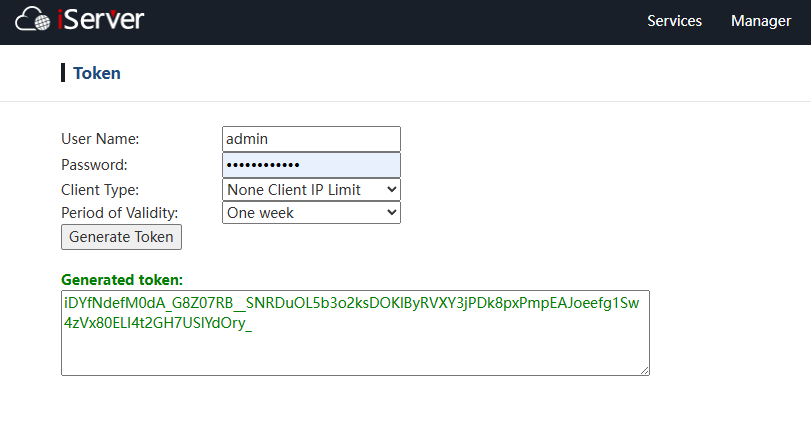 |
String | |
| Server Type | Service types available for workspace-based publishing including: Map Service, Data Service, 3D Service, Spatial Analysis Service, Vector Tile Service, etc. See service list below: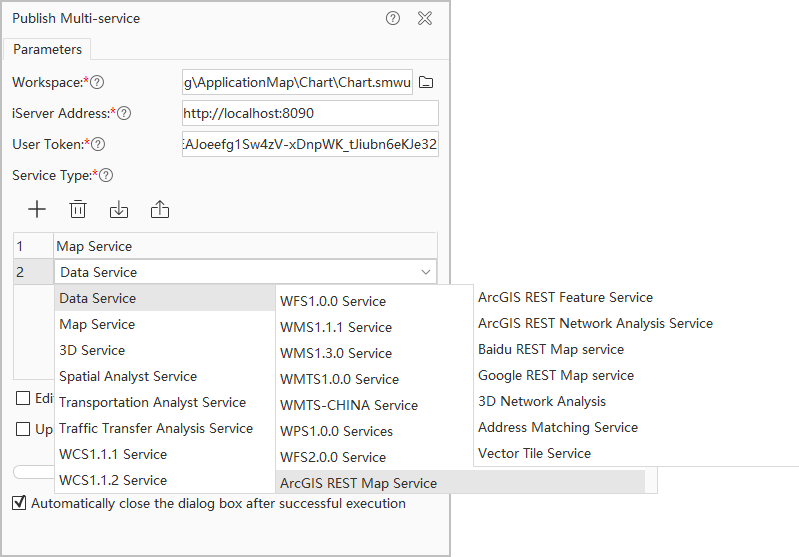 Note: Address Matching Service, Transportation Network Analysis Service, and Transportation Transfer Analysis Service are currently not supported. |
String | |
| Service Name | Optional parameter for customizing the service name. If not set, the workspace name will be used by default. The service name can only contain letters, digits, hyphens (-), and underscores (_). When two or more service types are specified in the "Service Type" parameter, this parameter becomes invalid, and each service will use the workspace name as its service name by default. |
String | |
| Editable | Check this option to enable post-publishing editing capabilities. | Boolean | |
| Upload Workspace | Check this option, then ensure the workspace file to be published and all its referenced data files (typically including UDBX file-based data sources, image files opened by the workspace in read-only mode, etc.) are stored in the same standalone directory. During publishing, the program will package this directory into a compressed archive, upload it to the target iServer server's local directory (typically located under its installation directory), and automatically decompress it. Subsequent publishing steps will proceed based on the decompressed files. Normally, you need to check this parameter when the computer running the Multi-Service Publishing Tool is not on the same machine as the target iServer server, to ensure the server can access all data files required by the workspace. Additionally, if the workspace references a database-type data source, ensure the target iServer server can access the corresponding database server. When "Upload Workspace" is checked, note the following: 1. Ensure the workspace file name contains no Chinese characters, and verify that the workspace file and all its referenced file-based data sources (e.g., UDBX files) are not opened or occupied by any other program. Otherwise, the entire service publishing process will fail directly. 2. If the workspace references a large volume of data, the packaging, uploading, and decompression processes will significantly increase the total time required for the publishing operation. 3. Ensure the target iServer server has sufficient local disk space to store the uploaded compressed package and all decompressed files. |
Boolean |
Output
The tool outputs a JSON-formatted string containing service access URLs of published services.