



Instructions for use
In the absence of a model, the Generate Training Data tool can be used to generate training data required for model training based on original remote sensing image data and vector annotation data. Due to the large volume of remote sensing image data and the high memory requirements of convolutional neural networks, the Generate Training Data tool is needed to synchronously split the image data and label data into small images and labels, generating data suitable for neural network model training.
If the training data is used for "super-resolution reconstruction", only low-resolution sample images need to be input, and no sample tags are required.
Parameter description
-
Training Data Purpose: Depending on the purpose, it supports selecting binary classification, classification of ground objects, target detection, object extraction, scene classification, universal change detection, and super-resolution reconstruction.
-
File type:
-
When the training data purpose is binary classification, classification of ground objects, target detection, object extraction, scene classification, or super-resolution reconstruction, the file type can be either dataset or folder.
-
If dataset is selected, the sample image supports inputting file-based image data (e.g., *.tif, *.img, etc.), image dataset, and mosaic dataset.
-
If folder is selected, the image folder path needs to be input.
-
-
When the training data purpose is universal change detection, the file type can be either dataset or image list.
-
If dataset is selected, the sample image and compare image support inputting file-based image data (e.g., *.tif, *.img, etc.) and image dataset.
-
If image list path is selected, it supports txt and csv formats. Each row in the list corresponds to an image file path, and each row in the sample image list corresponds one-to-one with that in the compare image list.
-
-
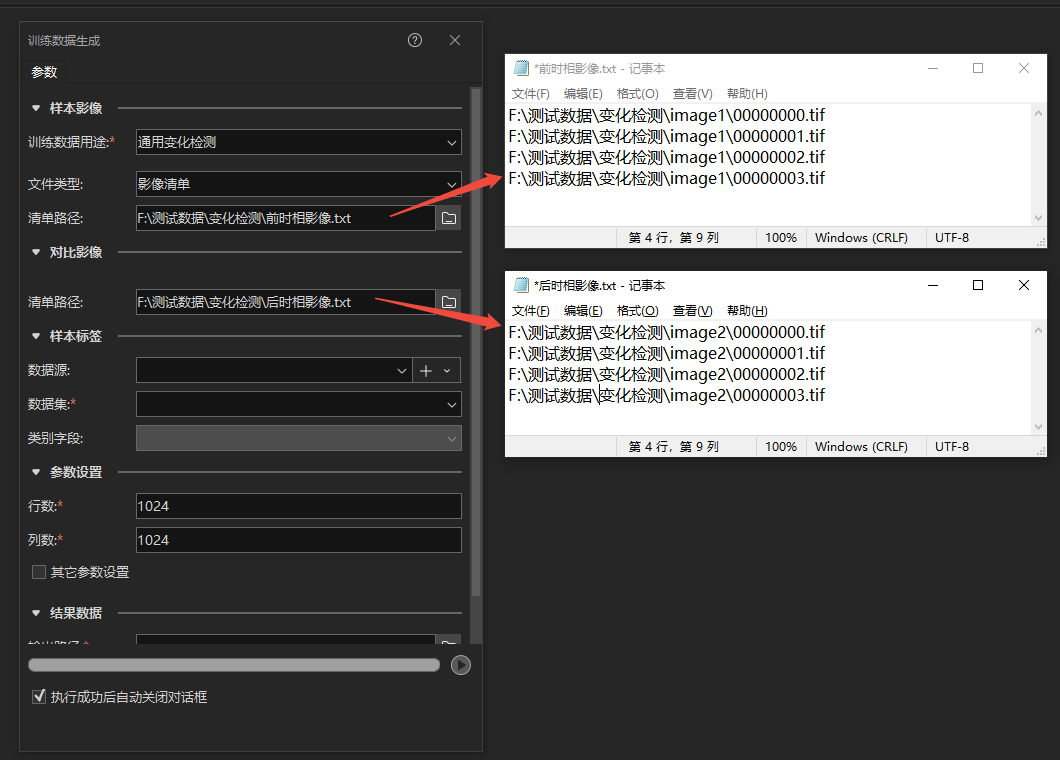
 Notes:
-
Only supports 8-bit unsigned format images.
-
For super-resolution reconstruction, only three-band images are supported as input.
-
Binary classification, classification of ground objects, target detection, object extraction, scene classification, and universal change detection support three-band and multi-band images (images with four or more bands).
-
Target detection supports single-band and three-band SAR image data.
-
The coordinate system and resolution of the pair of sample image and compare image input for universal change detection must be consistent.
-
The image name and the path where the image is located must not contain the "," character.
-
Sample tag data source/dataset: The vector label for training data, supporting vector polygon data under UDBX data sources. This parameter is hidden when the training data purpose is super-resolution reconstruction.
Notes:
-
The coordinate system of the sample label dataset must be consistent with that of the sample image.
-
The data source/dataset name and its path must not contain the "," character.
-
Category Field: Depending on the purpose:
-
For target detection, if there are multiple classes of targets, select the corresponding category field in the sample vector attribute table; for a single class of targets, leave this parameter empty.
-
For binary classification, this parameter cannot be filled.
-
For classification of ground objects, select the corresponding category field in the sample vector attribute table.
-
For scene classification, select the corresponding category field in the sample vector attribute table.
-
For object extraction, if there are multiple classes of objects, select the corresponding category field in the sample vector attribute table; for a single class of objects, leave this parameter empty.
-
For universal change detection, this parameter cannot be filled.
-
For super-resolution reconstruction, this parameter is hidden.
-
-
Number of Rows/Columns: Set the number of rows and columns for splitting, in units of pixels, with a default value of 1024px. During model training, the larger the size of the input training data for the same network structure, the more memory/GPU memory it occupies; the training effect for the same-sized features on training data of different sizes also varies. Therefore, by changing this parameter, the image data can be split into training data of different sizes to meet the requirements of different situations for training data. Based on the characteristics of currently supported deep learning network structures, the number of rows and columns for the picture size should be the same.
-
Other Parameters: To meet diverse user needs, check Other Parameters to customize the following parameters:
-
Image Format: The image format of the training data, supporting TIFF, JPEG, and PNG formats.
-
Vertical/Offset X: Sometimes, to expand the training data and ensure that each label can fully participate in training without being split, the images need to be split with overlap. This value is the offset size in different directions during overlapping splitting. It is recommended to set it to half of the number of sample rows and columns, for example, Vertical/Offset X can be set to 256. When the sample data volume is sufficiently large, this value is recommended to be set to 0, meaning no overlapping splitting.
-
Index Starting Value: The system will sequentially encode the split-generated images with natural numbers, starting from 00000000 by default. If users need special replacement, they can set the starting value themselves. The default value is -1, indicating that if there is already generated training data in the selected export directory and data name folder, new generated training data will be appended by default. If this value is not -1, data will be generated starting from the set starting value in this folder, and existing data with the same serial number will be overwritten.
-
Save Unlabeled Data: When checked, unlabeled slices can be saved to supplement negative samples or balance positive and negative samples.
-
Super-Resolution Factor: Only visible when the training data purpose is "super-resolution reconstruction". Can be filled with 2 or 4 to train a 2x super-resolution model or a 4x super-resolution model.
-
-
Export Directory: Specify the save path for the training data. Note that the path must not contain the "," character.
-
Data Name: Specify the folder name for saving the training data. The name must not contain the "," character. If there is already generated training data in the selected export directory and data name folder, and the index starting value is -1, new generated training data will be appended to it.
Related Topics