



During the acquisition of remote sensing imagery, factors such as sensor characteristics and atmospheric conditions often result in a non-ideal dynamic range distribution of brightness in the source data. Direct display may exhibit insufficient contrast and details that are difficult to discern. The main purpose of stretching image data is to improve its display effects and quality, thereby enhancing the clarity of the imagery. This process helps to highlight key information suitable for human or machine analysis while suppressing irrelevant information, increasing the utility value of the image data.
In essence, image stretching makes ground features in the imagery clearer and more distinguishable by adjusting brightness and contrast.
Currently, the image stretching methods provided by SuperMap iDesktopX include Minimum Maximum, Percent Clip, Gaussian, Histogram Equalization, Logarithmic Stretch, and Gamma Stretch. You can select an appropriate stretch method based on specific image characteristics and requirements to optimize the display effects of the imagery and enhance its value for imagery analysis.
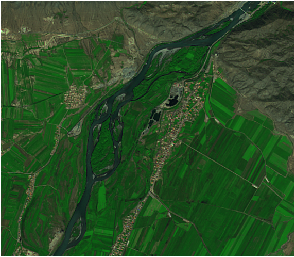
Minimum Maximum
By linearly mapping the pixel values of the image from their original range to a specified new range, distributing the pixel values within this new range.
This stretching process significantly improves the contrast and brightness of the image, making ground features clearer. It is generally suitable for raster images where pixel values are densely distributed.
 |
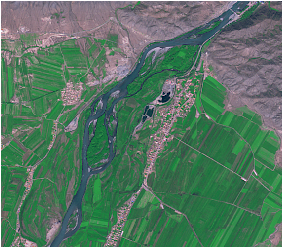 |
| Figure: No Stretching | Figure: Minimum Maximum |
Percent Clip
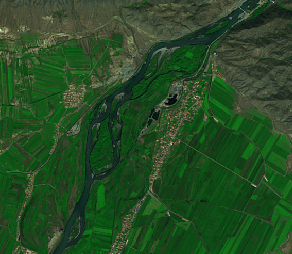
It is assumed that the majority of the image's pixels fall within a certain range. Values exceeding the maximum range are considered to have a pixel value of 255, and values below the minimum range are considered to have a pixel value of 0. Then, a Minimum Maximum stretch is applied to the pixel values within that range. The maximum and minimum values are determined by specifying the maximum and minimum truncation percentages.
For example: For an image with a pixel value range of [0,100], set the maximum and minimum truncation percentages to 90 and 10, respectively. After Percent Clip, the range [0,10] will be displayed as 0, values between [10,90] will be stretched to the [0,255] range for display, and the range [90,100] will be displayed as 255.
 |
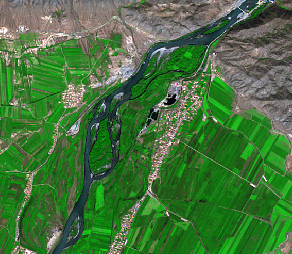 |
| Figure: No Stretching | Figure: Percent Clip |
Gaussian
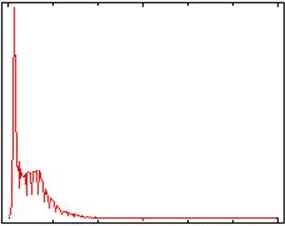
The purpose of Gaussian stretch is to make the pixel values of image data tend towards a normal distribution, which is a type of linear extrusion. By multiplying the pixel values by a Gaussian coefficient, they are then stretched to the [0,255] range for display.
 |
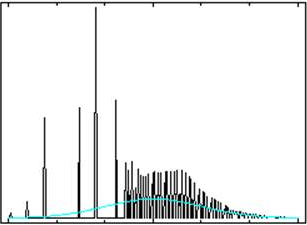 |
| Figure: Histogram Before Stretching | Figure: Histogram After Gaussian Stretch |
Histogram Equalization Stretch
By redistributing the image pixel values, so that the number of cells for each pixel value in the image is roughly equal.
For example: The original pixel values of an image are concentrated in the [50,100] range, with very few cells in the [0,50] and [100,255] ranges. Through Histogram Equalization, the [50,100] range is equally stretched to [0,255], making the number of cells for each pixel value tend to be consistent.
This stretch method is not suitable when the quality of the original image is poor, the data dynamic range is small, or the histogram distribution is extremely uneven.
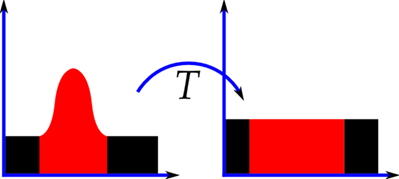 |
| Figure: Schematic of Histograms Before and After Stretching (Image source: Internet) |
|
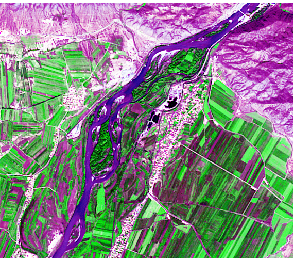 |
| Figure: No Stretching | Figure: Histogram Equalization Stretch |
Logarithmic Stretch
Expands the low-gray scale range of the image while compressing the high-gray scale range. It expands the darker parts of the image and suppresses the brighter parts, emphasizing the low-gray scale areas of the image.
Gamma Stretch
When an image is underexposed or overexposed, Gamma Stretch can adjust the image's contrast. Using nonlinear transformation, it expands the low/high gray scale ranges of the image, thereby correcting darker or brighter images, enhancing image display details, and improving the display quality of image data.
This stretch method requires setting a Gamma Stretch Parameter. The default value is 0.5, with a valid range of (0, +∞).
-
When the Gamma Stretch Parameter equals 1, no Gamma Stretch is applied to the image.
- When the Gamma Stretch Parameter is less than 1, the contrast in the dark areas of the image increases, details become more prominent, but details in the bright areas may be lost, and the overall image becomes brighter.
- When the Gamma Stretch Parameter is greater than 1, the contrast in the bright areas of the image increases, details become more prominent, but details in the dark areas may be lost, and the overall image becomes darker.
Adaptive Stretch
Adaptive Stretch (full name: Contrast Limited Adaptive Histogram Equalization) is a variant of adaptive histogram equalization. This method divides the image into multiple sub-regions, calculates the histogram for each region separately, and redistributes the brightness values of the image accordingly. This enables it to effectively enhance local contrast and improve edge sharpness within each region of the image.
However, traditional adaptive histogram equalization may excessively amplify contrast in relatively uniform areas of the image (where the histogram is highly concentrated), causing significant noise amplification in those areas. Adaptive Stretch effectively reduces this noise amplification problem by limiting the degree of contrast enhancement.
This method is suitable for enhancing the local contrast of imagery and currently supports processing images with 8-bit unsigned and 16-bit unsigned data types.
Regarding the handling of no-data regions:
- Specified No-Data Regions (typically 0 or 255): User-specified no-data regions will be identified and excluded. The pixel values in these regions retain their original values during calculation and are therefore not affected by the enhancement process in display.
- Other Regions: Pixel values in areas of the image not specified as no-data will participate in the Adaptive Stretch calculation. The processed pixel values may change. If the resulting value falls within the specified no-data range (e.g., 0 or 255), it may be mistakenly identified as a no-data region during display, causing visual anomalies.
When using Adaptive Stretch, the following parameter information needs to be set:
- Crop Threshold: By limiting the maximum number of pixels corresponding to a single pixel value in the histogram, it indirectly constrains the magnitude of local contrast enhancement. This effectively prevents significant noise amplification or artificial artifacts caused by over-enhancement in noisy areas or areas with concentrated grayscale distributions (such as flat areas).
- Number of Tile Rows/Columns: Specifies the number of tiles into which the image is divided, i.e., Total Number of Tiles = Rows × Columns.
- Large Number of Tile Rows/Columns: Smaller sub-region area, making the enhancement algorithm more sensitive to local image details, resulting in finer and more significant local contrast improvement. However, differences in processing results between adjacent sub-regions may cause blocky boundary artifacts.
- Small Number of Tile Rows/Columns: Larger sub-region area, leading to smoother and more uniform enhancement effects spatially, reducing the risk of block effects. However, the enhancement effect on small-scale details and textures in the image weakens, potentially failing to sufficiently improve local contrast.