



Instructions for Use
Similar to the target detection task in computer vision, target detection for remote sensing imagery involves using deep learning algorithms to automatically determine and identify the category and location of one or more targets within the imagery. The results are marked and output in the form of vector bounding boxes, facilitating the identification of target type and location. The target detection function features fast detection speed and relatively high accuracy, and is commonly used to quickly determine the quantity and location of different categories of targets within imagery, among other geographic information.
Parameter Description
-
Source Dataset:Select the imagery requiring target detection. Supports both dataset and folder types.
-
-
If the file type is set to Dataset, it supports input of file-based image data (e.g., *.tif, *.img, etc.), image datasets, and mosaic datasets.
-
If the file type is set to Folder, you need to input the image folder path.
-
 Notes:
- Only supports 8-bit unsigned format imagery.
- Supports three-band and multi-band imagery (imagery containing 4 or more bands), and the band order of the imagery must be consistent with the sample images used during model training.
- Target detection supports single-band and three-band SAR image data.
-
Model File:Select Model File (*.sdm).
- Probability Threshold:For each detected object, the system calculates a probability indicating how well it matches the target features. The detection result only saves objects with a score above this value. The default is 0.5.
- Deduplicate Threshold:The system generates multiple candidate bounding boxes for detected objects within a single image and assigns probability scores to each. The optimal box is determined after applying the Non-Maximum Suppression (NMS) algorithm. Candidate boxes with an Intersection over Union (IoU) overlap with the optimal box greater than the deduplicate threshold are removed. The deduplicate threshold is generally between 0.3 and 0.7, with a default of 0.3.
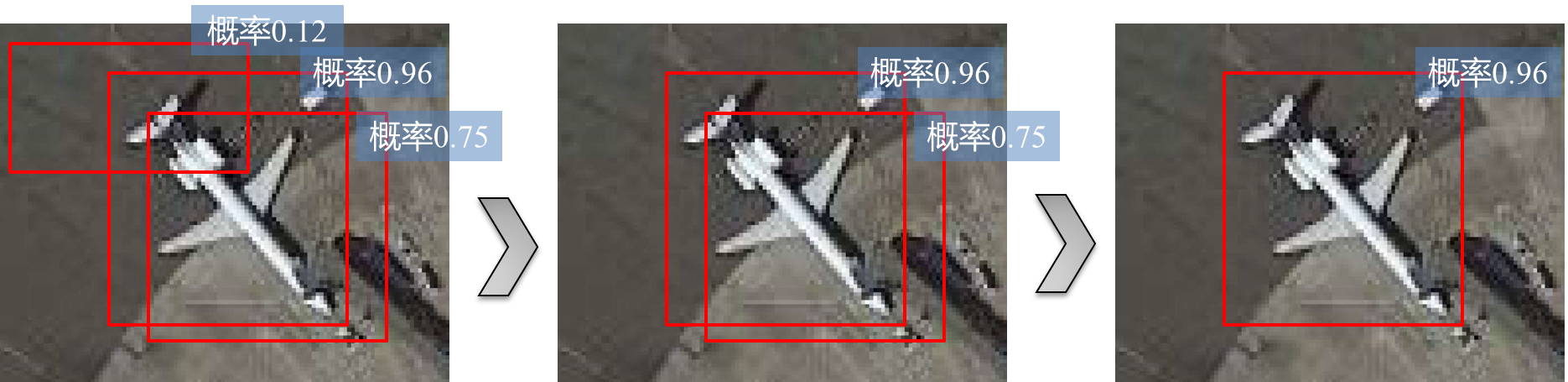
Illustration of Probability Threshold and Deduplicate Threshold Parameters
- Batch Size:Due to the large volume of remote sensing image data, and limitations of computer performance, the model cannot load all data at once. Therefore, a tiled reading and processing method is used during inference. The batch size refers to the number of image tiles processed simultaneously. Appropriately increasing the batch size can improve interpretation efficiency, but it is limited by the memory of the inference device (GPU memory for GPU inference or RAM for CPU inference).
- Processor Type:You can use the computer's Central Processing Unit (CPU) or Graphics Processing Unit (GPU) to process the data.
- GPU ID:Specify the GPU ID for data processing. Default is 0. If "Processor Type" is set to CPU, this value is fixed at -1. If using GPU, you need to query the GPU ID via the "nvidia-smi" command in the system command line. The GPU ID should be based on the query results. If multiple GPUs are available, you can specify the GPU identification numbers for processing data. To use multiple GPUs, separate the IDs with English commas ",", e.g., "0,2,3", indicating the use of GPUs with IDs 0, 2, and 3.
- Other Parameters:Check "Other Parameters" to input a region dataset with the same coordinate system as the source data, used to limit the inference area.
-
Result Data:This refers to the result vector dataset for target detection. Set the data source and name for saving the result dataset. For batch inference, the original image name will be appended to the vector dataset name using an underscore "_" to distinguish object extraction results from multiple images.
Related Topics