Feature Description
The Create Vector Pyramid tool can create vector pyramids for SuperMap vector datasets.
Problems Solved by Vector Pyramid:
Vector pyramid can significantly improve the display efficiency of massive vector data at small scales, achieving second-level response for map browsing. For example: After creating a vector pyramid for ten-million-level earth polygon data, the full view performance is improved by 10 times, and only about 140,000 simplified objects are drawn at full view, with correct display effects.
When creating a vector pyramid for a vector dataset, the original vector dataset is the most detailed original level. Based on the original level data, the program generates a series of sub-datasets with different degrees of data simplification as data corresponding to different pyramid levels according to certain rules and algorithms. The smaller the pyramid level, the higher the degree of data simplification. When displaying a dataset with a vector pyramid, the map shows data from the appropriate pyramid level based on the display scale. The smaller the display scale, the higher the simplified pyramid level will be displayed, greatly improving map display efficiency.
The simplification of vector data by vector pyramid is based on specific algorithms. The basic idea is that when displaying vector data, as the scale shrinks, many small objects become almost invisible to the naked eye, and details such as bends or directions of lines (line objects or polygon boundaries) become blurred. Simplification involves removing almost invisible objects and using simple lines to fit complex lines, no longer drawing complex details of lines. This ensures the correctness of vector data display effects at small scales while greatly improving map display efficiency.
Explanation about data for creating vector pyramid and pyramid levels:
Currently, data supported for creating vector pyramids includes: point, line, and polygon vector datasets in UDBX, PostGIS, Yukon, and XUGU DB data sources.
Creating vector pyramids consumes many resources (time, memory, and CPU computing resources). In practical applications, whether it is necessary to create a vector pyramid for vector data depends on the data volume and the expected goals for map display efficiency. Generally, for vector data with a volume reaching millions, a vector pyramid is needed to achieve a smooth map browsing experience at small scales.
The larger the vector pyramid level, the lower the degree of data simplification, and the more time it takes to generate the pyramid. Setting the minimum and maximum levels of the vector pyramid requires a preliminary understanding of the time consumption for map display of the original vector dataset at different scales, and deciding whether to create corresponding pyramid levels as needed (see below: pyramid levels and scale comparison table). According to testing experience, for larger scales (such as scales larger than pyramid level 12), the browsing efficiency of the original vector data can basically meet the requirements for smoothness. Creating vector pyramids above level 12 does not significantly improve display efficiency and consumes a lot of resources.
According to testing experience, for larger scales (such as scales larger than pyramid level 12), the browsing efficiency of the original vector data can basically meet the requirements for smoothness. If the map display efficiency is obviously low, you can troubleshoot from the following aspects:
- The original vector dataset has not created a spatial index and needs to rebuild the spatial index.
- For PostGIS vector datasets, you can enable "simplify view" (located in the "Vector" page of the dataset attribute panel) to improve display efficiency.
Table 1 shows the comparison table between pyramid levels and scales, and also includes the display resolution for the corresponding levels, called level resolution. The data simplification algorithm for vector pyramid will simplify the data based on the specified resolution. The resolution used by the data simplification algorithm = level resolution * resolution factor. That is, the "resolution factor" can adjust the degree of data simplification for the corresponding level.
The larger the resolution value used by the data simplification algorithm, the higher the degree of data simplification, the higher the efficiency of pyramid generation and display, but the higher the data distortion. Therefore, the "resolution factor" must balance display accuracy and efficiency.
Table 1: Under different coordinate systems, the scale and level resolution corresponding to vector pyramid levels
| Level | Scale | Resolution (degrees) (Coordinate System: EPSG 4326) | Resolution (meters) (Coordinate System: EPSG 3857) |
|---|---|---|---|
| 0 | 1:295,829,355.455 | 0.703125000000 | 78271.516964020500 |
| 1 | 1:147,914,677.727 | 0.351562500000 | 39135.758482010200 |
| 2 | 1:73,957,338.864 | 0.175781250000 | 19567.879241005100 |
| 3 | 1:36,978,669.432 | 0.087890625000 | 9783.939620502560 |
| 4 | 1:18,489,334.716 | 0.043945312500 | 4891.969810251280 |
| 5 | 1:9,244,667.358 | 0.021972656250 | 2445.984905125640 |
| 6 | 1:4,622,333.679 | 0.010986328125 | 1222.992452562820 |
| 7 | 1:2,311,166.839 | 0.005493164063 | 611.496226281410 |
| 8 | 1:1,155,583.42 | 0.002746582031 | 305.748113140705 |
| 9 | 1:577,791.71 | 0.001373291016 | 152.874056570353 |
| 10 | 1:288,895.855 | 0.000686645508 | 76.437028285176 |
| 11 | 1:144,447.927 | 0.000343322754 | 38.218514142588 |
| 12 | 1:72,223.964 | 0.000171661377 | 19.109257071294 |
| 13 | 1:36,111.982 | 0.000085830688 | 9.554628535647 |
| 14 | 1:18,055.991 | 0.000042915344 | 4.777314267824 |
| 15 | 1:9,027.995 | 0.000021457672 | 2.388657133912 |
| 16 | 1:4,513.998 | 0.000010728836 | 1.194328566956 |
| 17 | 1:2,256.999 | 0.000005364418 | 0.597164283478 |
| 18 | 1:1,128.499 | 0.000002682209 | 0.298582141739 |
| 19 | 1:564.2495 | 0.000001341105 | 0.149291070869 |
| 20 | 1:282.12475 | 0.000000670552 | 0.074645535435 |
| 21 | 1:141.062375 | 0.000000335276 | 0.037322767717 |
| 22 | 1:70.5311875 | 0.000000167638 | 0.018661383859 |
Parameter description
| Parameter Name | Parameter Interpretation | Parameter Type |
|---|---|---|
| Source Datasource | The datasource where the source dataset is located. | Datasource |
| Source Dataset | The vector dataset to create a vector pyramid for. Currently supports point, line, and region datasets in UDBX, PostGIS, Yukon, and XUGU DB data sources. | DatasetVector |
| Minimum Level | The minimum pyramid level, default is 0. | Integer |
| Maximum Level | The maximum pyramid level, default is 11. The larger the pyramid level, the lower the degree of data simplification, and the more time it takes to generate. Set the maximum level reasonably by referring to the "Feature Description". | Integer |
| Step | The interval between pyramid levels, default is 1, indicating that the generated pyramid levels are consecutive. If greater than 1, pyramid levels will be generated skipping levels. For example: minimum level 5, maximum level 9, step 2, will only generate pyramid levels 5, 7, and 9. The step range can be {1,2,3,4}. | Integer |
| Resolution Factor | The data simplification algorithm for vector pyramid will simplify the data based on the specified resolution. The resolution used by the data simplification algorithm = level resolution * resolution factor. That is, the "resolution factor" can adjust the degree of data simplification for the corresponding level. The larger the resolution factor, the larger the resolution value used by the data simplification algorithm, the higher the degree of data simplification, the higher the efficiency of pyramid generation and display, but the higher the data distortion. Therefore, the "resolution factor" must balance display accuracy and efficiency. Default value is 0.75, and the fillable range is ≥0.5. | Double |
| Creation Method | The data simplification algorithm, including: topological method and grid method. Compared to the grid method, the topological method has a higher degree of data simplification, requires more memory resources to create vector pyramids, takes more time to create, and results in higher display efficiency for the vector pyramid. The grid method has a lower degree of data simplification, so creating vector pyramids is more efficient, but the display efficiency of the resulting vector pyramid is not as good as that of the topological method. Choose an appropriate creation method based on actual data conditions, machine configuration, and expected generation efficiency and display performance of the vector pyramid. Default is the topological method. | String |
| Detach Storage | Whether the source dataset and vector pyramid data are stored in the same schema. Checked indicates detach storage, where the pyramid is stored under the schema named sdx; unchecked indicates the pyramid is stored under the source dataset's schema. | Boolean |
| Rebuild Pyramids | Whether to rebuild the vector pyramid. When the source dataset already has a vector pyramid, checked indicates deleting the existing pyramid and rebuilding; unchecked indicates retaining the existing pyramid without rebuilding. | Boolean |
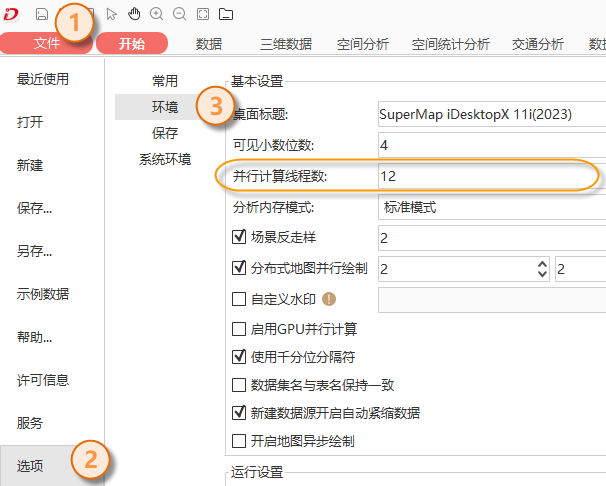
The Create Vector Pyramid operation supports multi-threaded execution. In iDesktopX, go to the "File" menu, select "Options" and then "Environment". The "Parallel Computing Thread Count" can specify the number of threads used to create vector pyramids, as shown in the figure below.

Output Result
The result dataset of the Create Vector Pyramid tool is the input SuperMap vector dataset to be created with a vector pyramid.
Cartography
Vector data with vector pyramid supports thematic mapping, greatly improving the production efficiency and browsing efficiency of massive data maps.
Thematic mapping or layer filtering display requires using fields from the vector dataset. By default, the vector pyramid layer dataset only retains the smid and smgeometry fields of the original vector dataset. When displaying thematic maps, when showing pyramid levels, the data at that level needs to obtain selected fields from the original vector dataset through associations to complete thematic map display. Testing shows this process is very time-consuming. Therefore, SuperMap provides the "Copy Field to Vector Pyramid" tool, which can append fields used by thematic maps or other layers to the vector pyramid layer dataset, eliminating the need to obtain selected fields from the original vector dataset and further improving the map display efficiency of vector pyramid layers.
Copy Field to Vector Pyramid Tool Parameters:
| Parameter Name | Default Value | Parameter Interpretation | Parameter Type |
|---|---|---|---|
| Dataset | A SuperMap vector dataset with a vector pyramid. You can use the "Open the Dataset" tool to open the dataset and use the output result of the "Open the Dataset" tool as input for this parameter. | DatasetVector | |
| Field Name to Be Copied | Fields to be appended to the vector pyramid layer dataset, supporting specification of multiple fields. | String |
Compatibility Notes
Creating a vector pyramid for a vector dataset essentially generates a series of sub-datasets with different degrees of data simplification. These datasets, as pyramid layer data, are relations of the original dataset. Therefore, in SuperMap iDesktopX (version 11.1.0), when opening a dataset with a vector pyramid, only the original vector dataset is visible; its associated pyramid layer datasets are not visible. However, in database management tools, the tables of pyramid layer datasets can be seen, as shown in the figure below.

SuperMap GIS 11.1.0 and above versions support vector pyramid capabilities. Using SuperMap iDesktopX versions below 11.1.0 to open a dataset with a vector pyramid will register the pyramid layer dataset tables as ordinary datasets in the datasource. When opened again with SuperMap iDesktopX 11.1.0 or above, these ordinary datasets still exist but will not affect the application of the vector pyramid. You can also cancel the registration of pyramid layer datasets as ordinary datasets through the following operations.

Cancel Registration of Pyramid Layer Datasets as Ordinary Datasets
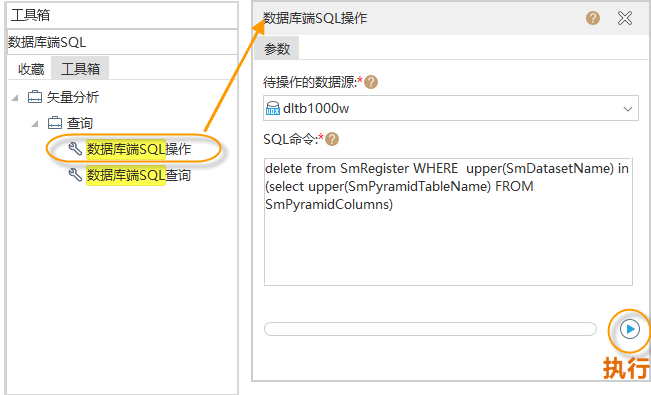
Search for the "Database-side SQL Operation" tool in the toolbox, as shown in the figure below, open the tool, and set parameters:
"Datasource to Be Operated On": The datasource where the dataset with a vector pyramid is located, supporting UDBX, PostGIS, Yukon, and XUGU DB data sources.
"SQL Command": Enter the following statement:
delete from SmRegister WHERE upper(SmDatasetName) in (select upper(SmPyramidTableName) FROM SmPyramidColumns)
- After completing the parameters, execute to cancel the registration of pyramid layer datasets as ordinary datasets. The pyramid layer datasets will not be displayed in the iDesktopX workspace manager.