create a strip map tiling page
Feature Description
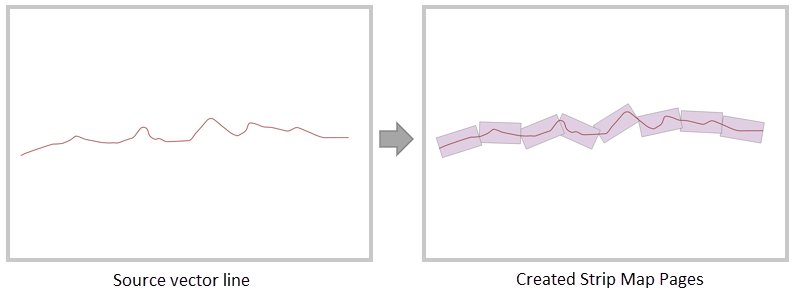
Creating a strip map tiling page refers to generating a series of continuous bounding rectangles with specific lengths and widths along given linear features. These rectangles can be defined as tiling pages for strip maps based on linear features, commonly used in linear engineering projects such as road networks, power grids, oil pipelines, and river lines.
Note: The orientation of the generated tiling pages is consistent with the node direction of the source vector line data.
Parameter description
| Parameter Name | Default Value | parameter interpretation | parameter type |
|---|---|---|---|
| source dataset | The source vector dataset to be calculated, which must be a line dataset. | DatasetVector | |
| obstacle dataset(optional) | Obstacle dataset, i.e., design breakpoints in the map sheet (e.g., administrative boundaries). The generated rectangles will be truncated when encountering obstacles and then recalculated. Supported types include point, line, and region datasets, and the coordinates should be consistent with the source dataset. | DatasetVector | |
| target datasource | The specified datasource where the result dataset is stored. | Datasource | |
| the name of the resulting dataset | The specified name of the result region dataset. | String | |
| the length of the rectangular page | 0.0 | The length of the rectangular page along the line, which must be greater than or equal to 0. The unit is consistent with the source dataset's unit. When the source dataset is in a planar (projected) coordinate system, the default unit is meters; when in a geographic (latitude/longitude) coordinate system, the default unit is degrees. When this value is 0, an internal default value is given based on the coordinate system: 1500 meters for projected coordinates, and 0.015 degrees for GCS. | double |
| the width of the rectangular page | 0.0 | The width of the rectangular page perpendicular to the line, which must be greater than or equal to 0. The unit is consistent with the source dataset's unit. When the source dataset is in a planar (projected) coordinate system, the default unit is meters; when in a geographic (latitude/longitude) coordinate system, the default unit is degrees. When this value is 0, an internal default value is given based on the coordinate system: 1000 meters for projected coordinates, and 0.01 degrees for GCS. | double |
| starting point distance | 0.0 | The distance from the starting tiling page to the start point of the line dataset, with a default value of 0. The unit is consistent with the dataset's unit. | double |
| overlap distance | 0.0 | The overlap distance between two adjacent tiling pages, with a default value of 0, consistent with the dataset's unit. Note that the overlap distance must be less than half of the rectangular page length. | double |
Output Result
| Parameter Name | parameter interpretation | parameter type |
|---|---|---|
| result dataset | result region dataset | DatasetVector |
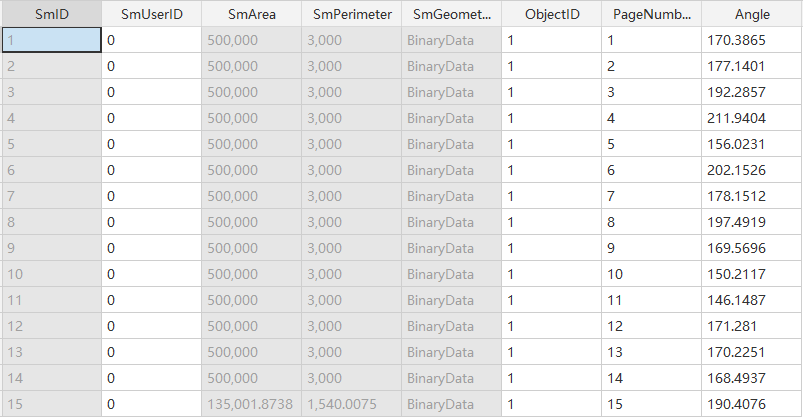
Newly generated fields in the result table:
- “ObjectID”: Represents the SmID of the source dataset.
- “PageNumber”: Indicates the order of the generated result rectangles along the line direction (starting from 1).
- “Angle”: Represents the angle of the result tiling rectangular pages (calculated counterclockwise from the due east direction).