



Resampling
Feature Description
create a new raster dataset, assign the pixel value of the original raster or a calculated value to its pixel.
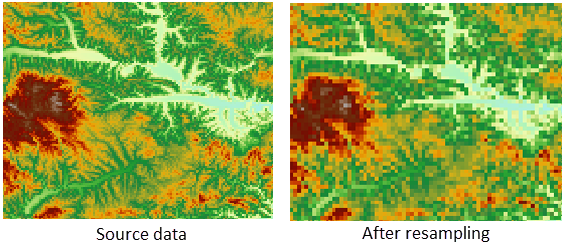
Resampling method description:
- nearest: Assigns the nearest raster value to the new raster. The advantage of this method is that it does not change the original raster values, is simple and fast to process, but it can have a maximum displacement of half a cell size. It is suitable for representing discrete data such as classification or thematic data, like land use, vegetation types, etc.
- bilinear: Calculates the new raster value using a weighted mean of the 4-neighborhood around the interpolation point in the input raster, with weights determined by the distance from each cell center in the 4-neighborhood to the interpolation point. The resample result of this method is smoother than that of nearest, but it changes the original raster values. It is suitable for representing continuous data such as the distribution of phenomena, terrain surfaces, like DEM, temperature, rainfall distribution, slope, etc., as these data are originally continuous surfaces obtained through interpolation of sampling points.
- cubic: More complex, similar to bilinear interpolation, it also changes raster values. The difference is that it uses a 16-neighborhood for weighted calculation, which can give the calculate result some sharpening effects. This method also changes the original raster values, may exceed the value range of the input raster, and requires significant computation. It is suitable for resampling aerial photos and remote sensing imagery.
Parameter description
| Parameter Name | Default Value | Parameter Interpretation | Parameter Type |
|---|---|---|---|
| source raster data | source raster data | Dataset | |
| Result raster size | I.e., the resolution of the output raster dataset, with the same unit as the input imagery | Double | |
| Resampling mode | nearest | There are three methods: nearest, bilinear, and cubic convolution interpolation | ResampleMode |
| Target datasource | The datasource where the output data is located | Datasource | |
| the name of the resulting dataset | the name of the output dataset | String |
Output Result
| Parameter Name | Parameter Interpretation | Parameter Type |
|---|---|---|
| result dataset | result dataset | Dataset |