



Instructions for Use
This tool converts photo files with geolocation information into spatial point data with precise coordinates, establishing a one-to-one correspondence between photos and their spatial locations.
Geotag information within photos is typically automatically recorded by GPS-enabled cameras or mobile phones during capture, including latitude, longitude, altitude, azimuth, etc. The tool automatically reads this information from photos and converts it into usable spatial data and attribute data.
It can be used in data production scenarios to spatialize field survey photos, providing precise spatial references for office-based data modification and effectively supporting the field and office collaboration workflow.
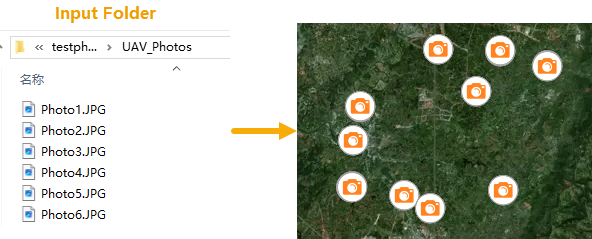
Function Condition Description
- Supported Photo Formats: JPG, JPEG, TIF, PNG.
- Coordinate System: The result dataset uses the GCS_WGS_1984 coordinate system, consistent with the standard for GPS devices.
Supported starting from SuperMap iDesktopX 2026.
Parameter Description
| Parameter Name | Parameter Interpretation | Parameter Type |
|---|---|---|
| Input Folder | Specifies the folder path containing the photo files. The tool recursively scans this folder and all its subfolders for photo files, automatically identifying and processing all photos in supported formats. | String |
| Result Data | Specifies the datasource and name for storing the resulting point dataset. | Datasource |
| Invalid Photos Table |
Controls whether to create a separate attribute table for photos with invalid coordinates.
|
String |
| Add Photos as Attachments |
Specifies whether to associate the original photos as attachments to the result dataset.
|
Boolean |
| Show in Map |
Specifies whether to automatically load the results into the map for visual display.
|
Boolean |
Output Result
| Parameter Name | Parameter Interpretation | Parameter Type |
|---|---|---|
| Result Dataset | The resulting point dataset. The default dataset name is "PhotosToPoints". | DatasetVector |