SuperMap iDesktopX Licensing

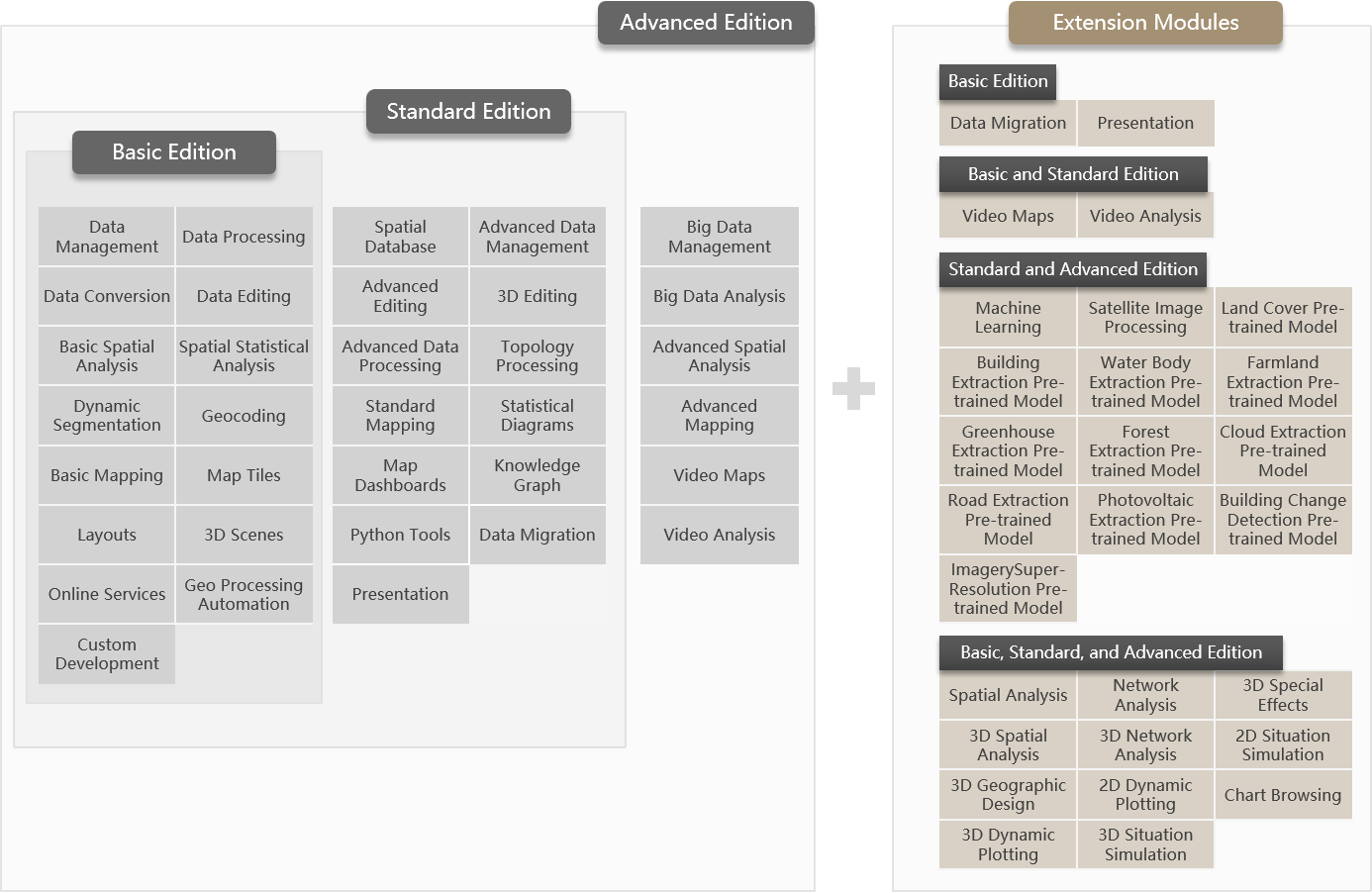
In order to meet the different needs of users, SuperMap iDesktopX provides three versions: Basic, Standard and Advanced. From the Basic Version to the Advanced Version, the product capabilities are enhanced in turn, and the latter version includes the functions of the former version. Meanwhile, extension modules are available for you to choose according to your needs.

  • Basic Version

    Provides basic data management, editing and processing tools; it provides the functions of data migration, statistical diagrams; supports integrated two and three dimensional display and interactive map production; supports two and three dimensional tile production and service release; supports basic spatial analysis and comprehensive spatial statistical analysis.

  • Standard Version

    On the basis of the Basic Version, the Standard Version enhances the functions of data management, editing, processing, map mapping, etc.; it provides the functions of 2D-3D integrated editing, topology processing, knowledge graph and map dashboards.

  • Advanced Version

    Based on the Standard Version, it provides comprehensive spatial analysis functions, as well as machine learning and big data management and analysis capabilities.

  • Extension Modules

    In the Basic, Standard, and Advanced Version, extended modules can be flexibly selected to enhance version capabilities and meet the diverse needs and budgets of users. Specifically:

    • The Standard Version already includes built-in Presentation module. This extension module does not need to be purchased separately after purchasing either the Standard or Advanced Version.

    • The Advanced Version includes built-in Spatial Analysis and Machine Learning modules, so users of the Advanced Version do not need to purchase these two modules separately.

    • The Satellite Imagery Processing, 3D Geological Modeling and 3D Flood Simulation Modules are only available as an optional module in the Standard Version and Advanced Version.

    • Pre-trained model extensions, including Land Cover, Building Extraction, Water Body Extraction, Farmland Extraction, Greenhouse Extraction, Forest Extraction, Cloud Extraction, Road Extraction, Photovoltaic Extraction, Building Change Detection, and ImagerySuper-Resolution, require a license for the Machine Learning module.

Supported Function Modules by Versions

Functional Module
Description
Basic Version
Standard Version
Advanced Version
Data Management
  • Supports data management through file-based data sources, file-based workspaces;
Data Processing
  • Provides data coordinate system settings and projection conversion functions, including projection conversion: coordinate point conversion, data set conversion, batch projection conversion, four-parameter conversion;
  • Provides vector data base processing functions, including appending rows/columns, reclassifying, attribute updating, merging datasets, calculating geometric attributes, splitting, calculating number/length/area/concave polygon/external rectangle, updating columns, removing redundant nodes, removing duplicated objects, deleting objects according to filtering conditions, obtaining the range of the dataset, counting the number of objects in the surface, generating neighboring points, and so on;
  • Provides raster data basic processing functions, including raster algebraic operations, data update, resampling, regrading, image synthesis, segmentation, stitching, weighted sum, NDVI, NDWI, synthesized multi-band image, aggregation, raster mosaicing, contour extraction, and raster cropping;
  • Provides data alignment function, support for spatial two and three-dimensional data alignment, correction and transformation of spatial position;
Type Conversion
  • Supports importing vector, raster, model and other data formats, including AutoCAD data, ArcGIS data, image raster data, 3D model data (SKP/DXF/3DS/X/OBJ/FBX/DAE), Lidar data (TXT/LAS/PLY), Google data (KML/KMZ), vector files, GeoJson, SimpleJson, GJB, telecommunication data, Geo3DML geoid model file (XML) and other data types;
  • Supports exporting vector, raster, model and other data formats, including GeoJson files, VCT files, TIFF files, ArcGIS Grid files, telecom raster files, TIN terrain files and other data types;
Data Editing
  • Supports object drawing functions, including drawing point, line, surface, text objects, and also supports enabling object snapping;
  • Supports editing object nodes and modifying the spatial shape of line and surface objects;
  • Provides comprehensive object editing features, including object arithmetic, editing endpoints, object type conversion, moving objects, object manipulation, and routing editing, etc;
  • Supports all editing operations on attribute tables, including modifying attribute structure, calculating geometric attributes, updating columns, statistical analysis, etc;
Basic Mapping
  • Supports the production of a variety of topic maps, including single-valued, segmented, labeled uniform, labeled single-valued, labeled segmented, statistical, hierarchical symbols, aggregated maps, and custom topic maps;
  • Supports drawing legends, accompanying maps, connection diagrams, map grids, and lunar connection diagrams in maps;
  • Provides mobile labeling, label pre-processing, label management, label weight management and other functions;
  • Provides performance diagnostics, conflict detection, terrain homogenization, stereo maps, point matching line orientation, and deformation map mapping tools;
  • Provide map out function, support to output map as image or PDF file;
Layouts
  • Supports for modifying layout page orientation/size/margins, layout properties;
  • Supports drawing points, lines, faces, and text objects in the layout and modifying the style;
  • Supports adding images, tables, statistical icons, grids, scales, legends, compasses, maps, and other objects to the layout;
  • Supports exporting layouts as images or PDF files;
Map Tiles
  • Provides single/multi-tasking way to generate raster tiles or vector tiles, including new cutout task, update tiles, append tiles, tile continuation, restore tiles, and save the tile results to the object storage service;
  • Provides tile checking, boundary checking, tile erasing, tile merging, tile extracting, and tile converting functions;
  • Provides tile publishing, tile browsing and other tile application functions;
Statistical Diagrams
  • Support the creation of statistical charts, including bar charts, bar charts, pie charts, line charts, bubble charts, area charts, combination charts, scatter charts, time series charts, histograms;
  • Provides rich chart visualization tools for quick statistics and data mining based on attribute data;
  • Support for exporting statistical charts or converting to thematic charts;
  • Supports interactive operations with maps;
3D Scenes
  • Supports 3D multi-source data to display and browse in the scene;
  • Provides flight management functions;
Basic Spatial Analysis
  • Provides buffer, multi-buffer, and 3D buffer vector analysis functions;
  • Provides raster statistical analysis functions, including basic statistics, common statistics, neighborhood statistics, area statistics, block statistics, regional statistics, elevation statistics;
  • Provides SQL query and vector space query functions.
Spatial Statistical Analysis
  • Provides spatial statistical analysis methods such as measuring geographic distribution, analyzing patterns, clustering distributions, modeling spatial relationships, spatial sampling and statistical inference, and generating spatial weight matrix files;
Dynamic Segmentation
  • Provides generate route and calibrate route functions;
  • Provides table management functions for generating event tables, overlaying event tables, and fusing event tables;
  • Supports for generating spatial data;
  • Supports management of dynamic segmentation relationships;
  • Supports extracting M-values and querying M-values;
Geocoding
  • Provides a full process solution for geocoding, including preparing address dictionaries, generating and publishing address indexes;
Online Services
  • Supports access to online maps such as WorldMap, GoogleMaps, WordTerrain, XYZTile, StarMap Earth, 4D Earth, Keliad, Century Spatial Image, and more;
  • Supports access to Web services provided by OGC-compliant WFS, WMS, WCS, WMTS, etc;
  • Supports access to iServer published REST services as well as the iServer DataStore;
  • Supports accessing and browsing image and vector data from cloud storage services;
  • Supports Online online resources including symbols, color schemes, data, maps and more;
  • Supports interaction with the iServer platform to conveniently publish workspaces (including maps and data), local tiles, and MongoDB tiles as iServer-supported REST services and OGC services for resource sharing;
  • Supports messaging and data collaboration through online accounts;
Geo Processing Automation
  • Supports modeling based on the data processing and analysis tools provided in the Basic Edition, which allows for automatic and continuous execution of processing automation models;
  • Supports iterative file, iterative dataset, and variable functions for easy batch processing of data;
  • Supports preconditions, in-line variable substitution functions;
  • Supports new creation, import and export of model library files, by setting passwords for model libraries in order to realize encryption protection for models;
  • Supports publishing models as services to facilitate sharing of models with the iServer side.
  • Provides a task manager to view the progress of model execution, tool parameter information and execution status in real time, which is convenient for tracing the execution record of the model;
Custom Development
  • Provides work environment design with visual, interactive, and rapidly customizable interfaces and functionality;
  • Provides rich UI controls and tool interfaces;
  • Supports startup interface and product name customization;
  • Supports desktop-based plug-in development framework for extended development;
Python Tools
  • Support to execute corresponding functions by calling relevant interfaces through Python scripts, and realize the interaction of method prompting and auto-completion;
  • Supports rich data processing functions;
  • Supports for lightweight secondary development in Python;
Data Migration
  • Supports 2D and 3D maps static maps, dynamic maps, videos, pictures and other controls;
  • Supports access to real-time vector data, video data;
  • Supports target recognition and target trajectory tracking with real-time video data;
  • Supports linkage interaction between controls to mine the temporal and spatial distribution patterns of data;
  • Supports custom development, custom business analysis and monitoring system, etc;
 
Spatial Database
  • Supports for more than ten kinds of commonly used databases, including SQLPlus, OraclePlus, OracleSpatial, PostgresSQL, PostGIS, Yukon, MySQL, Ali POLARDBGanos, Huawei GaussDB 200, Damon DMPlus, NPC KingBase, Han HighGoDB, ElasticSearch, Shenzhou General SHENTONG, Vastbase, Yashan Yashan, Oracle for ArcSDE and so on;
×
Advanced Data Management
  • Supports management of image data through mosaic datasets;
  • Provides database user management functions, support new users/roles, and manage user/role access to data;
  • Provides streaming data management function, support real-time vector data access, management and display;
×
Advanced Data Processing
  • Provides more comprehensive vector data processing functions, including fusion, integration, margin joining, line smoothing, point thinning, point clustering, broken polygon merging, vector resampling, face extraction of the centerline line, face trunk line centerline, and face aggregation;
×
Topology Processing
  • Provides topology preprocessing, topology checking, and error checker functions;
  • Provides line topology processing, extraction of boundary lines, topology configuration, topology logic map functions;
×
Advanced Editing
  • Provides data versioning management function, support multiple people to edit the same dataset collaboratively, provide version management, register version, submit updated version, deal with editing conflict function, and provide historical moment function, you can trace the data information by specifying the moment or adding the historical moment;
  • Provides data replica management, which is convenient for data administrators to distribute and collect data, and for extranet workers to edit the data;
  • Provides database transaction management functions, support for opening transactions, fallback transactions, commit transactions;
  • Provides interactive data collection capabilities;
×
3D Editing
  • It supports editing and processing 3D data in the scene, and provides functions such as 3D data processing, type conversion, extraction of 3D data, and 3D tile generation, management, and conversion;
×
Standard Mapping
  • Provides standard drawing frames and symbolic mapping functions;
  • Support for creating labeled matrix thematic maps;
  • Supports editing and management of symbol resource resources;
  • Supports AI mapping, which can intelligently migrate image styles to maps, automatically render maps, and adjust brightness, contrast, and saturation;
×
Map Dashboards
  • Supports 2D and 3D maps static maps, dynamic maps, videos, pictures and other controls;
  • Supports access to real-time vector data, video data;
  • Supports target recognition and target trajectory tracking with real-time video data;
  • Supports linkage interaction between controls to mine the temporal and spatial distribution patterns of data;
  • Supports custom development, custom business analysis and monitoring system, etc;
×
Knowledge Graph
  • Support Yukon, Neo4j two kinds of graph database;
  • Supports batch construction of entities and entity relationships;
  • Supports setting the map style and layout for associated browsing with the map window;
  • Supports graph query and analysis, including graph query and shortest path analysis using openCypher syntax;
  • Support for map saving and sharing;
×
Presentation
  • Supports creating, opening, and saving presentation projects.
  • Supports generating page scenes based on 3D scenes, providing functions for adding, editing, and deleting pages, along with a page manager for page management.
  • Supports adding rich object elements such as text, pictures, videos, charts, tables, and shapes to each page.
  • Supports playing the presentation, allowing control of previous/next page, play, and pause via the keyboard during playback.
×
3D Special Effects
  • Provide three-dimensional display, three-dimensional particle system (rain, snow, flame, fireworks, fountains and other effects), three-dimensional material (water effects), sun shadows and other three-dimensional special effects functions;
×
Big Data Management
  • Supports HDFS data upload and download;
  • Provides vector, raster management tools for big data;
×
×
Big Data Analysis
  • Provides big data raster and vector analysis, including spatial overlay, trajectory analysis, terrain analysis, and raster statistics;
  • Provide big data tilt data processing tools, including tilt data preprocessing, merging root nodes, texture compression, calculating normals, monolithization, and so on;
  • Provides tools for big data 3D cache generation, including batch generation of model caches, point cloud caches, raster file generation of terrain tiles (TIN), etc;
  • Provides online calculation and analysis functions, including buffer analysis, density analysis, overlay analysis, single-object spatial query, and regional summary analysis.
×
×
Spatial Analysis
  • Supports all functions in Basic Spatial Analysis
  • Provides Overlay Analysis and Thiessen Polygon Analysis functions;
  • Supports surface analysis, vector rasterization, raster refinement, binary raster refinement, DEM construction, distance raster, density analysis, interpolation analysis, solar radiation, hydrological analysis, histogram, raster query, distance calculation, and position analysis functions;
  • Provides cellular automaton functions based on artificial neural networks, principal component analysis, etc.;
×
×
Machine Learning
  • Provide sample management function, which can quickly label pictures and image samples to generate training data;
  • Provide model training, can train picture analysis, image analysis, video analysis models;
  • Provides image analysis functions such as target detection, feature classification, object extraction, and generic change detection;
  • Provide image classification, target detection and other image analysis functions;
  • Provides metacellular automata functions based on artificial neural networks, principal component analysis, etc;
  • Provides Video Maps and Video Analysis;
×
×

Supported Extension Modules by Version

Functional Module
Feature Description
Basic Edition Standard Edition
Advanced Edition
Remarks
Spatial Analysis
  • Same as Advanced Edition Spatial Analysis, this module is built-in in the Advanced Edition;
Optional Optional
Built-in
--
Network Analysis
  • Provides location allocation analysis, traveling salesman problem (TSP) analysis, multiple traveling salesman problem (MTSP) analysis, optimal path analysis, find nearest facility analysis and other transportation analysis functions;
  • Provides feature tracing, adjacent element analysis, connectivity element analysis, critical facility analysis, connectivity analysis and loop checking and other facility network analysis functions;
  • Supports building network datasets;
  • Supports dynamic positioning based on linear referencing;
  • Supports route planning and navigation;
  • Provides build 3D network and custom build 3D network analysis functions;
  • Provides 3D optimal path analysis function;
  • Provides pipe burst analysis function;
Optional Optional Optional
--
Machine Learning
  • Same as Advanced Edition machine learning.
Optional Optional
Built-in
--
3D Spatial Analysis
  • Provides 3D spatial analysis functions based on 3D scenes, including visibility, viewshed, view dome, skyline, etc.;
  • Provides various terrain-based 3D spatial analysis functions, including slope and aspect, contour, flooding, etc.;
  • Provides drawing export functions for DSM, DOM, elevation map, etc.;
Optional Optional Optional
--
3D Geodesign
  • Provides data import functions, supporting import of 3DXML, IFC, CityGML, RVM, GIM, RVT, DGN data, and import of 3DS, X, OBJ, FBX, DAE, OSG, OSGB, S3M, S3MB, S3MBZ, GLTF, STL, OFF, MOD data via batch import or point-attached external models;
  • Provides rule-based modeling functions, supporting extrusion, building construction, tube well modeling, road engineering design, urban road design, etc.;
  • Provides extraction, analysis and calculation functions for model data, including simplification, convex hull, shadow volume, boolean operation, profile, extract boundary, etc.;
  • Provides various functions for oblique photography 3D models, such as mosaic and hole digging;
  • Provides various functions for TIN terrain data, such as clipping and mosaic;
  • Provides build geological body and processing functions;
  • Provides 3D field data processing functions;
  • Provides various model processing and correction functions, including topological fix, manifold fix, remove normals, etc.;
  • Provides the 3D Geodesign GPA module, including operations for building parametric models, basic variables, object input/output, etc.
Optional Optional Optional
--
3D Geological Modeling
  • Supports generating geological structure models based on drilling data to express the spatial distribution of geological structures such as strata, coal seams, and folds.
--
Optional Optional
--
3D Flood Simulation

By combining 2D hydrodynamic models with 3D GIS visualization technology, achieves simulation analysis and dynamic display of flood processes:

  • Based on terrain data of the specified area, comprehensively considers factors such as rainfall rate, surface infiltration, evaporation parameters and hydraulic models to simulate the entire process of flood inundation, progression and recession.
  • Supports converting abstract simulation data into vivid, intuitive dynamic visualization scenes, enabling comprehensive observation of flood flow direction, inundation extent and water depth changes.
  • Supports querying and analyzing specific simulation results at any location within the area through point selection operations, such as water level, water depth, flow velocity and other key indicators.
  • Supports generating simulation results as S3M tiles, enabling efficient loading and rendering of massive 3D data, and supporting sharing, publishing and multi-terminal collaborative application of results.
--
Optional Optional
--
Presentation
  • Same as Standard Edition presentation.
Optional Built-in Built-in
--
2D Dynamic Plotting
  • Provides 2D dynamic plotting functions and the associated 2D dynamic plotting symbol library;
Optional Optional Optional
--
2D Situation Simulation
  • Provides situation simulation functions based on 2D dynamic plotting;
Optional Optional Optional
--
3D Dynamic Plotting
  • Provides 3D dynamic plotting functions and the associated 3D dynamic plotting symbol library;
Optional Optional Optional
--
3D Situation Simulation
  • Provides situation simulation functions based on 3D dynamic plotting;
Optional Optional Optional
--
Satellite Image Processing
  • Supports access to 22 mainstream remote sensing satellite data including GF, ZY3-02, SuperView-1, etc.;
  • Supports managing intermediate and result data throughout the mosaic dataset workflow; supports generating and managing tie points and ground control points;
  • Provides image fusion, image registration, and image color balancing functions;
  • Provides automated production workflows for DOM and DSM/DEM;
  • Provides plane accuracy and fine plane accuracy image quality assessment functions;
  • Provides detection functions for mountain, road, and building deformation;
--
Optional Optional
--
Chart Browsing
  • Provides basic chart browsing functions, supporting import and export of nautical charts;
  • Supports rich nautical chart property settings, including two-color and four-color display of water depth, simple and traditional marker display effects, safety contour labeling, etc.;
Optional Optional Optional
--
SuperMap iDesktopX TransformX Extension
  • Supports TransformX Tool access capability, allowing SuperMap TransformX Model File to be added as a tool node, run independently or participate in GPA model construction, enabling data conversion workflow reuse. To use BIM model read/write capabilities, please additionally select the license of the 3D Geodesign module.
Optional Optional Optional
--
Land Cover Pre-trained Model
  • Provides a land cover pre-trained model file, supporting intelligent interpretation of eight types of features: buildings, roads, water bodies, farmland, forest, grassland, bare land, and others from high-resolution (0.5-2m) remote sensing imagery (RGB bands) in one pass.
Optional Optional Optional This extension module can only be selected after the machine learning module is selected.
Building Extraction Pre-trained Model
  • Provides a building pre-trained model file, enabling extraction of building roof outlines from high-resolution (0.5-2m) remote sensing imagery (RGB bands).
Optional Optional Optional
Water Body Extraction Pre-trained Model
  • Provides a water body pre-trained model file, enabling extraction of water body outlines from high-resolution (0.5-2m) remote sensing imagery (RGB bands), especially adept at extracting water bodies within urban areas.
Optional Optional Optional
Farmland Extraction Pre-trained Model
  • Provides a farmland pre-trained model file, enabling extraction of farmland extents from high-resolution (0.5-2m) remote sensing imagery (RGB bands).
Optional Optional Optional
Greenhouse Extraction Pre-trained Model
  • Provides a greenhouse pre-trained model file, enabling extraction of greenhouse extents from high-resolution (optimal 0.8m) remote sensing imagery (RGB bands).
Optional Optional Optional
Forest Extraction Pre-trained Model
  • Provides a forest pre-trained model file, enabling extraction of forest extents from high-resolution (0.5-2m) remote sensing imagery (RGB bands).
Optional Optional Optional
Cloud Extraction Pre-trained Model
  • Provides a thick cloud pre-trained model file, enabling extraction of cloud extents from high, medium and low resolution (0.5-30m) remote sensing imagery (RGB bands).
Optional Optional Optional
Road Extraction Pre-trained Model
  • Provides a road extraction pre-trained model file, enabling extraction of road extents from high-resolution (0.5-2m) remote sensing imagery (RGB bands).
Optional Optional Optional
Photovoltaic Extraction Pre-trained Model
  • Provides a photovoltaic extraction pre-trained model file, enabling extraction of photovoltaic panels or photovoltaic land extents from high-resolution (0.5-2m) remote sensing imagery (RGB bands).
Optional Optional Optional
Building Change Detection Pre-trained Model
  • Provides a building change detection pre-trained model file, enabling extraction of building change information from high-resolution (0.5-2m) remote sensing imagery (RGB bands).
Optional Optional Optional
Image Super-resolution Pre-trained Model
  • Provides an image super-resolution pre-trained model file, supporting 4x super-resolution reconstruction of 1-2m remote sensing imagery (RGB bands).
Optional Optional Optional

Supported Functions by Operating System

SuperMap iDesktopX provides product packages for Windows (64-bit) and Linux systems, and the functions supported in different systems and architectures are different, as detailed in the following table:

Functional Module
Description
Windows (64-bit)
Linux
x86 architecture
ARMv8 architecture
Data Management  
Data Processing  
Data Conversion  
Data Editing  
Basic Mapping  
Layouts  
Map Tiles Multi-tasking tile generation, tile checking, tile management
3D Scenes Other Features
Generate Tiles from Point Cloud × ×
Basic Spatial Analysis  
Spatial Statistical Analysis  
Dynamic Segmentation  
Geocoding  
Online Services  
Geo Processing Automation  
Custom Development  
Spatial Database  
Advanced Data Management  
Advanced Data Processing  
Topology Processing  
Advanced Editing  
3D Editing  
Standard Mapping Other Features
AI illustrations ×
Statistical Diagrams  
Map Dashboards  
Knowledge Graph  
Python Tools   ×
Data Migration   × ×
Big Data Management   ×
Big Data Analysis  
Spatial Analysis  
Network Analysis  
Machine Learning Other Features ×
Video Maps × ×
Video Analysis × ×
3D Spatial Analysis  
3D Special Effects  
3D Geographic Design Other Features
Import Model(SKP) × ×
Import Model(FBX) ×
3D Geological Modeling   × ×
3D Flood Simulation  
2D Dynamic Plotting  
2D Situation Simulation  
3D Dynamic Plotting  
3D Situation Simulation  
Satellite Image Processing  
Chart Browsing  
SuperMap iDesktopX TransformX Extension  
Land Cover Pre-trained Model   ×
Building Extraction Pre-trained Model   ×
Water Body Extraction Pre-trained Model   ×
Farmland Extraction Pre-trained Model   ×
Greenhouse Extraction Pre-trained Model   ×
Forest Extraction Pre-trained Model   ×
Cloud Extraction Pre-trained Model   ×
Road Extraction Pre-trained Model   ×
Photovoltaic Extraction Pre-trained Model   ×
BuildingChange Detection Pre-trained Model   ×
ImagerySuper-Resolution Pre-trained Model   ×