Cartography FAQs
| Q1: | On Linux systems, text labels in maps display exception. |
| A: | During map visualization, special fonts such as 'Microsoft YaHei' may be used. These fonts might not be available in Linux operating systems, causing display exceptions for text elements like map annotations. Please refer to the attachments fonts_1.zip and fonts_2.zip, which contain common mainstream fonts. Download and extract them to the 'root/support/fonts/' directory (create it if it doesn't exist) to display text elements properly. |
| Q2: | Publishing a map service with Chinese names in a Linux system without a Chinese environment causes display exceptions in the map preview image in the browser. |
| A: | If Linux does not have a Chinese environment, it is recommended to change the published map name to an English name; or publish the map service with Chinese names in a Linux system that has a Chinese environment. |
| Q3: | When generating map tiles, part of the vector data in the map is missing in the results, as shown below: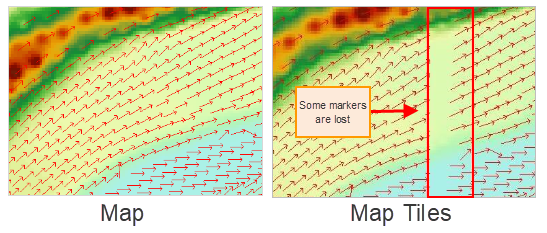 |
| A: | This issue usually occurs after generating map tiles for point vector data, where point symbols are partially missing. The solution is to turn off the 'show full label' setting for the point data layer in the map and then regenerate the map tiles. In SuperMap iDesktopX, to turn off the 'show full label' setting, open the layer properties panel for that point layer in the map, uncheck the 'show full label' option to disable it, as shown below: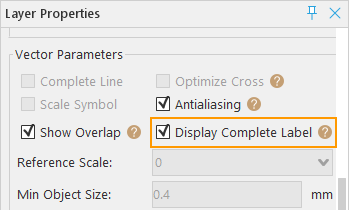
|
| Q4: | After publishing a map from the workspace as a REST Map Service using SuperMap iServer, browsing the map service reveals that part of the vector data is missing, as shown below: |
| A: | This is the same type of issue as the previous one. The solution is also to turn off the 'show full label' setting for the point data layer in the map and republish the modified map. For details on how to turn off the 'show full label' setting, refer to the section above. |
| Q5: | For image/raster datasets with a large number of rows and columns, if no image pyramid is created, opening them in a map at small map scales results in the image/raster dataset not displaying. What should be done? |
| A: | Build pyramids for the image/raster dataset, then add it to the map. When zoomed to small scales, the dataset will display properly. |
| Q6: | Does the map scale level of Tian Map align with the scale level of desktop map tiles global? |
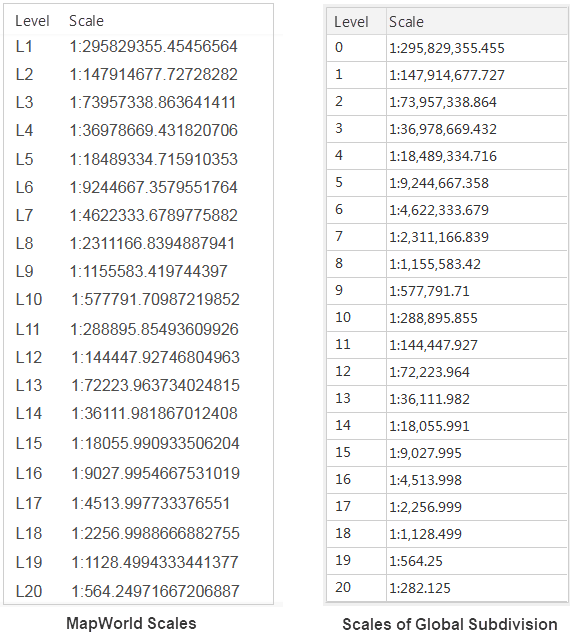
| A: | The scale of desktop global tiles matches that of Tian Map scale, but the difference is: Tian Map scale levels start from L1, while desktop global tile levels start from L0. The correspondence is as follows:
|
| Q7: | When data without a coordinate system (planar coordinate system) is loaded into a map, the results obtained using map measurement are incorrect. How should this be handled? |
| A: | The coordinate system of the dataset needs to be set to a known correct coordinate system before measurement. |