



In the Interoperability Settings group of the Nautical Chart Properties panel, the display of the symbol S-98 interoperability standard is organized. Including Interoperability Level, S-104 Query Water Level, S-102 Query Soundings, Water level adjustment, Dynamic water level, etc.
S-98 Product Interoperability
S-98 is the "S-100 Data Products Interoperability Specification" (Data Product Interoperability in S-100 Navigation Sytems) developed by the International Hydrographic Organization (Iho), referred to as the S-98 product interoperability.
The purpose of this specification is to ensure that different data products based on S-100 standard can work smoothly in Electronic Chart Display and Information System (ECDIS) and other ship-based and shore-based systems.
By defining the Interoperability Catalogue, the S-98 specification provides a set of rules and structures to guide the simultaneous use and display of multiple S-100 data products, ensures the interoperability between different data layers, and provides users with a comprehensive and coordinated navigation information environment.
Interoperability level
L0 and L1 interoperability level settings are provided. When there are chart products such as S-57, CJ-57 and S-101, they are displayed according to the display specifications of their respective products.
- L0: The display of Map is affected by the sorting of layers in Layer Manager, and the top layer will cover the display of the lower layer;
- L1: When the Map contains multi-standard data, the data will be displayed according to the S-98 product interoperability standard, regardless of the position of the layer.
S-104Query Water Level
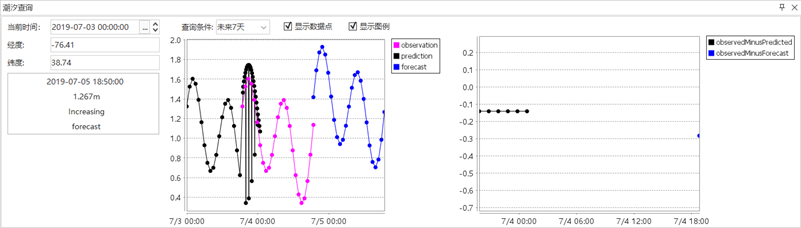
After clicking the Water Level Search button, the Tide Search window will pop up below Map. Select the hydrometric station in the Map with the mouse, and the Stop Info will be displayed in the Tide Search window.
- Current Time: the default is the time point when the selected hydrometric station starts recording. The current time can be changed through the setting button on the right or by direct input. After the change, the trend change chart on the right will also change.
- Query Conditions: The default value is Next Seven Days, which displays the water level change in the next seven days. At the same time, it also provides the options of Future 3 hours, Future 6 hours, Future 12 hours, Future 1 day, Future 3 days, Future 5 days and Future All, which can be switched as required.
- Display Data Points: Select whether to display the data points that make up the trend chart in the trend chart.
- Display Legend: Select whether to add legend information on the right side of the trend chart.
S-102Query Soundings
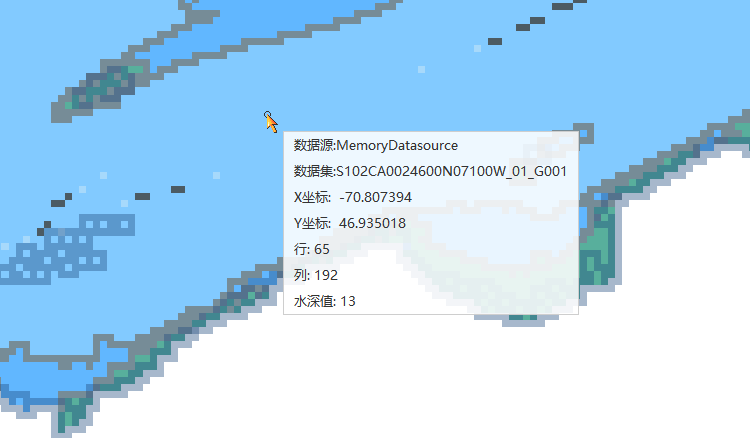
Click the Query Soundings button to Move Stop by Mouse to Map, and Data Information at the mouse position will be displayed below the mouse, including Datasource, Dataset, X coordinate, Y coordinate, row, column, and water depth value.
Water level adjustment
Open S-102 and S-104 data in Current Map and check the WLA grouping check box. S-102 data will be adjusted and displayed according to the water level data of S-104. The water level data is determined by the time in the Water level adjustment.
Dynamic water level
Open S-102 and S-104 data in Current Map and check the WLA grouping check box and Dynamic water level. S-102 data will be adjusted and displayed according to the Start Time, End Time, interval time and play interval parameters of S-104 water level station data. The S-102 bathymetric surface can be viewed over time by pressing the play button.
- Start Time: The Start Time for dynamically displaying S-102 data, which can be set according to the Attributes in the corresponding S-104 data.
- End Time: The End Time for dynamically displaying S-102 data, which can be set according to the Attributes in the corresponding S-104 data.
- Interval time: the time interval for S-102 data adjustment, the default is 1, and the unit is hour. Unit Settings for seconds, minutes, and days are also provided.
- Playback interval: when playing S-102 data, the display duration of data change at each interval is 1 by default, and the unit is s.