



Multi service publishing
Instructions for Use
The multi-service publishing tool will publish map or data services based on the workspace. For example, if the service type selected for publishing is REST Map Service, all maps in the workspace will be published as REST Map Service; If the selected service type for publishing is data service, then all data sources in the workspace will be published as data services. The multi service publishing tool supports publishing multiple service types simultaneously.
Parameter Description
| Parameter Name | Default Value | Parameter Definition | Parameter Type |
|---|---|---|---|
| Workspace | Full path of workspace files, only locally stored file based workspaces are supported | String | |
| IServer service address | SuperMap iServer server address, including port number, for example: http://localhost:8090/ 。 | String | |
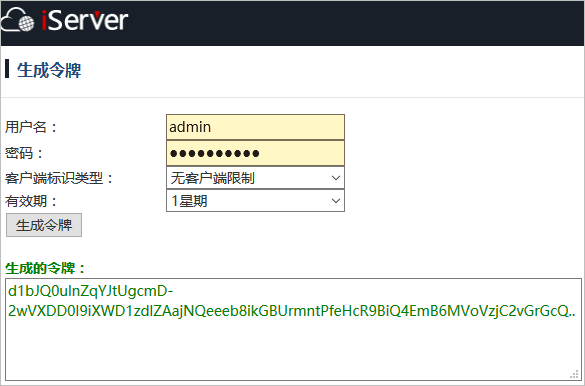
| User Token | Allow authorization to publish services on the SuperMap iServer server. Here, a valid token is required, which is the user token. The application method is: 1 User login, login address is http://localhost:8090/iserver/services/security/login 。< Enter the service list page( http://localhost:8090/iserver/services )Click on the username in the upper right corner and select "Token" from the dropdown box to directly access the token application address http://localhost:8090/iserver/services/security/tokens 。< Br>3. Enter relevant parameters for verification and click on "Generate Token" to obtain the token< br>! |
String | |
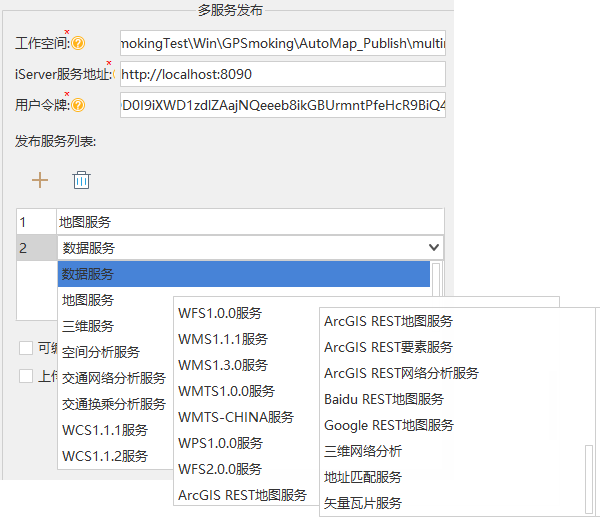
| Publishing service list | Specify the service types published based on the workspace, including: map service, data service, 3D service, spatial analysis service, vector tile service, etc. See the following service list for details: ! |
String |
Output Results
The output result of the multi service publishing tool is a string in Json format, which records the service access address of the published service.