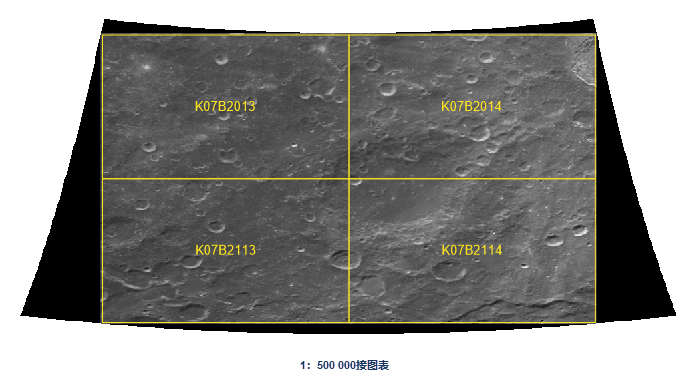



Moon Index Map
Instructions for use
Moon Index Map is a standard map sheet Dataset generated by dividing the lunar topographic map into several sheets according to a certain scale and longitude and latitude difference parameters. Currently only the Geographic Coordinate System is supported.
On the basis of 1:1 000 000 topographic map, the Basic Scale topographic map of the moon in China is divided into maps by using the longitude and latitude network trapezoidal framing method, according to the coordinate system specified in GB/T 30112 2013, and using certain longitude and latitude differences.
- Map Range of Lunar Topographic Map
- The
- 1: 1,000,000 lunar topographic map divides the northern and southern hemispheres into 14 horizontal lines according to the latitude difference of 14 °, to 84 °, 84 ° ~ 90 °. The line numbers are numbered A, B, … from north to south. , N; the longitude difference is different for each horizontal direction, as follows:
Latitude range 0°~14° 14°~28° 28°~42° 42°~56° 56°~70° 70°~84° 84°~90° Meridian difference 18° 18° 20° 24° 30° 45° 360° Map Range reference of - Basic Scale lunar topographic map is shown in the following table:
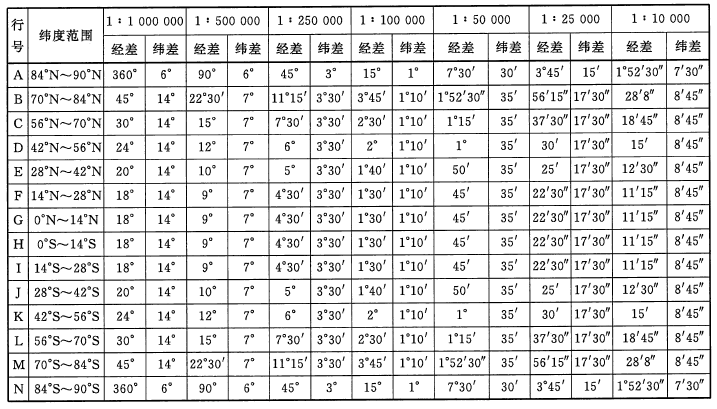
- 1: 1,000,000 lunar topographic map divides the northern and southern hemispheres into 14 horizontal lines according to the latitude difference of 14 °, to 84 °, 84 ° ~ 90 °. The line numbers are numbered A, B, … from north to south. , N; the longitude difference is different for each horizontal direction, as follows:
- Number of lunar topographic map:
- Scale code: 1: 1,000,000 ~ 1: 10,000 lunar topographic map scale codes are A ~ G in turn.
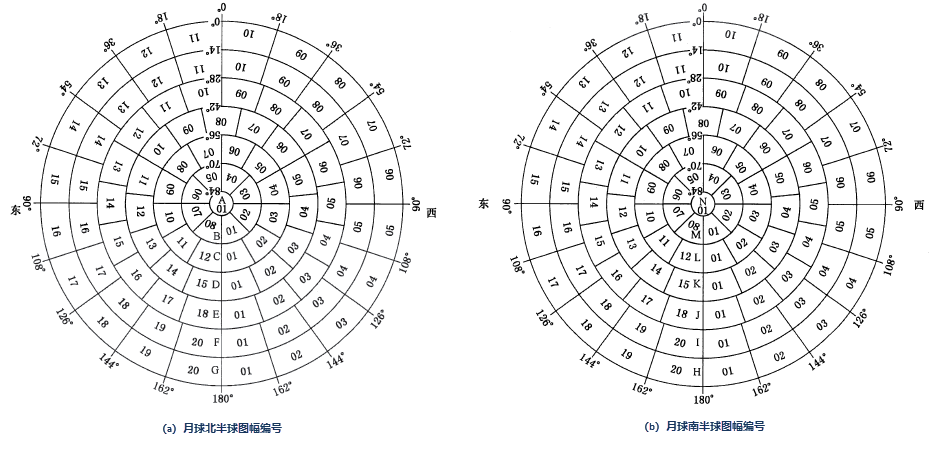
- Sheet No.: consists of its row No. And column No.
- The sheet number of
- 1: 1,000,000 lunar topographic map is composed of "sheet line number (character code) + sheet column number (digital code)", as shown in the following figure:
 The row and column number of
 - 1: 500,000 ~ 1: 10,000 topographic map is to divide the 1: 1,000,000 topographic map into several rows and columns according to the longitude difference and latitude difference of each scale topographic map. The map sheet number is composed of eight-digit codes, and the row and column numbering method is adopted, which is composed of the map sheet number of the 1:1 million topographic map, the scale code, and the row and column number of each map sheet (see the figure below).
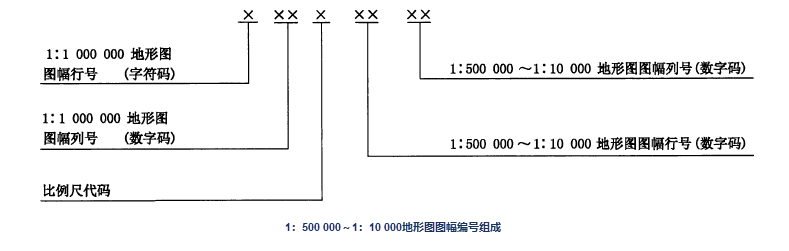
- 1: 1,000,000 lunar topographic map is composed of "sheet line number (character code) + sheet column number (digital code)", as shown in the following figure:
Function entrance
- Data tab-> Data Processing-> Map Cartography-> Moon Index Map.
- Map tab-> Map-> Moon Index Map.
Parameter Description
- Parameter Settings:
- Scale: Set the Basic scale of the generated view frame.
- Range Type: Global and user-defined ranges are provided. If Custom Bounds is selected, the right Export Bounds Parameter Settings box is opened.
- Export Bounds: You can enter four coordinates in the upper, lower, left and right text boxes to define Map Range, or Bounds Settings through the Function Button on the right.
- Whole Map: The full range of the currently opened map, which can be viewed in the Map Properties panel through the Full View operation of the map.
- Current Windows: The view range of the currently opened map. You can adjust the Current View by zooming in, zooming out, and modifying the scale of the map.
- Custom Bounds: Select Object and Draw Polygon are supported.
- Result Data: Set the generated Resulting dataset name and the Datasource.