



Function Description
Summary Field is to calculate the summary Statistical Data for the fields in the property table. The summary Statistics Result will output a new attribute table, which will consist of the fields containing the results of the statistical operation and the frequency of occurrence of each single value in the Summary Field.
Multiple Summary Fields can be set to perform multi-type summary statistics at the same time, which makes statistics more convenient and faster. Statistics Result is attribute table data, which is convenient for users to export to Excel and other file forms for use in other scenarios. For example, when summarizing Land Use data, the user needs to make statistics on various data, such as slope, quality grade, cultivated land, construction land, etc. By using the statistics summary function, the user can avoid setting statistics conditions repeatedly, and the Statistics Result can be obtained quickly.
Function entrance
- Property Sheet tab-> Statistic Analysis group-> Summary Field button
Parameter Description
- Source Data: Set the data involved in summary statistics by setting Filter Expression and Group Field.
- Filter Expression: You can set Filter Expression to filter out data that does not need to participate in statistics. Refer to SQL Query .
- Group Field: Support the setting of group statistics. If no Group Field is specified, the output attribute table will contain only one record; if one Group Field is specified, there will be one record for each Group Field value; if more than one Group Field is specified, the second grouping will be based on the previous grouping.
- Summary Field: check the fields involved in the summary in the Summary Field list, and set the Statistics Type.
- Select Statistic Field: In the field list, there is a check box in front of each field. Check the check box to indicate that the field is involved in statistics.
- Statistics Type: supports the following statistics operations: maximum value, minimum value, sum, average value, standard deviation, and variance. Multiple selections are supported. Set Statistics Type here as maximum value, minimum value and sum.
- The following naming convention creates a corresponding Result Field for each Statistics Type: Max _ 'field', Min _ 'field', Sum _ 'field', Average _ 'field', StdDeviation _ 'field', Variance _ 'field', (where 'field' is the input Field of Compute Statistic Data).
- Target Dataset: Set the Datasource and Dataset for storing the output of the summary Statistics Result.
Application example
Case description
The existing Land Use classification data of a region includes such fields as Administrative Division Name (XZQHMC), Land Type Name (DLMC), and Patch Land Type Area (TBDLMJ). It is necessary to count the area of different patches in each administrative division. Take the Sample Data SampleData \ ExerciseData \ LandUse \ LandUse. Udbx as an example to perform Detail Description for the summary operation.
Main operation steps
- Open the LandUse. UdbxDatasource and select the Browse Attribute Table item in the Vector Dataset JSTB Context Menu.
- Click Property Sheet tab-> Statistic Analysis group-> Summary Field button, or right-click and select Summary Fileld.. to bring up the Summary Field dialog.
- Set two Group Fields XZQHMC (name of administrative division) and DLMC (name of land type) at the Group Field. The program will first group by XZQHMC during statistics, and then group DLMC for the second time based on the first grouping.
- Select the check box for the TBDLMJ (Plot Type Area) field in the list of Summary Field. And set its Statistics Type to Max, Min, Sum.
- Sets the Datasource and Dataset where the summary Statistics Result output is stored.
- Click the OK button to execute the field summary operation. The execution completed will prompt the result in the Output Window. The summary results generate a new Tabular Dataset.
Show Result
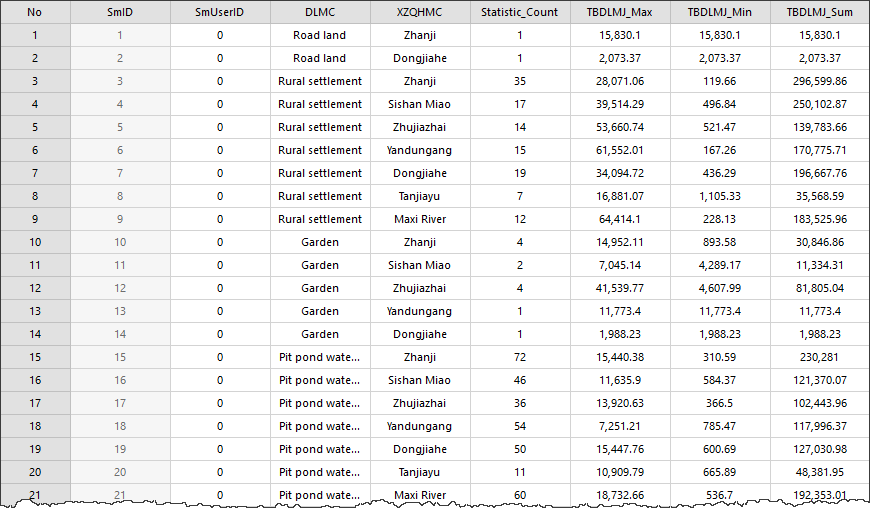
Administrative Division Name and Land Type Name are the set Group Field, and Statistic _ Count is the frequency of each single value of Statistic Field under the current Group Field. Max _ TBDLMJ, Min _ TBDLMJ, Sum _ TBDLMJ are Statistics Type results.
Related topics
Property sheet Statistic Analysis