 Instructions
Merges region objects in the specified distance to a new region object, thereby getting a region dataset.
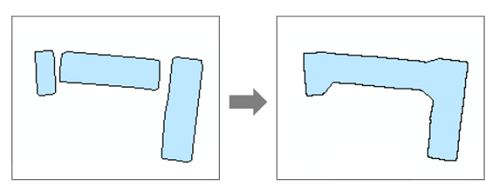
Application scenarios: we need to determine the degree of aggregation of rural residential areas by indicators such as connectivity. Connectivity refers to the aggregation of parcels or houses within a range into a map spot. For instance, the aggregation distance of a plot of construction land is 100 meters. The application will create a 100-meter buffer around each plot to be aggregated and aggregate plots with the specified range.
With different aggergation distances, you can get different results.

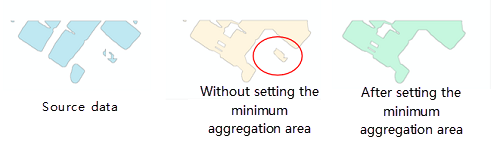
To exclude some independent tiny region, you can specify a limited area.
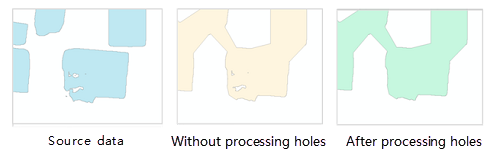
To eliminate gaps (hollow regions) from the resulting data, you can set the hole limited area.
Functional Entrance
- Toolbox > Data Processing > Vector: Aggregate Polygon. Drag the tool to the modeler window. (iDesktopX)
Parameter Description
- Source Dataset: sets the region dataset to be processed.
- Target Datasource: sets the datasource to save the resulting dataset.
- Target Dataset Name: sets the name of the resulting dataset.
- Aggregate Distance: sets the distance that the borders of regions should meet when aggregating regions. The aggregation operation can be performed on the position where the distance between two borders of two regions is less than the value. Unit: meter.
- Unit: sets the unit of the limited distance.
- Limited Area: specifies the limited area. Region objects with areas less than the value won't involve in the aggregation. The area unit depends on the unit of the aggregation unit. 0 is by default, which means to keep all regions.
- Hole Limited Area: Sets the minimum area of a hole in a region. The hole whose area is less than the value will be filled. The area unit depends on the unit of the aggregate distance. 0 is by default, which means to keep all regions.
- Click Run to perform the operation. The output window will tell if the operation is successful.